




New Trade Zone
Trade Zone is now live
Use the new Trade Zone for auctions and instant-price trades so Pokemon and item offers are easy to find.

Lugario
Registered User
-
Joined
-
Last visited
Everything posted by Lugario
-
Congrats @Kennnek, you won! PM me here or in-game or in Discord for the trade.

-
Bump -Less than an hour left-
-
Start Meowstic
-
Bump -17 Hours left-
-
Goodra: 150k Cofagrigus: 123k
-
Start
-
-
Started 13:26 GMT +1

-
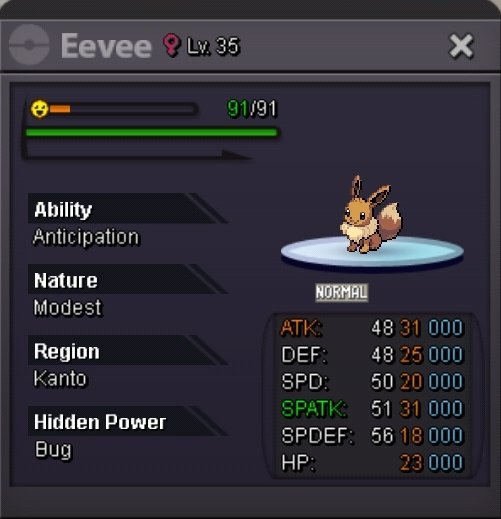
Auction Details: Starting Offer: 400k End Point: 48 Hours after Starting Offer is met Timer Minimum Raise: 100k No Insta Accepted Payments: Pokedollars Important Reminders: This is a Silver Server auction. If bidding from an alternative server, state that you will transfer upon winning. If you intend to purchase with an alt account, specify the account alongside your bid. If a bid is received in the final 15 minutes of the auction, the end point will be delayed by 15 minutes from that bid, and will be delayed by 15 minutes for each new bid thereafter, until the current offer has been held for a full 15 minutes. Happy Biding!

-
@Yoy010 you post on the wrong section. You can try to ask at REGION LOCKED POKEMON MEGATHREAD for some help or Request Chat at the discord server.
-
@Quest01 I don't know about the specifically Ash fight you are asking, but as far as for the other part of your question, NPC Trainers reset every week and you can fight them again.
-
Devs are aware of the healing glitch in Hoenn and are planing to fix it in the future. No ETA tho.
-
Goodra 120k Timid Blastoise 60k Modest Blastoise 20k Hawlucha 40k *Not everything is a raise, but I wanna keep up my bids together so I know how much I have bid to which Pokemon.
-
100k
-
An Auction House is on DEV to-do list to be implemented some time in the future.
-
What time/day with which timezone does the Auctions end?
-
Goodra 120k Timid Blastoise 60k Gengar 70k Hawlucha 40k Sawsbuck 20k
-
+1 Plus maybe keep messages history, if not possible for the whole time, at least for the last 24 hours before them getting deleted. Because else every time chat closes you lost messages and many times you accidentally close a chat and later on you can't find something u talked with the other person. This could also help people know to who they traded their pokes for XY reasons and can take screenshots if person not responding.
-
Goodra 40k Timid Blastoise 20k Gengar 30k Hawlucha 30k Sawsbuck 20k
-
Shop is CLOSED Until further notice. Thank you for your understanding.
-
A rewarding system which would motivate people to be more active on the game and join frequently every day. Many MMO's already have and would be a cool addition to PRO. It could be divided this way: Daily Quests Weekly Quests Monthly Quests Daily quests would be easy level to accomplish. For example "Catch a X level Pokemon with Y level of IVs". Weekly quests would be medium level to accomplish. For example "Win 5 Random Battles". Monthly Quests would be hard level to accomplish. The WQ could be one of the monthly quests. Completing a quest should give some Pokedollars and Player XP Points. Doing quests should give you achievements, which you can later see at any time. One achievement for example could be "World Quest Conqueror" for completing 6 WQ successfully and upon completing it could give a temporary/permanent title that player could use it and be shown before the player name. Achievements could be there for other stuff too, for example new players when getting their first Pokemon would complete the "Pokemon Trainer" achievement. The Player XP Points mentioned above would give a level up system for players. Some parts of the quests could be done in a combination with a "Season Pass" every month like many other games have, but could be done without it too. I don't see any negative adding my suggestion. Overall I believe it would be a great addition on PRO and would give more Post Game Content for casual players and more fun playing.


-
It's already planned on the DEV to-do list to happen at sometime in the future.
-
I think they mean to release it as a Pokemon generally and not specifically to the NPC and provide screenshots of the process to send it here so they would restore the one u want. Don't forget the screenshot and the Pokemon ID to be included.
-
Start - Server Transfer if win
-
For the happiness I have read somewhere that you need to faint it from Wild Pokemon Battle. Maybe try that. Info about Pokemon Happiness: https://pokemonrevolution.net/forum/topic/83551-all-information-for-the-happiness-of-a-pokémon/


