




New Trade Zone
Trade Zone is now live
Use the new Trade Zone for auctions and instant-price trades so Pokemon and item offers are easy to find.

Deadslimed
Suspended
-
Joined
-
Last visited
Everything posted by Deadslimed
-
NAME CHANGE Username: Radenhunter New Username: Deadslimed Server to charge the money from: Gold SERVER TRANSFER Username: Deadslimed Server to charge the money from: Gold Main Server to transfer: From Gold to Silver Hi sir, my request is the transfer of my account from (Gold) to (Silver) with the name change, thanks so much.
-
I buy starmie plis
-
What's your IGN? Radenhunter How many hours do you have in PRO? 1800 hours Do you have discord? Green.Tea #9468 How far are you in story? Sinnoh How active are you in PRO? Online every day Are you a PvP or PvE player? Or do you enjoy both? Both
-
i think im unlucky man.. XD001 use roar to me.. its destroy my pokedollar ":(
-
Sorry,, i am cancel for this
-
Is it sold to you?
-
I can start 150k. :)
-
9,7m by me
-
Do you accept trade my shiny rare? Or maybe i can give money and epic poke
-
I mean that shiny glalei
-
I wait you in sinnoh, i am in hearthome
-
Do you have discord?
-
Are you online now?
-
Can i start 300k for magcargo
-
Is sold for galliel
-
I offer 200k
-
You wrong topic,,
-
When we meet in game?
-
Waw,, sold? Who is buy it?
-
I can start it with money and epic poke? If you accept i Will show my poke soon in game
-
Start marill
-
Can i start 1,5m
-
5m if still sell
-
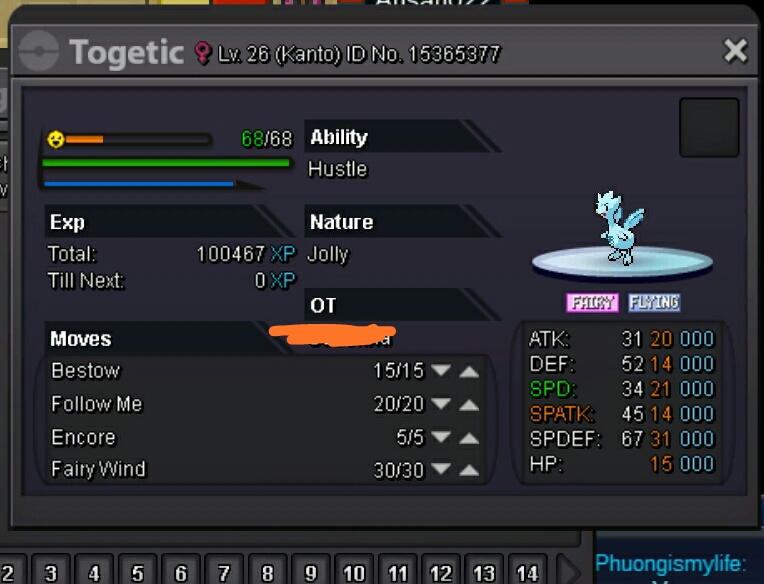
Hi guys I want sell this So 1,5m Insta 5m Action only one day after the first offer. Happy bidding
-
2m