




New Trade Zone
Trade Zone is now live
Use the new Trade Zone for auctions and instant-price trades so Pokemon and item offers are easy to find.

Kenesu
Registered User
-
Joined
-
Last visited
Everything posted by Kenesu
-
UP! Updated minimum bid.
-
-
-
Bid starts with 200k Min. raise 50k Insta:1m Bid ends after 24 hours from first bid.
-
-
PVP ready Bid starts for 400k. Minimum raise 100k. INSTA: 2m Bid ends after 24 hours from first bid.
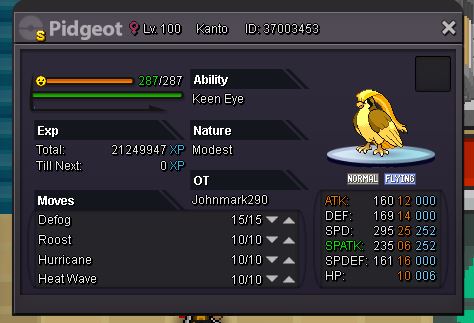
-
I'll raise 850k :)
-
Thank you so much! Looking forward for the update
-
just notice that Pewdie and diepy boss (Medium) in game corner in Goldenrod city not following the set of pokemon in this guide. Kindly update this guide. Thank you Pewdie starts with Metagross next medicham and mew in my case.
-
Oh my! Thank you so much!
-
Good day! Guys I need help about the pokemon line up that I can have to defeat the two bosses there. Thank you
-
Re: Masters Dojo (Han1996/ FearkL / ClassicNeon)(Daycare Service) <r><QUOTE author="MrYeoui"><s> </e></QUOTE> done :) <E>:y:</E> <E>:y:</E></r>
-
Re: Masters Dojo (Han1996/ FearkL / ClassicNeon)(Daycare Service) <r><QUOTE author="MrYeoui"><s> </e></QUOTE> hi i'm kenesu. One of the prospects that is doing evs training. if you want I can do that ev training. Just pm me in game. same name kenesu :)</r>
-
Re: GUILD ILLUSION AND REALITY RECRUITING {Blue Server}-{Active people wanted} <r><QUOTE author="han1996"><s> </e></QUOTE> ign:Kenesu<br/> Badges:16<br/> want to join..cause I dont have any guild yet..and i think its interestiing yo have guild<br/> i already have discord<br/> fav poke...gengar<br/> i can be active in both :)</r>
-
IGN: kenesu Play time: 81 hrs. Highest lvl of poke: 100
-
Merry Christmas fellas!!
