




New Trade Zone
Trade Zone is now live
Use the new Trade Zone for auctions and instant-price trades so Pokemon and item offers are easy to find.

Geomine
Suspended
-
Joined
-
Last visited
Everything posted by Geomine
-
-
Boost
-
its not working like that lol the starting offer remains 1m and if wont met the aucion wont start
-
bump
-
up
-
-
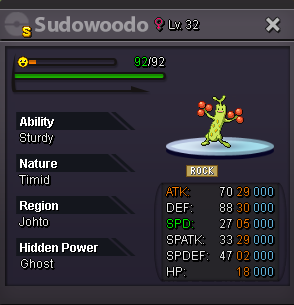
s.o 1m insta 3m min bid 50k 3days auction starting from the first bid. good luck to everyone. my discord Geomine#1285 my ingame name Geomine
-
up
-
bump
-
very good and fast dex services highly recommended
-
IMMORTALS Immortals are back and they are here to stay if you are looking to join in one of top pvp guilds in gold server you are in the right place. our discord server: https://discord.gg/UZ93RZdHyH To apply just post a comment completing the form or pm Geomine and if you meet the requirements we will contact you back.
-
Tournament got cancelled.
-
Bump 24 hours lefted till the sign ups closes
-
Bump
-
Yeah thats the proof thanks
-
Do you have any proof of that bids? Can you post them here?
-
Good luck :3
-
Bump one week left before sign ups officially close
-
I think you may want to tag a trade moderator cause i see you bumping it for like 2 weeks or something like that 😞
-
You saying auction at the title but i dont see anywhere starting price or insta price can you add those please ❤️
-
Can i start it for 800k?
-
Bump
-
Bump
-
Bump 9 days lefted till sign ups closes
-
Start natu
