




New Trade Zone
Trade Zone is now live
Use the new Trade Zone for auctions and instant-price trades so Pokemon and item offers are easy to find.


Desumi
Suspended
-
Joined
-
Last visited
Everything posted by Desumi
-
All Pikachu's goes missing!
-
All Senko foxes goes missing

-
YES! UwU
-
nice xD
-
uwu gimme win already
-
Shh, don't tell anyone
-
Yeah xD Now let me win! ;-;
-
Shooting Flex Seal. Worth a watch, while I'm winning this forum game https://m.youtube.com/watch?v=brj4mkdb6UM
-
I just sawed this boat in HALF!
-
If they flex, just Flex Tape them! Works great underwater! 100% tested by Phil himself.
-
Hes not flexing, just purposely showing a random legendary.
-
You don't want to see mine
-
Nope. Just SS'ing random pokesHere is something to compensate showing off. The sadest landorus you can see. Bad IVs, not H.A (Wouldn't use it in PvP, so wanted Sheer Force) and its nature kills me.
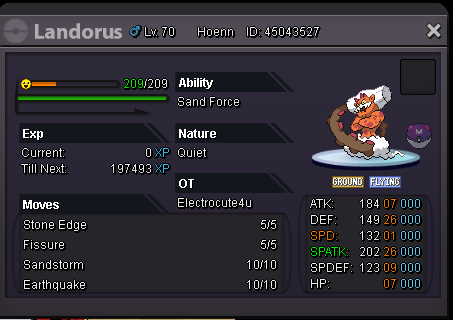 Sure thing forum friend Thank you! Appriciate it, makes me happy to know this! Thank you!Well, its time to take that mandatory sleep before work thing everyone is doing. So
 If its better then this, I'm willing to hear you out.
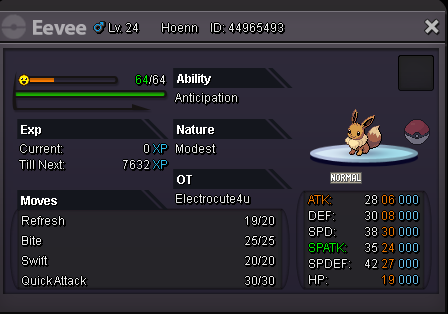 If its not a Sylveon, nobody wants it. Trust me, I'm talking all the way from PvP to PvE strats. If it ain't no Sylveon, nobody wants it. Or that's just me. But still, Sylveon. Yes, only if its a Sylveon. Oups, somehow this ended up as a new message? PRO, you high? I never double post, so how come it split in half O.oSumi is the cutest.If you like this post, I'll give you a cute gifThey are everywhere! Just hiding in plain sight!

Account
Navigation
Search
Configure browser push notifications
Chrome (Android)
- Tap the lock icon next to the address bar.
- Tap Permissions → Notifications.
- Adjust your preference.
Chrome (Desktop)
- Click the padlock icon in the address bar.
- Select Site settings.
- Find Notifications and adjust your preference.
Safari (iOS 16.4+)
- Ensure the site is installed via Add to Home Screen.
- Open Settings App → Notifications.
- Find your app name and adjust your preference.
Safari (macOS)
- Go to Safari → Preferences.
- Click the Websites tab.
- Select Notifications in the sidebar.
- Find this website and adjust your preference.
Edge (Android)
- Tap the lock icon next to the address bar.
- Tap Permissions.
- Find Notifications and adjust your preference.
Edge (Desktop)
- Click the padlock icon in the address bar.
- Click Permissions for this site.
- Find Notifications and adjust your preference.
Firefox (Android)
- Go to Settings → Site permissions.
- Tap Notifications.
- Find this site in the list and adjust your preference.
Firefox (Desktop)
- Open Firefox Settings.
- Search for Notifications.
- Find this site in the list and adjust your preference.