




New Trade Zone
Trade Zone is now live
Use the new Trade Zone for auctions and instant-price trades so Pokemon and item offers are easy to find.


Desumi
Suspended
-
Joined
-
Last visited
Everything posted by Desumi
-
+1 It takes ages to scroll down to Revival Herb or other stuff that's literally at the bottom or close to bottom or if I need something but can't find it. Searching should be a feature added to in-game item bag.
-
Its weekend. Gonna be up most of the night trying to catch all 3 legendary birds. Had some insane god-like luck earlier fighting the fire elder, Lawrence IV and Zapdos and Moltres following him, with just a Mega Gyarados with half HP and god-like luck. So, I feel like I'm lucky enough to win this forum game as well
-
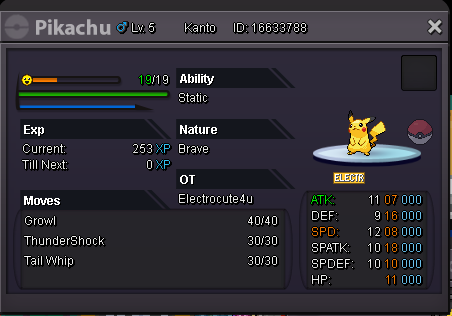
Pika Pika
-
aye aye! OwO
-
You can read more about this in this thread: https://pokemonrevolution.net/forum/topic/65717-trade-evolution-megathread/OwO+1Well, you haven't made it publically available on the forums. So nobody would even know about it.True. XDOnly Pika I have.
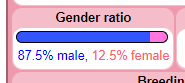
 Gimme a 1, 1 , 31, 1, 1, 1 sylveon. Gimme a 2, 2 , 31, 2, 2, 2 sylveon.Even tho the ratio of a Sylveon being drastically in favor of being a male, its still kinda cute ngl.
 If only it was pink and fluffy and a little less shocking to hold. Its kind of static, if ya know what I mean. Or maybe this is some shocking news to discover?Sylveon best Poke.
 Easy winHmm...
Account
Navigation
Search
Configure browser push notifications
Chrome (Android)
- Tap the lock icon next to the address bar.
- Tap Permissions → Notifications.
- Adjust your preference.
Chrome (Desktop)
- Click the padlock icon in the address bar.
- Select Site settings.
- Find Notifications and adjust your preference.
Safari (iOS 16.4+)
- Ensure the site is installed via Add to Home Screen.
- Open Settings App → Notifications.
- Find your app name and adjust your preference.
Safari (macOS)
- Go to Safari → Preferences.
- Click the Websites tab.
- Select Notifications in the sidebar.
- Find this website and adjust your preference.
Edge (Android)
- Tap the lock icon next to the address bar.
- Tap Permissions.
- Find Notifications and adjust your preference.
Edge (Desktop)
- Click the padlock icon in the address bar.
- Click Permissions for this site.
- Find Notifications and adjust your preference.
Firefox (Android)
- Go to Settings → Site permissions.
- Tap Notifications.
- Find this site in the list and adjust your preference.
Firefox (Desktop)
- Open Firefox Settings.
- Search for Notifications.
- Find this site in the list and adjust your preference.