Skip to content
View in the app

A better way to browse. Learn more.

Pokemon Revolution Online

A full-screen app on your home screen with push notifications, badges and more.

To install this app on iOS and iPadOS
  1. Tap the Share icon in Safari
  2. Scroll the menu and tap Add to Home Screen.
  3. Tap Add in the top-right corner.
To install this app on Android
  1. Tap the 3-dot menu (⋮) in the top-right corner of the browser.
  2. Tap Add to Home screen or Install app.
  3. Confirm by tapping Install.
New Trade Zone
Trade Zone is now live
Use the new Trade Zone for auctions and instant-price trades so Pokemon and item offers are easy to find.
Open Trade Zone

Desumi

Suspended
  • Joined

  • Last visited

Everything posted by Desumi

  1. Hewwo Yuno, big fan of who?
  2. Desumi replied to Desumi's topic in Playground
    525
  3. Desumi replied to Desumi's topic in Playground
    523
  4. Desumi replied to Desumi's topic in Playground
    520
  5. Desumi replied to Desumi's topic in Playground
    518
  6. Desumi replied to Desumi's topic in Playground
    516
  7. Desumi replied to Desumi's topic in Playground
    514
  8. Desumi replied to Desumi's topic in Playground
    512
  9. Desumi replied to Desumi's topic in Playground
    509
  10. Desumi replied to Desumi's topic in Playground
    507
  11. Desumi replied to Desumi's topic in Playground
    505
  12. Desumi replied to Desumi's topic in Playground
    503
  13. Hey Testarossaa This is part of the quest if you still haven't captured Darkrai yet and or picked your party. When you're in the Dark Realm you'll have a limited set of items available, as well as no Pokemon in your party to start with. While you roam the Dark Realm you'll need to recruit your party by interacting with Pokemon, first one being the Munna when you enter the Dark Realm. If you're unsure how to do the quest, here is a guide that you can follow. Hope this sorts your worries out and happy Darkrai hunting!
  14. Desumi replied to Desumi's topic in Playground
    501
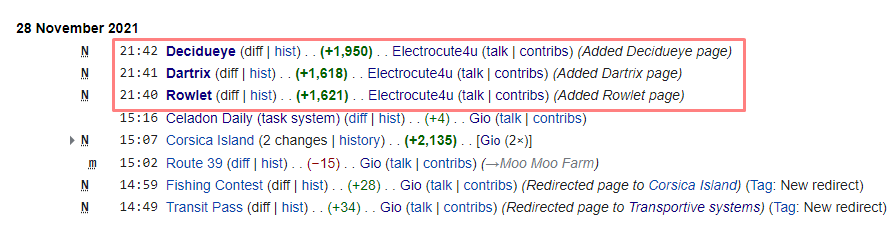
  15. Speedrunning page creating on PRO wiki and had to SS it to prove it to @Scara, since he too lazy to check the PRO wiki himself uwu
  16. But I want to win something!
  17. Desumi replied to Desumi's topic in Playground
    499

Account

Navigation

Search

Search

Configure browser push notifications

Chrome (Android)
  1. Tap the lock icon next to the address bar.
  2. Tap Permissions → Notifications.
  3. Adjust your preference.
Chrome (Desktop)
  1. Click the padlock icon in the address bar.
  2. Select Site settings.
  3. Find Notifications and adjust your preference.