




New Trade Zone
Trade Zone is now live
Use the new Trade Zone for auctions and instant-price trades so Pokemon and item offers are easy to find.

Crazycatlord2
Registered User
-
Joined
-
Last visited
Everything posted by Crazycatlord2
-
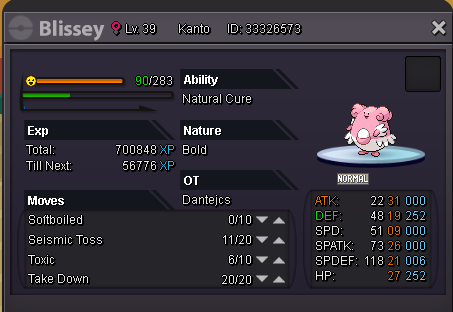
I imagined, thanks for the availability ^^Good evening! I was training my chansey but I accidentally made him blissey. the point is that I was training him to have chansey not blissey, is there any chance of getting chansey back?
 when I try to log in I see "lost connection". I do not use proxy, I play from home, I also tried to connect from the phone with the 4G line of a different provider. the connection works perfectly and does not have any sort of limitation, I can do everything I did before, except to be able to log into the silver server. while I was taking care of the pokemon in vermilion, the game got stuck and I could not move the pg. so I logged out and from that moment I can not log in anymore . I have seen that other players also have the same problemI was stuck in the game (I could no longer move the pg), so I make logout and now I can not get in anymore. it appears to me "lost connection". how can we solve this problem?I have this problem: I received the reward from vlad but did not receive any halloween box. IGN: crazycatlord2 Server: Blue Choice: Houdoum mount