New Trade Zone
Trade Zone is now live
Use the new Trade Zone for auctions and instant-price trades so Pokemon and item offers are easy to find.
All Activity
Past hour
-
Dracojp joined the community
-
Txxfpdkp joined the community
-
+1 ofc
-
+1
-
^bump
-
The internet is full of interesting sounds, funny reactions, memorable phrases, and entertaining audio clips. Finding and playing these clips does not have to be difficult. Sound buttons provide a simple way for people to access individual sounds with just one click. Whether someone is looking for a funny meme reaction, a gaming effect, a celebration sound, or something random to share with friends, a soundboard can make the whole process quick and enjoyable. The simplicity of sound buttons is what makes them so useful. Visitors do not need complicated programs or technical skills to play a clip. They can browse a collection, find a button with a familiar name, and press it to hear the audio. This straightforward design works well for both experienced internet users and people who are discovering online soundboards for the first time. Audio can add a different kind of expression to online conversations. Written messages are useful, but sometimes a sound can communicate a reaction much faster. A short laugh can make a joke more obvious, while applause can show appreciation. A dramatic effect can create excitement, and a funny voice can completely change the mood of a conversation. Sound buttons make these small audio reactions easy to access whenever they are needed. Meme culture has also made short audio clips extremely popular. Many online jokes are connected to recognizable sounds, voices, or phrases. People may remember a meme simply by hearing its audio. This makes familiar clips enjoyable to replay, especially when sharing them with friends. A good collection of sound buttons can bring together many of these memorable reactions in one convenient place. Gaming is another area where sound effects can make online interaction more entertaining. Players experience surprising victories, funny mistakes, unexpected events, and frustrating moments throughout a game. A quick audio reaction can add humor to these situations. Streamers can also use sound buttons during live broadcasts to react to gameplay or interact with viewers. Because the clips are short and easy to play, they can be used without interrupting the action. Organization is very important when creating a large collection of sounds. If every clip is placed together without categories, visitors may have trouble finding what they want. Grouping sounds into sections can make browsing much easier. Categories might include funny reactions, meme sounds, gaming effects, celebrations, applause, animal noises, dramatic clips, and notifications. A logical structure helps users move around the collection without wasting time. A search feature can provide even more convenience. Someone may know exactly what type of sound they need but not remember which category contains it. A simple keyword search can quickly show relevant options. Clear names for sound buttons are also important because users should have an idea of what they are about to hear before clicking. Good labels make the entire collection easier to understand. Sound quality can have a big effect on how enjoyable a clip is. Not every recording needs to be professionally produced, especially when the purpose is comedy or casual entertainment. However, the audio should still be clear and comfortable to hear. Extremely low volume, heavy distortion, or excessive background noise can make a clip difficult to enjoy. Keeping the volume reasonably balanced across different sounds can also improve the experience. Fast playback is another important feature. People expect a sound button to respond quickly after being clicked. If there is a noticeable delay before the audio begins, visitors may assume that something is wrong. Properly optimized files and a responsive website can help sounds start quickly. This is especially useful when users are trying several clips in a row. Mobile support is also essential for modern websites. Many people browse using smartphones, so sound buttons should be easy to tap on a small screen. A responsive layout can adjust the size and position of controls depending on the device being used. This allows visitors to enjoy the same sound collection on phones, tablets, and computers without dealing with a confusing interface. Content creators can find sound collections useful for many different projects. Streamers can use reactions during live broadcasts, while video creators can add short effects to make particular moments stand out. Podcasters can use audio cues between sections, and social media creators can experiment with funny clips in short videos. Exploring different sound buttons can also provide inspiration for people who are looking for creative ways to improve their content. Sharing is another reason people enjoy short sounds. When someone finds a clip that makes them laugh, they may want to send it to a friend. Certain sounds can even become inside jokes among groups of people. A particular reaction might be played whenever something funny happens, eventually becoming a familiar part of the group's conversations. This gives audio a social quality that makes it more than simple background entertainment. Short clips are especially convenient because they require very little time. Users can listen to a sound in a few seconds and then continue browsing. They do not need to watch a long video or listen to an entire recording just to hear one funny reaction. This makes sound buttons suitable for people who want quick entertainment during a break or while chatting online. User control is another important part of a good soundboard. Automatic audio can be annoying when someone opens a webpage without expecting a sound to start. Giving visitors the choice to press a button before audio plays provides a much better experience. Simple controls for stopping a sound or adjusting volume can also be useful when users are testing multiple clips. Accessibility should be considered as well. Not everyone can hear audio, so important information should not depend entirely on sound. Clear text labels can tell users what each button represents, while simple visual controls can make navigation easier. Sound should be an additional entertainment feature rather than the only way visitors can understand the content of a website. A website does not need thousands of sounds to be useful. A smaller collection can be more enjoyable when the clips are carefully selected and properly organized. Too many duplicate or poorly labeled sounds can make browsing frustrating. Maintaining categories, checking that playback works, and removing unnecessary content can help keep a soundboard easy to use. Previewing sounds can make the selection process easier. A visitor may be searching for a particular type of reaction but have several choices available. Clicking different sound buttons lets them compare the clips and decide which one works best. It can also make browsing more entertaining because users may discover sounds that they did not originally expect to find. The appearance of the soundboard should remain clean and easy to understand. Buttons should stand out clearly, names should be readable, and related sounds should be grouped together. A simple interface allows users to focus on the audio instead of figuring out complicated controls. The goal is to make every interaction feel natural. Sound buttons can also help give a website its own character. A collection filled with funny and memorable sounds can feel much more interactive than a standard page containing only text and images. Visitors can actively explore the content, test different clips, and find their favorites. This can make the website more memorable and encourage people to return later. Descriptions can also help visitors discover related sounds. Someone might arrive looking for a specific meme reaction and then notice several other clips in the same category. Good navigation encourages this type of exploration. When related sounds are easy to find, visitors can spend more time discovering different parts of the collection. One interesting quality of audio is its ability to create an instant reaction. A familiar laugh, voice, phrase, or dramatic effect can remind someone of a particular online moment almost immediately. Even a very short clip can become memorable. Sound buttons make it easy to replay these sounds whenever users want to enjoy or share them again. As online communication continues to change, audio will remain an important part of digital entertainment. People already use text, images, emojis, GIFs, and videos to communicate. Short audio clips add another layer of expression. Sound buttons make those clips available in a simple format that requires very little effort from the user. In the end, the appeal of sound buttons comes from their combination of simplicity, speed, and entertainment. They can be useful for gamers, meme fans, streamers, content creators, and anyone who enjoys funny online audio. A successful soundboard does not need to be complicated; it needs interesting sounds, clear categories, responsive playback, and an interface that visitors can understand immediately. Whether someone wants a quick laugh, a gaming reaction, a dramatic effect, or an amusing sound to share with a friend, sound buttons provide an easy solution. With a well-organized collection and a smooth user experience, even a simple audio clip can make online interaction more enjoyable. That is what makes sound buttons such a convenient and entertaining part of modern digital content.
-
If you have heard about Jenny Mod and want to try it in Minecraft, the first thing to understand is how the download and installation process works. Jenny Mod is a third-party Minecraft modification that adds new characters, interactions, items, and gameplay features. Because Minecraft has different editions and versions, the installation process can vary depending on whether you are using Java Edition or Bedrock Edition. Before downloading anything, check which Minecraft version you have and make sure the mod you choose is compatible with it. Taking a few minutes to check compatibility can save you from common installation problems later. For players using Minecraft Java Edition, the traditional Jenny Mod setup is commonly associated with Minecraft 1.12.2 and the Forge mod loader. Forge provides the environment Minecraft needs to load many Java mods. If you are using another Minecraft version, you should not assume that the same Jenny Mod file will work with it. Mods are normally created for particular versions of Minecraft, so the game version, Forge version, and mod version should match as closely as possible. If you are new to Minecraft modding, creating a separate profile for the mod can be a simple way to keep your normal Minecraft installation unchanged. Before installing the mod, it is also worth making a backup of your Minecraft worlds. This is a useful habit whenever you install third-party modifications because a compatibility problem can sometimes cause crashes or other unexpected behavior. Keeping a backup means you can return to your original world if something goes wrong. It is also better to download mod files carefully and avoid websites that ask you to install unrelated programs or suspicious applications. A Java mod is normally provided as a .jar file, while Bedrock addons commonly use formats such as .mcpack or .mcaddon. Once you have the compatible version of Minecraft and the required Forge installation, you can prepare the Java Edition setup. Open the Minecraft Launcher and select the Forge profile that matches the version required by your Jenny Mod file. It is helpful to start Minecraft with Forge once before adding the mod. This gives Forge an opportunity to create the required folders and confirms that the loader itself is working correctly. After reaching the Minecraft menu, close the game and continue with the mod installation. The next step is to locate the Minecraft mods folder. On Windows, you can usually find it by pressing Windows + R and entering %appdata%\.minecraft. Inside the .minecraft folder, look for a folder called mods. If it is not there, you can create one yourself. Place the compatible Jenny Mod .jar file directly inside this folder. There is normally no reason to extract the .jar file. Leaving it in its original format allows Forge to recognize it when Minecraft starts. After placing the file in the correct folder, open the Minecraft Launcher again and choose the appropriate Forge profile. Start the game and wait for Forge to load the installed modifications. Depending on your computer and the number of mods installed, the first startup may take a little longer than usual. When Minecraft reaches the main menu, open the Mods section and check whether Jenny Mod appears in the list. If it is listed, Forge has successfully detected the mod. If it does not appear, check that the file is in the correct folder and that the Minecraft and Forge versions match the requirements of the mod. Once the installation is working, creating a new test world is a good way to learn how the mod works. A Creative world can be especially useful because you can experiment with the available items and features without worrying about losing valuable survival progress. Depending on the version you installed, Jenny and other mod content may be accessed through specific items, commands, or spawning methods. The exact controls can change between releases, so it is best to check the instructions that come with your particular version instead of assuming every release works in exactly the same way. The main purpose of learning how to use Jenny Mod is to understand the new content it adds to Minecraft. The mod can introduce an interactive character and different types of interactions that are not part of the standard game. Some versions use particular Minecraft items to begin interactions with Jenny. Once the character is available in your world, you can explore the options provided by the version you installed. Spending some time experimenting in a test world makes it easier to understand the mod without affecting your main survival world. Bedrock Edition is different from Java Edition, so players using Bedrock should not follow the Forge installation process. Bedrock addons are generally distributed in formats such as .mcpack or .mcaddon. After downloading a compatible addon, opening the file with Minecraft can start the import process automatically. Once the addon has been imported, create a new world or open the settings for an existing world and look for the Resource Packs and Behavior Packs sections. The appropriate packs need to be activated before the addon can function properly. Mobile users may also be able to install compatible Bedrock addon files through their device's file manager. After downloading the file, locate it and open it with Minecraft. The game should recognize the supported addon format and begin importing it. After the import is complete, check the world settings and activate the required packs. If the addon instructions mention additional settings, follow those instructions carefully because requirements can differ between releases. One of the most common reasons Jenny Mod does not work is a version mismatch. For example, if a mod was created for Minecraft 1.12.2, placing it into a completely different Minecraft version may result in an error or prevent the game from launching. The same issue can happen if you use an incompatible Forge version. When troubleshooting, start by checking the Minecraft version, Forge version, and Jenny Mod version. These three details should be compatible before you try more complicated solutions. Another possible problem is a conflict with another installed mod. If Minecraft works normally with Forge and Jenny Mod alone but crashes after you add several other mods, another modification may be causing the conflict. A simple way to investigate is to temporarily remove the additional mods and test the game with only the necessary files. If Jenny Mod works normally, add the other mods back one at a time. This can help you identify which file is causing the problem. Performance can also become an issue when using heavily customized Minecraft setups. Custom models, animations, textures, and several installed mods can place additional demands on your computer. If the game begins to lag after installation, try lowering graphics settings and checking how many other mods are running. It is also useful to avoid installing unnecessary modifications alongside Jenny Mod while you are testing it. A simpler setup makes troubleshooting much easier. Players should also be careful when searching for a Jenny Mod download online. There can be many websites using similar names, and not every download page necessarily provides the same version of the mod. Before downloading a file, check its extension, Minecraft compatibility, installation requirements, and available documentation. Be cautious if a page tells you to download an unrelated executable or asks you to disable important security software. You should never need to compromise your computer's security simply to install a Minecraft modification. Keeping different Minecraft installations separate can make modding much easier. If you regularly play both modified and unmodified Minecraft, consider using separate profiles or installations. This prevents incompatible mods from accidentally being loaded with your regular game. It also allows you to keep an older Minecraft version specifically for a mod while continuing to use a newer version for normal gameplay. Overall, downloading and using Jenny Mod is mainly about choosing the correct version and following the installation requirements carefully. Java Edition users generally need a compatible Minecraft version, the appropriate Forge loader, and the Jenny Mod .jar file placed in the correct mods folder. Bedrock users need a compatible addon and must activate its resource and behavior packs in the world settings. After installation, a separate test world is a convenient place to explore the available features and learn the controls. If you are having trouble getting the mod to work, do not immediately reinstall everything. First check the Minecraft version, mod version, Forge requirements, file extension, and location of the downloaded file. These simple checks solve many common installation problems. Once everything matches, start with a clean test world and explore the mod gradually. With the correct setup and a little patience, learning how to download and use Jenny Mod can be a straightforward part of experimenting with Minecraft's large modding community.
-
Morse code is one of those old communication systems that still manages to be interesting today. Most of us are used to sending messages through phones, computers, and social media, so seeing a message made from dots and dashes can feel a little unusual. However, the idea behind Morse code is actually quite simple. It gives each letter, number, and some punctuation marks a particular combination of short and long signals. By using those combinations, normal text can be changed into Morse code and later changed back into readable text. The basic idea behind text to Morse code is to replace each character with its matching Morse pattern. A dot represents a short signal, while a dash represents a longer signal. Different combinations create different letters. For example, E is represented by one dot, while T is represented by one dash. Other letters use combinations of several dots and dashes. Once you understand this basic idea, it becomes much easier to see how an entire sentence can be converted. Morse code has a long history connected with telegraph communication. Before modern communication tools became common, sending information across long distances could take a considerable amount of time. Telegraph systems provided a way to transmit information using electrical signals, but there needed to be a system for representing letters and numbers. Morse code became one of the solutions, allowing operators to send messages using a simple collection of signals. One interesting thing about Morse code is how much information can be represented using only two basic elements. Instead of needing a different symbol for every possible letter, Morse code combines dots and dashes in different ways. This creates patterns for the alphabet, numbers, and various punctuation marks. The system is therefore relatively small while still being capable of representing ordinary written messages. When converting text to Morse code, each letter needs to be handled separately. Imagine that you have a short word that you want to convert. You would first look at the first letter and find its Morse pattern. Then you would do the same for the second letter and continue until the entire word has been converted. The individual patterns are then placed in the same order as the original word. Spacing is particularly important when writing Morse code. A series of dots and dashes can become confusing if there is no clear separation between characters. Usually, spaces are used to separate individual letters, while a larger separation or another convention can indicate a new word. Keeping the spacing consistent makes the message much easier to read and decode. Numbers work in a similar way. Each number has its own Morse representation made from dots and dashes. The patterns for numbers have a useful structure, which means they can become easier to remember with practice. If you are new to Morse code, it is usually easier to start with letters and then learn numbers after you become comfortable with the basic alphabet. Punctuation marks can also be represented in Morse code. Common marks such as a period, comma, and question mark have their own patterns. This means you can convert more than just individual words. With the right reference, complete sentences can be changed into Morse code while keeping the punctuation included. For beginners, a Morse code chart is a useful place to start. A chart lets you see the pattern for each character and compare different letters. You do not have to memorize everything at once. Learning a few characters at a time is often much easier. After becoming comfortable with those patterns, you can slowly add more letters to your knowledge. Another simple way to practice is to convert familiar words. Your name is a good example because you already know the letters and their order. Write the name normally, find the Morse pattern for each letter, and then put the patterns together. After doing this several times, you may begin recognizing certain combinations without needing to check the chart. A text to Morse code converter can also make the process much easier. Instead of manually searching for every letter, you can enter ordinary text and receive its Morse version. This is particularly useful when you have a longer sentence or paragraph. It can also help you check whether a manually created Morse message is correct. Using a converter can actually be part of the learning process. You can type a word into the converter and study the result. Then try writing the same word from memory. Once you have finished, compare your version with the converted version. Repeating this exercise can help you become more familiar with common character patterns. Morse code is not limited to something that is written on a screen or piece of paper. Historically, it could also be transmitted through sound. A short tone could represent a dot and a longer tone could represent a dash. The timing between signals helped listeners understand where characters and words separated. This is why Morse code is sometimes associated with rhythmic sounds. Light can also be used to represent Morse signals. A short flash can act as a dot, while a longer flash can represent a dash. This makes the system interesting because the same basic information can be communicated through different forms. It does not necessarily have to be spoken or written. For people who enjoy puzzles, Morse code can be a fun way to create hidden messages. A collection of dots and dashes can look meaningless to someone who does not know the system. Once the person learns the basic Morse alphabet, however, the same sequence becomes readable. This makes Morse code useful for puzzle games, classroom activities, treasure hunts, and other challenges. It is also important to understand that Morse code is not a modern form of encryption. Converting a message into dots and dashes does not automatically make the information private. Anyone familiar with the Morse system can decode the message. The purpose is mainly to represent and transmit information in a particular format rather than to protect it from being understood. One reason Morse code remains popular is its connection to communication history. It provides an example of how people found ways to send information when modern digital technology was not available. Learning even the basics gives you an idea of how communication worked during an important period of technological development. Text to Morse code can also introduce people to the idea of encoding. The original message consists of normal characters, but those characters can be represented in another form. The message remains recognizable once the new representation is decoded. This simple concept is useful for understanding how different communication systems can represent the same information in different ways. If you are planning to learn Morse code, there is no need to rush. Start with a few simple letters and practice them regularly. Once you know several characters, try converting short words. After that, move on to short sentences and eventually numbers and punctuation. Listening to Morse signals can be added later if you want to become more comfortable with the timing and rhythm. Manual conversion can be enjoyable, but it becomes more difficult when the text gets longer. A single missing dot or extra dash can change the intended character. Spacing mistakes can also make a message difficult to decode. For longer content, using a text to Morse code tool can save time and provide a quick way to check the final result. There is also a creative side to Morse code. People can use it in artwork, puzzles, educational projects, personal messages, and digital designs. A simple phrase can look completely different when represented as dots and dashes. Someone who knows Morse code can recognize the hidden meaning, while everyone else may simply see an interesting pattern. The system can be especially enjoyable for people who like learning small skills that are outside everyday life. Morse code does not require expensive equipment to study. A simple reference chart and some practice are enough to get started. Online conversion tools can make things even easier by allowing you to experiment with different words and sentences. The most important thing for beginners is to understand that Morse code becomes easier with repetition. At first, the patterns may all look similar, and it can be difficult to remember which combination belongs to which letter. After repeated practice, certain patterns start to become familiar. Short practice sessions can be more useful than trying to memorize the entire system in one sitting. Overall, text to Morse code is a straightforward way of representing ordinary writing with dots and dashes. Each character has a specific pattern, and correct spacing helps keep the converted message readable. Although Morse code was created for an earlier era of communication, it remains an interesting subject because it combines history, technology, language, and pattern recognition. Whether you are completely new to Morse code or simply looking for a fun way to experiment with it, converting ordinary text is a good starting point. Try a familiar word, check each character, and then put the patterns together. Once you become comfortable with individual letters, you can move on to full sentences. A text to Morse code converter can make the process quicker while also giving you a useful way to practice and check your work. What starts as a strange collection of dots and dashes can quickly become an understandable message with a little patience and practice.
-
Klockercodes joined the community
-
Zerointegrity joined the community
-
Reavaaa joined the community
-
Smootieneko joined the community
Today
-
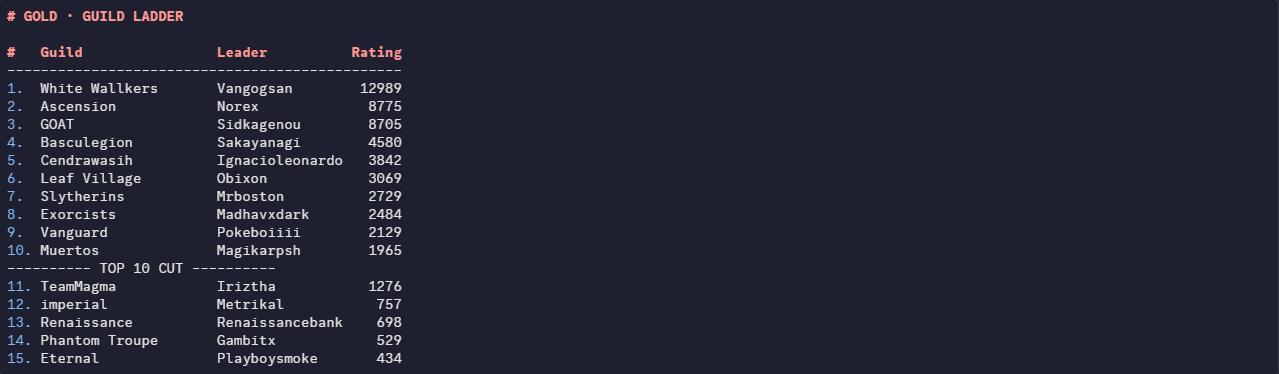
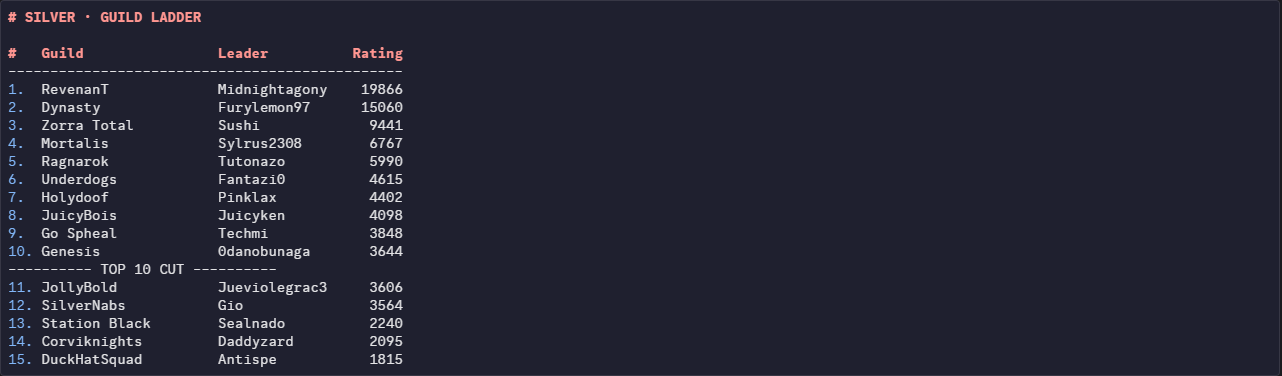
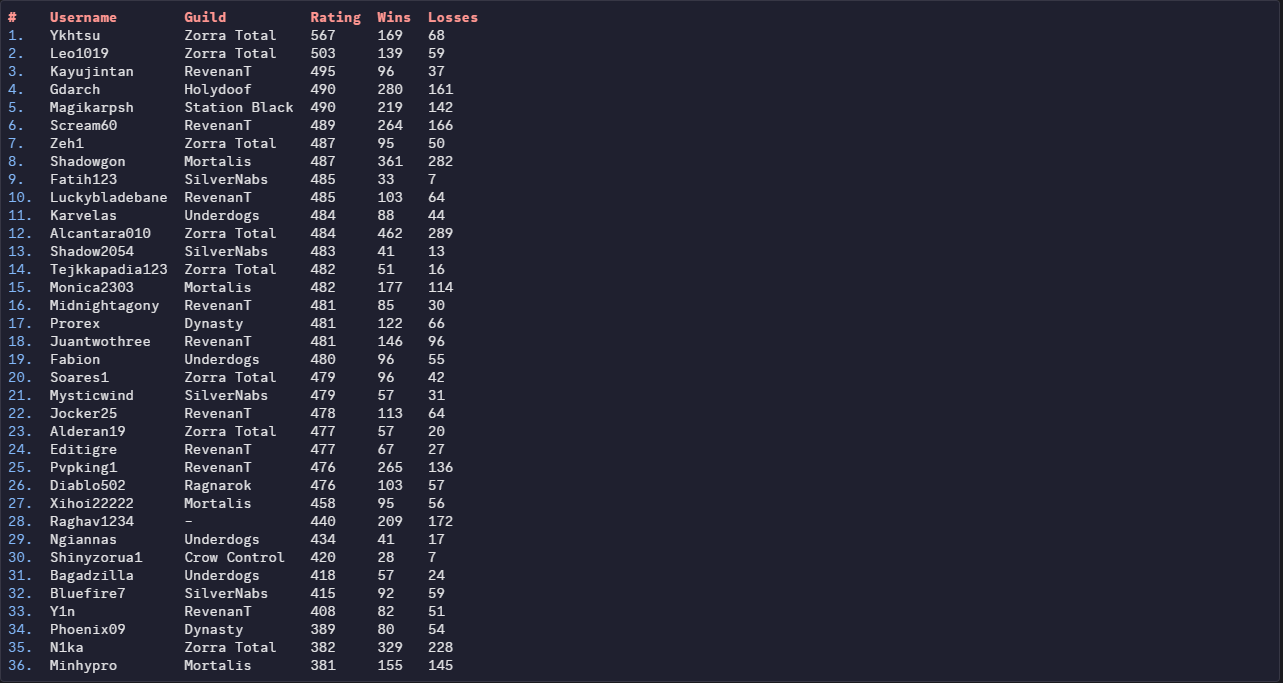
Greetings Trainers, here are the PvP Season results of the month September 2026! Like always, we would like to thank everyone for giving PRO a competitive environment for another season. We would also like to congratulate each player and guild who made it to the top of the ladder, it's not an easy feat reaching the top. We all wish you the best in the next season. Thanks for participating! REWARDS: Normally, 1st Place will receive 600 PvP coins, 2nd place 595, and so on. Top ladder guilds shall receive 25% EXP Boost for the entirety of the next season! Additionally, Top 25 players from each server will receive: Access to Tutor Heaven! An exclusive Victorious Chroma! Special rewards will be distributed every 12 hours to those who reach the top 25 during this PvP Season, the distribution is as follows: 1st Place: 5× PvP Chests 2nd–3rd Place: 4×PvP Chests 4th–10th Place: 3× PvP Chests 11th–19th Place: 2× PvP Chests 20th–25th Place: 1× PvP Chests * Golden PvP Chests have better odds to give exclusive cosmetics! RANKED LADDER RESULTS: Top 25 Silver Ranked Rating (No Tier Ladder) Top 25 Gold Ranked Rating (No Tier Ladder) RANDOM RANKED LADDER RESULTS: Top 25 Silver Random Ranked Rating (No Tier Ladder) Top 25 Gold Random Ranked Rating (No Tier Ladder) RANKED GUILD LADDER RESULTS: Silver Guild Rating Gold Guild Rating Disclaimer: Results may have a marginal difference to ones recorded by other players. The results taken were taken seconds before the ladder was reset, whilst the servers were offline. If you used a Discord bot, or gathered your own screenshots earlier than us, your results may be inaccurate. If you are or aren't on the ladder when you think you should/n't be, please contact Rayziell via Forum Threads. Please note that users with the exact same rating may switched positions during the reward process, we have no influence over that.




-
Username: Kairu Server: Silver Timezone: PH GMT+8
-
Barna99 joined the community
-
Username: C1qiqibtw Server: Silver Timezone: Romania/ CET +1
-
Crgviaum joined the community
-
Yycdbost joined the community
-
Username: Royalboss Server: Gold Country: India Timezone: +5.5
-
Ramzjrns joined the community
-
Blaziken sold.
.png.2bbc8d47b77cb48c0db82e9c19b2e467.png)
-
up
-
Username: Sendo69 Server: Silver Country/Timezone: India/+5:30
-
bump! Since both need ms i will giveaway a cc to one random in my discord in the next day, join mates! https://discord.gg/w3wb9FKhhu
-
@Vicrow Yes.
-
Hello @D1v1n3 , You can transfer again anytime for 100 coins, or if you'd rather not pay, just wait 30 days from your last transfer and it'll be free. Also, please try not to tag staff directly. If you need help with anything, drop your question in the General Support forum and someone from the community or the staff team will get back to you. below is the General Support forum link: General Support Goodluck!
-
Hello there, Servers are up, you can try again. Also you can check the server status in PRO Official discord #prostatus here: https://discord.com/channels/302930139270873090/1084570388769546240
-
i tag u did u get it?
-
Just to clarify to everyone: if you haven’t tagged me in the PRO Discord, you’re not entered. Discord makes everything much easier to manage. If you’ve already tagged me, you’re all set and will receive your first hunt tag later today. If not, please do so.
-
yeah u can do it
-
if u need any help let me know here my dc id emperorvicrow
-
@R0ckst4r @Vicrow If you’ve tagged me with “in” in the PRO Discord, I shall register you both.
-
@Lacomus accept it in dc
-
plua 1 hell yeahhh
-
i want in