New Trade Zone
Trade Zone is now live
Use the new Trade Zone for auctions and instant-price trades so Pokemon and item offers are easy to find.

Nonyuuge
Registered User
-
Joined
-
Last visited
Everything posted by Nonyuuge
-
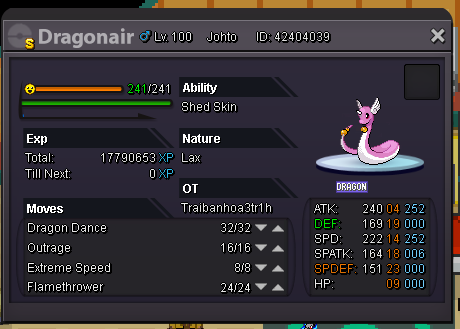
In-game name: Nonyuuge Server: Silver Pokemon ID and/or screenshot:
-
bump
-
bump
-
bump
-
Bump
-
-
bump
-
bump
-
bump
-
Bump
-
bump
-
bump
-
bump
-
bump
-
bump
-
BUMP
-
-
bump
-
bump
-
bump
-
bump
-
bump
-
bump
-
bump
-
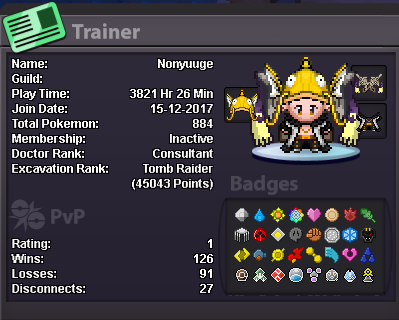
- Why do you want to join NoMercy? my friend who is a member of the guild invited me, but i was already thinking about entering before that. I decided to leave my old guild because there were a lot of toxic people (belzebel knows who I'm talking about) and I prefer to be around friendly people. - What can you contribute to NoMercy? some time ago i used to play pvp and did around 200-350 rating. but I’m not playing much these days, but I can try to be more active. - Have you ever been banned in PRO, and why? Yes. the reason was account spam. I didn't know at the time that there was an account limit per player. xD - Other than having fun playing the game, what are your goals in PRO? it is always good to make new friends. I also want to become better at pvp - How old are you and other than English, what languages do you speak? I'm 18, I speak portuguese, english and i can understand a bit of spanish - What is your discord name and ID tag number? Nonyuuge#3295 - Provide a screenshot of your Trainer Card: