




Skip to content
View in the app

A better way to browse. Learn more.

Pokemon Revolution Online

A full-screen app on your home screen with push notifications, badges and more.

To install this app on iOS and iPadOS
  1. Tap the Share icon in Safari
  2. Scroll the menu and tap Add to Home Screen.
  3. Tap Add in the top-right corner.
To install this app on Android
  1. Tap the 3-dot menu (⋮) in the top-right corner of the browser.
  2. Tap Add to Home screen or Install app.
  3. Confirm by tapping Install.

Haunchurb

Suspended
  • Joined

  • Last visited

  1. Username: Haunchurb Server: Silver
  2. leechers gonna leech~
  3. It says that per IP there can only be 4 accs or else the Ip will be banned?, or I read that wrong, I just want to install PRO on our computers in our café and dormitories.
  4. I released my scizor please restore it, didnt got any screen shot of id huhu :( please restore it
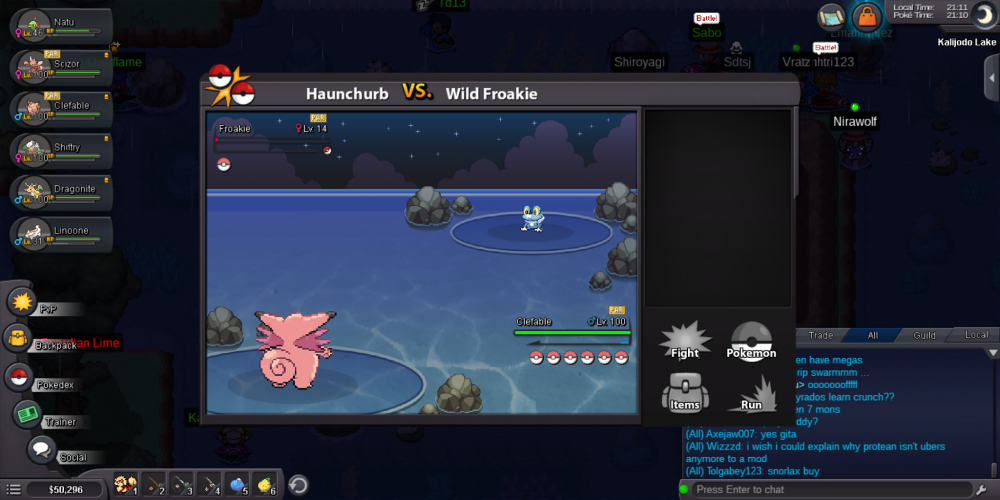
  5. When a battle starts the game crashes on android

Account

Navigation

Search

Search

Configure browser push notifications

Chrome (Android)
  1. Tap the lock icon next to the address bar.
  2. Tap Permissions → Notifications.
  3. Adjust your preference.
Chrome (Desktop)
  1. Click the padlock icon in the address bar.
  2. Select Site settings.
  3. Find Notifications and adjust your preference.