




New Trade Zone
Trade Zone is now live
Use the new Trade Zone for auctions and instant-price trades so Pokemon and item offers are easy to find.

Kimstarz
Registered User
-
Joined
-
Last visited
Everything posted by Kimstarz
-
Bid 5.5m will transfer to gold with account azharsaurous (2nd account)
-
Auction ended forum can be closed
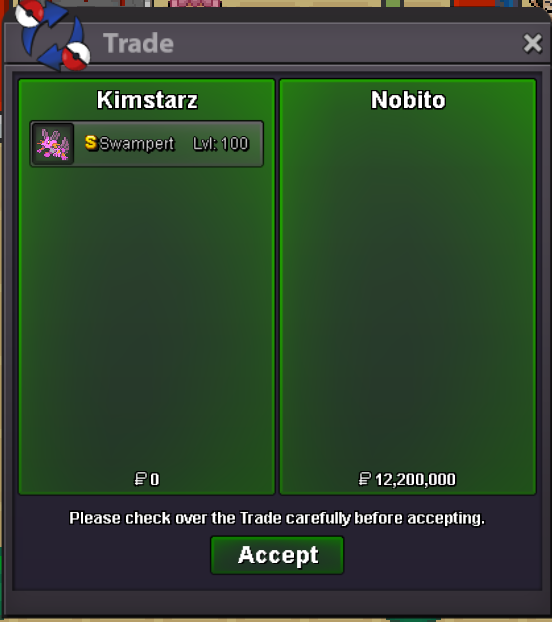
-
Bump less than 2 hours left
-
Bump 1 day left
-
Selling rare shiny Swampert Start price: 10m Insta price: 20m Minimum bid raise: 200k End Point: 48h (after start price is met) Accepted Payments: Pokedollars, Coin Capsules (x1 Coin Capsule = 500k), (x1 IV Reroll Ticket = 700k), (x1 Nature Reroll Tickets = 300k) This is a Cross Server auction. You may bid from any server, and I will transfer to your preferred server upon winning. If a bid is received in the final 15 minutes of the auction, the end point will be delayed by 15 minutes from that bid, and will be delayed by 15 minutes for each new bid thereafter, until the current offer has been held for a full 15 minutes.
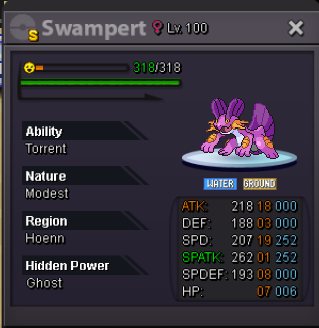
-
Im on silver server
-
17m
-
16.5m
-
16m
-
15.4m
-
14.6m
-
14.2m
-
13.5m
-
12m
-
10.5mil
-
-
-
11.2m transfer to gold if win
-
Hi trade mods please help force trade thank you. (Already pressed report twice)
-
@Masterzoe hi can we meet vermilion? Also add me on discord = 3busman
-
4.5m will transfer from gold if win
-
8m
-
Start ❤️ edit = will transfer to gold if win.
-
@Alhambhaai sorry can you pm me in discord to discuss further as i am not available for trade now. Discord name = ameer3bus if you do not have discord. can just pm me in Forum website (PRO)
-
51mins left

