




New Trade Zone
Trade Zone is now live
Use the new Trade Zone for auctions and instant-price trades so Pokemon and item offers are easy to find.

Crnlious
Registered User
-
Joined
-
Last visited
Everything posted by Crnlious
-
Player Name: Crnlious Server: Gold Timezone: GMT+3
-
I buy 300k one, contact me in game ID: Crnlious
-
okay 3.5m then.
-
How about 3m?
-
I can start with 2m if its okay for you. (Gold Server)
-
Hi i have iv reroled my kyurem recently new ivs appeard on catch preview screen but new ivs not applyed. Please help me for this problem im adding screenshot for the issue. Thank you.
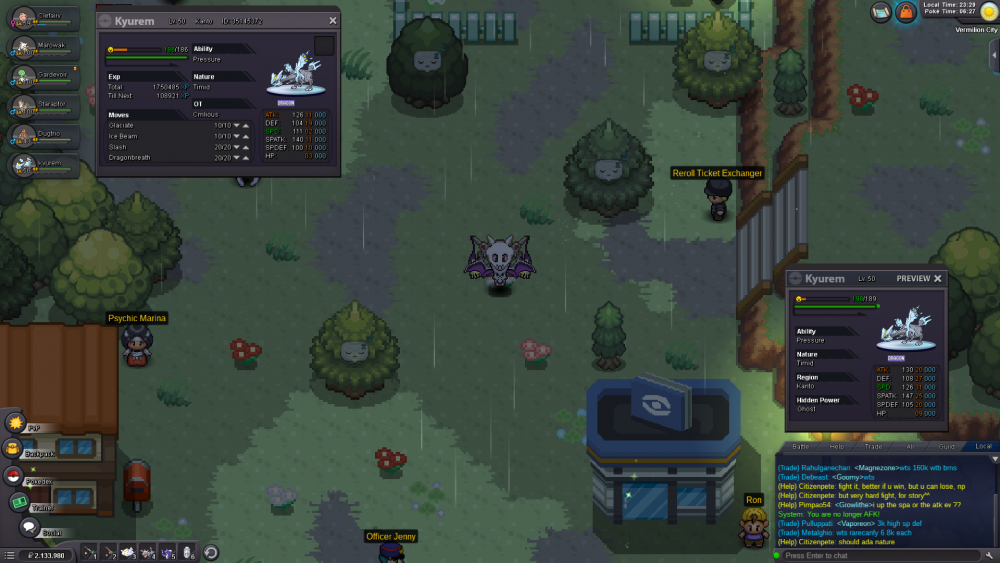 Thank you so much for the answer, it relieved me that i didnt do something wrong.I catch kyurem in a regular time in regular form. Can I change its from to Xmas form like shaymin can be changed to easter form during easter event. If cant can i release it and catch in xmas form at next christmas event. Thanks for attention, its realy important to have Xmas form Kyurem for me.
