




New Trade Zone
Trade Zone is now live
Use the new Trade Zone for auctions and instant-price trades so Pokemon and item offers are easy to find.

Sergiors
Registered User
-
Joined
-
Last visited
-
650k
-
Username: Sergiors Server: Gold Country/Timezone: UTC+4
-
92, 93, 94, 95, 96, 97, 98, 99, 100, 101
-
Hi @Epithet, yes, just tried again and it's still happening.
-
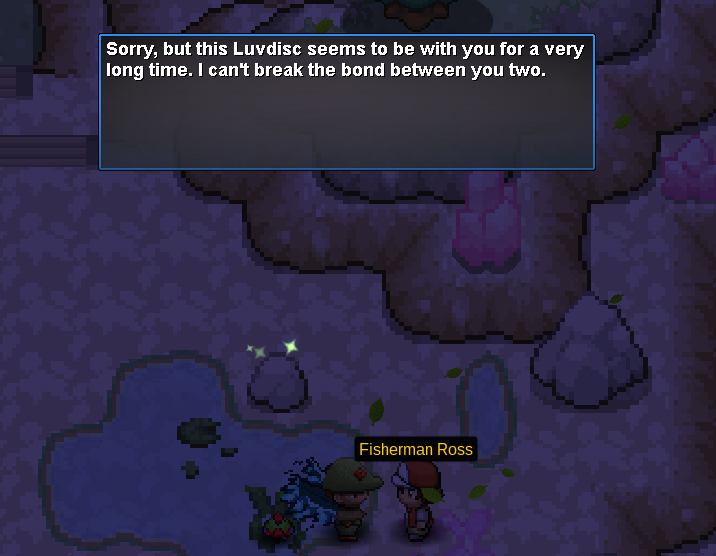
Hi everyone! I'm trying to hand Fisherman Ross a Luvdisc I just caught and he's saying this: It has over 90 IVs and it had just been caught. I tried relogging in and nothing chances.
-
Noticed the following changes with Oak: Rotom-Wash: Toxic instead of Hydro Pump Charizard: Focus Sash instead of Life Orb Tauros: Has Toxic (Rock Clim and Iron Tail remain)
-
There are a few trainers in Kanto whose cooldown to be re-challenged is longer than 7 days, namely: Cerulean Gym Route 16 Some in Route 8 (Stan, Aidan, Ricardo, Miranda, Megan, Leslie, Paige, Eli, Anne and Glenn, others are fine) Pokemon Tower top floor (only the rockets, the trainers in the other floors are fine). I'm sure of this as I've re-challenged them on Thursday last week and today, 8 days later, they're still not re-challengeable. I thought it was odd but possibly intentional, but when I asked about it on discord nobody knew about it and I was advised to report it here.
-
In SergioRS#6863
-
In-Game Name: Sergiors Discord Tag: SergioRS Server: Gold How often do you use Discord? New to it What is one suggestion you have for PRO Discord? Just joined, too early for that I'm afraid.