




New Trade Zone
Trade Zone is now live
Use the new Trade Zone for auctions and instant-price trades so Pokemon and item offers are easy to find.

370kibiryani
Suspended
-
Joined
-
Last visited
Everything posted by 370kibiryani
-
1.6m
-
705k
-
600k
-
500k
-
1k
-
369k
-
67
-
5k
-
Here is a guide to hoenn / sinnoh teleporter quest. After completing this quest , you will be able to battle Lt. Surge.
-
Done with teleporter quest ?
-
70k
-
+ Hopefully not but, If no one guesses the correct numbers then the player with nearest guess to correct numbers will be considered as winner.
-
Your discord ?
-
2.5 cash
-
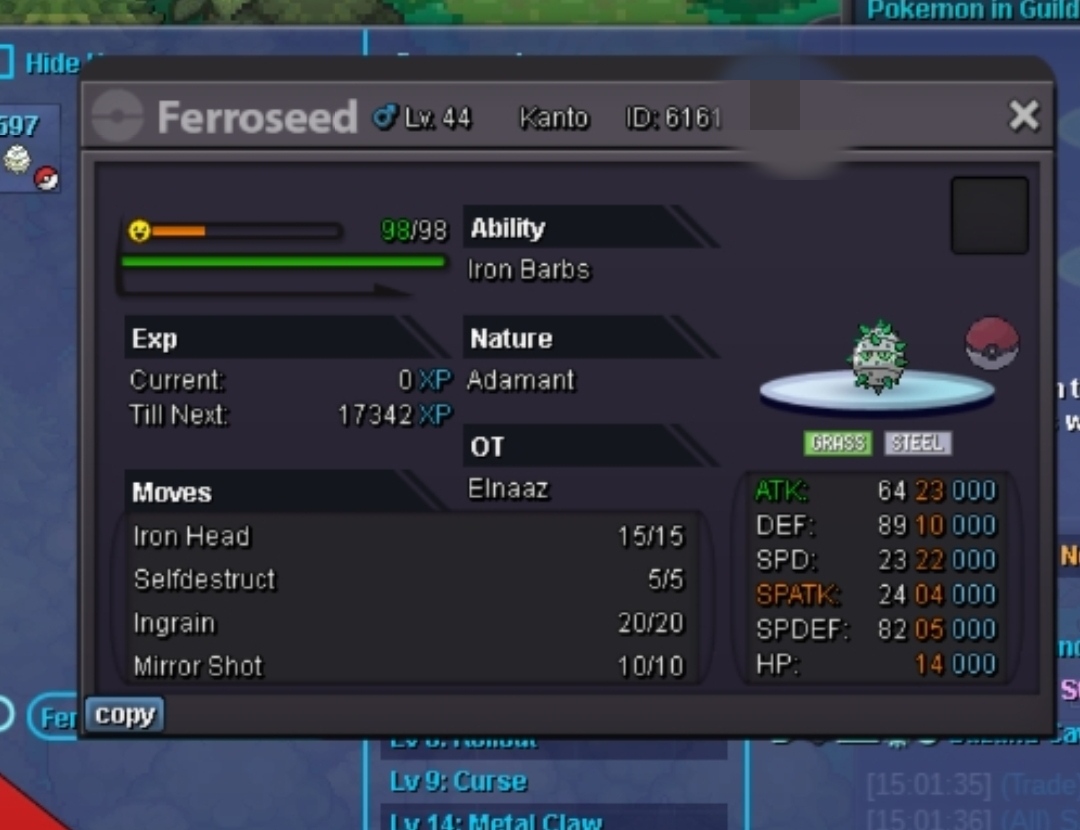
Here I have posted a screenshot of a ferroseed you basically have to guess the hidden numbers. First correct guess will receive a coin capsule. Caught Data : HINTS : RULES: Edited response will not be considered. You can respond more then once. Winner will be announced on 25th December 12:00 PM IST. Players from both servers can participate I'll deliver CC. Do not spam the thread. Response once per day if possible, will not be considered if spammed. Your all response will be considered but first one to post the correct numbers will receive a coin capsule.

-
Good luck with story ^-^
-
Yea it's okay to evolve him late. You can evolve him when you're about to go for elite 4s. This guide might help you to know about base stat / nature / IVs.
-
Your char will get stronger because evolving increases base stats as well.
-
If you evolve your char early , it'll be more powerful for sure but it will require more exp and if you evolve at high level you won't need to grind for exp much. Best will be anywhere between 80-100 for story purpose.
-
Can I start 2m?
-
600k 😂
-
-
-
-
Start ches

