New Trade Zone
Trade Zone is now live
Use the new Trade Zone for auctions and instant-price trades so Pokemon and item offers are easy to find.


Sin
Registered User
-
Joined
-
Last visited
Everything posted by Sin
-
Oh 95% of those are my words. I don't mind someone copying it but I'd like to be notified via PM first :) Good luck :)
-
Nice shop gl.
-
-
Buy Heracross. Let me know via Discord Sin#6417 so we can set up a trading time.
-
You can have faster support by going to the official thread: https://pokemonrevolution.net/forum/topic/65717-url Thou, back in August, the staff could not de-level a pokemon below level 97 from my request, so I am unsure if they are able to do it now. Regardless, best of luck! Sin
-
Update: Pokemon were finally returned after lending period expired. So it seems like they were stuck somewhere after the "Sending back" button was pressed. Not sure why the bug could not be replicated with the Scyther I mentioned above. There are many users who currently have the same issue if you notice.
-
Up.
-
Hello, Today, I used my alt account to lend Tyranitar, Reuniclus, and Scyther to my main account, SinLight. After a few hours, I pressed sending back Tyranitar and Reuniclus, but they were not sent back to the acc. After this, I decided to test with the remaining Scyther. It was sent back successfully. As of the time writing this post, I still have not received Tyranitar and Reuniclus back. I believe my problem is similar to this: https://pokemonrevolution.net/forum/index.php?threads/no-return-of-my-pokémons-after-a-loan.139618/#post-762179 Could you check and resolve the issue for me? Additionally, I'm really afraid of lending pokemon to friends previously but they were lost in the process just like this, and I just forgot about those pokemon. If by any chance those pokemon was lost in the same "black hole" (I play in Gold mainly for the record), and you could find and recover them, I would really, really, appreciate it. I will keep a lending record from now on to mitigate this issue. Thank you very much. Sin
-
300k.
-
Hello, Recently, our guild leader was banned permanently. This caused us to have some issues. Most prominently, we cannot now appoint new officers, and there was an accident that caused some officers to leave the rank. Their positions cannot be replaced since there is no guild leader now. Is it possible to appoint a new guild leader? Or, do we have to create a new guild altogether? Looking forward to hearing your advice. Sin
-
Nice clef bro, best of luck ^^
-
I do think I know that one. I am looking for something better but thanks for asking :)
-
Added Serp and Volca 31 spd hp ground to Wishlist.
-
That's how I I understood it too. Thou, I believe the new ending of the auction is 12:20, meaning it will end as soon as the clock turns 12:20, as specified in the rule: Meaning any offer made at 12:20:00, 12:20:01 (1 seconds after) and so on is invalid. The offer has to be made as late as 12:19:59. I remember reading a similar auction in Silver that has a similar complication too. That is why the 260k offer made in 12:20 was late, from my understanding.

-
@Tigerous Hello, sorry for the tag, but could you take a look at this auction's case? Near the end of the auction, the 2 offers are: Which is exactly 15 minutes from each other. and Trade rule specifies this: Thus, I believe the 260k offer is late and henceforth invalid. Could you clarify this and confirm the the correct winning amount? I would contact the seller after this verification to proceed the trade. If there is any complication arises, I would have to bother you again to facilitate the trade. Thank you in advance. Sin

-
-
-
-
Hello, I transferred the Volcanion mount to my alt account before to help it clear the region, so at that time it was still tradeable. Today, I attempted to move the Volcanion mount back to this main account of mine, but Volcanion mount has been set to be untradeable. Is it possible that a staff can help me trade the Volcanion mount back to this account again? I only have 1 Volcanion mount, and it would be a shame if it gets stuck to my alt account, which I don't spent time much there. Thank you very much. Sin
-
Update: Greninja has been sold. Feel free to come up with interesting offer for Chespin. For cash offer, I might start an auction if the starting offer is sufficient. Enjoy the weekend, Sin
-
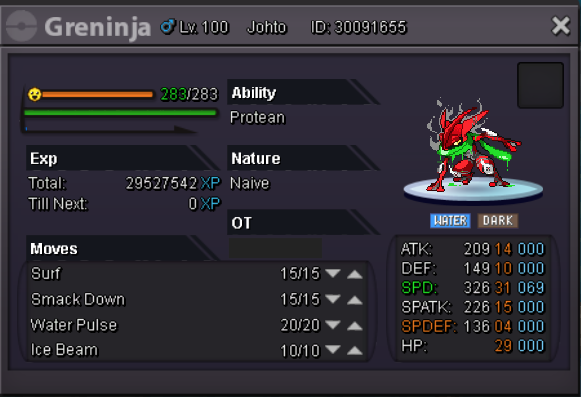
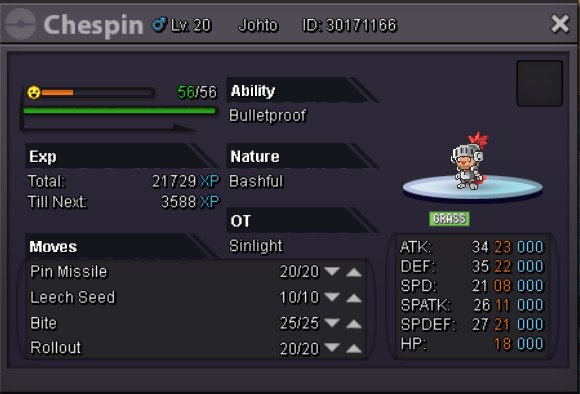
Hi all, The following rare PVP Halloween pokemon are up for sell/trade: (31 spd Naive H.A Gren, best one I have seen in both servers.) ------ SOLD (H.A Chespin great IV) ----- SOLD I am mainly looking for Epic PVP Pokemon to trade for these 2. For the list of the Pokemon I'm favorite of, please check my Wishlist in my signature or click here: https://pokemonrevolution.net/forum/index.php?threads/sin’s-wishlist.139860/ Epic/Godly Meta PVP Pokemon outside of the list is possible for trading potential also. A payment by pokedollar/CC is possible, but I would rather defer it to wait for an upcoming pokemon trading offer, unless the cash offer is a very irresistible one. I accept CC value at 330k each. I prefer to be contacted through Discord Sin#6417 for easier conversation, but u can mail me a PM in forum or in-game when I'm online also. Have fun! Sin
-
Bought 31 spd Excadrill, now looking for a 31/31 Excadrill or epic 20+ 31 spd one, moving h.a. Excadrill to lower priority need.
-
4.1
-
Nice shop. I buy Houndoom and Machamp. Note: Shoot me a PM or to Discord Sin#6417 when you are avail to trade.
-
Nevermind, pardon me.