




New Trade Zone
Trade Zone is now live
Use the new Trade Zone for auctions and instant-price trades so Pokemon and item offers are easy to find.

Revolutionation
Registered User
-
Joined
-
Last visited
Everything posted by Revolutionation
-
Yeah mt pyre sucks. Welcome back.
-
Welcome back
-
Kindly check you dms.
-
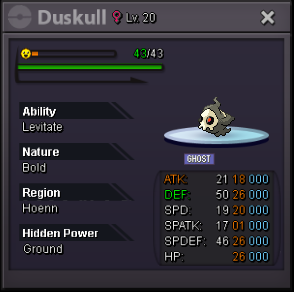
Username: RevolutioNation Server: Silver Country/Timezone: Gmt+8Pokemon follows a timeline. PRO is an mmo rpg. imo, legends should be caught in order by gen. and then to get megas which are in gen 6, requirements should be to complete all dex evo caught legends of previous generations. Best idea. Implement pls.@iLegendaryKing, Good day, kindly check your dms.Duskul sold.
 WelcomeGood to hear about that.Welcome back@MrSpock, Good day, kindly check your dms.WelcomeWelcome back P.Welcome
Account
Navigation
Search
Configure browser push notifications
Chrome (Android)
- Tap the lock icon next to the address bar.
- Tap Permissions → Notifications.
- Adjust your preference.
Chrome (Desktop)
- Click the padlock icon in the address bar.
- Select Site settings.
- Find Notifications and adjust your preference.
Safari (iOS 16.4+)
- Ensure the site is installed via Add to Home Screen.
- Open Settings App → Notifications.
- Find your app name and adjust your preference.
Safari (macOS)
- Go to Safari → Preferences.
- Click the Websites tab.
- Select Notifications in the sidebar.
- Find this website and adjust your preference.
Edge (Android)
- Tap the lock icon next to the address bar.
- Tap Permissions.
- Find Notifications and adjust your preference.
Edge (Desktop)
- Click the padlock icon in the address bar.
- Click Permissions for this site.
- Find Notifications and adjust your preference.
Firefox (Android)
- Go to Settings → Site permissions.
- Tap Notifications.
- Find this site in the list and adjust your preference.
Firefox (Desktop)
- Open Firefox Settings.
- Search for Notifications.
- Find this site in the list and adjust your preference.