




New Trade Zone
Trade Zone is now live
Use the new Trade Zone for auctions and instant-price trades so Pokemon and item offers are easy to find.

Buneary
Registered User
-
Joined
-
Last visited
Everything posted by Buneary
-
800k
-
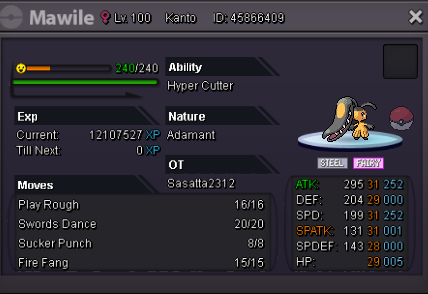
Hey guy's i'm the dude with the 23m Mawile. Press F for respects. But I agree with this post more so on the pvp councils thoughts were completely ignored on these bans. If there is a ban so be it however if you have pvp council to guide that decision ,and you don't listen or don't care about the feedback then that's an issue. Although I got to say hopefully I can beat the stall meta one day in Gen 7. :T Mega Mawile for the win!
-
Hurrah I have completed my Waifu Quest.
-
23m
-
22m
-
21m
-
20m
-
19m
-
18m
-
17m
-
16m
-
15m
-
14m
-
13m
-
12m
-
10M
-
Buneary Also Discord is Gin#3234
-
-
Bump
-
It would appear that I am the winner of the auction. I have reached out through discord ,and in game to get in touch. Hurray shiny mimi! Despite your nature ,and poor iv's I will love you lots! xD
-
The ivs make me sad. The nature makes me sad. This pokemon makes me sad. But by god. It's a shiny mimikyu. 😕 I'll start it.
-
14m
-
I believe the forums run on GMT time 4 hours ahead of EST so this auction should be over with melih4703 as the winner of the auction! The auction should have ended 10 minutes ago. So please contact me on discord so we can arrange to meet and trade Melih.

-
Last days bump! Less then 1 hour ,and 50 minutes left
-
BUMP
