




New Trade Zone
Trade Zone is now live
Use the new Trade Zone for auctions and instant-price trades so Pokemon and item offers are easy to find.

Voos
Registered User
-
Joined
-
Last visited
-
● What's your in-game name?: Voos ● How old are you?: 24 ● Are you active in Discord?: Yes, daily ● Where are you from?: United States ● What's your total playtime?: 381 hours ● What's your goal in PRO?: Laddering, making money ● What do you enjoy while playing the game?: The grind of it all ● Why do you want to be part of the guild?: Active community that I can contribute to ● What's your favorite Pokemon and why?: Aegislash because of the design. Think it's very unique and strongposted in discord
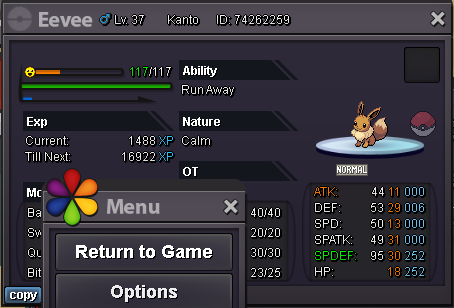
 Would you take 600k + a masterball for the kabutops?wtb bold wingullAnd impish eeveewtb bold hydration Wingull 30kbvuy 420k rotom and 400k lopunny100kgot you. bid in game after this if possible. 9 minutes left

Account
Navigation
Search
Configure browser push notifications
Chrome (Android)
- Tap the lock icon next to the address bar.
- Tap Permissions → Notifications.
- Adjust your preference.
Chrome (Desktop)
- Click the padlock icon in the address bar.
- Select Site settings.
- Find Notifications and adjust your preference.
Safari (iOS 16.4+)
- Ensure the site is installed via Add to Home Screen.
- Open Settings App → Notifications.
- Find your app name and adjust your preference.
Safari (macOS)
- Go to Safari → Preferences.
- Click the Websites tab.
- Select Notifications in the sidebar.
- Find this website and adjust your preference.
Edge (Android)
- Tap the lock icon next to the address bar.
- Tap Permissions.
- Find Notifications and adjust your preference.
Edge (Desktop)
- Click the padlock icon in the address bar.
- Click Permissions for this site.
- Find Notifications and adjust your preference.
Firefox (Android)
- Go to Settings → Site permissions.
- Tap Notifications.
- Find this site in the list and adjust your preference.
Firefox (Desktop)
- Open Firefox Settings.
- Search for Notifications.
- Find this site in the list and adjust your preference.