




New Trade Zone
Trade Zone is now live
Use the new Trade Zone for auctions and instant-price trades so Pokemon and item offers are easy to find.


-
@Krypple Cant see your screen, if possible post it again and we can help.
-
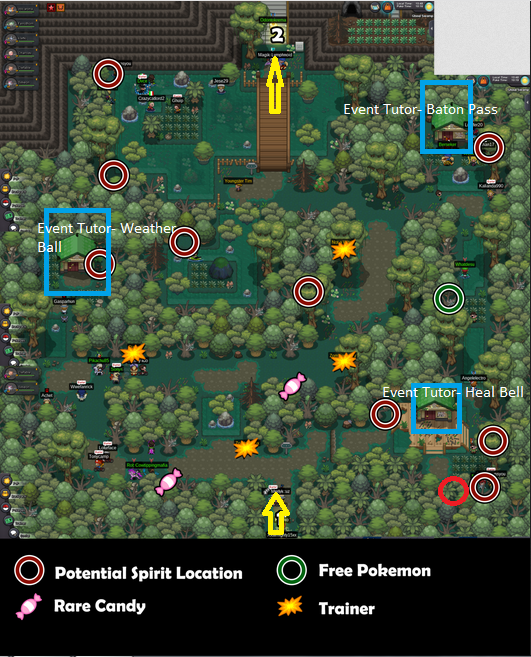
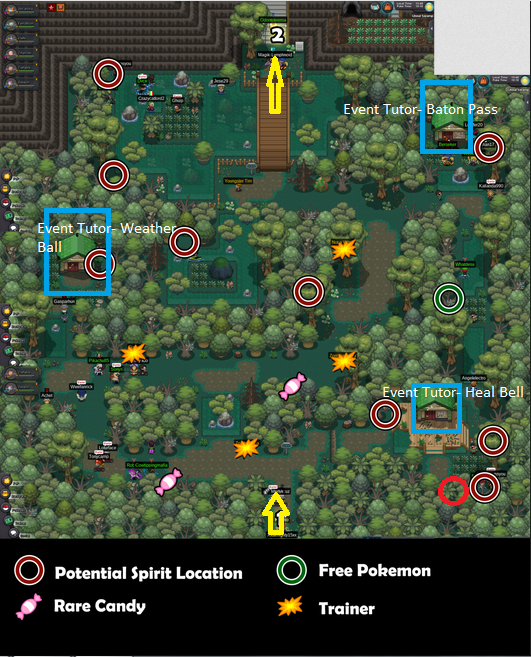
Hello @Parshansingh If still not resolved, be sure to check all the spots. Here a screen.
-
@Redtalon23
-
Dumb Question but did you remember doing the halloween event in 2015 ?
-
Memento show atk/sp.atk drop 2 times in battle log. https://gyazo.com/0f4ecfae20005b9ec7c4cc4b14064525
-
+1
-
-1, a banlist in a ladder is not always the way, outside of different tier. A banlist can happens in a tournament (draft League, tier format etc..) but not in a OU ladder competitive aspect. But as stated 40 times, we never getting tournament back into game again.
-
Bump, can we get a update ? (No hate) but I dont wanna see flexforlife etc... in every hunting spot cuz +8 hours hunt per day.
-
-1 Dont see myself hunting another boss team just for a boss which can have drop you dont like. Baton pass is fine.
-
Hello @Spammmantha ! To be able to use Rock Climb you require the 7th badge in Sinnoh (Icicle badge, Snowpoint city) Do you have it? If no, you will require to get it to be able to use it outside of battle!
-
The tracker is as cool as you! 😎
-
Yes all of them require membership for the wild encounter, excavation for gen7 starters doesnt. @Fazko91
-
Hello! New pokemon added are : Dreepy,Indeedee,Sineastea,Pincurchin Gen7 starters (Rowlet, which can be Hisuian variant and normal one, Popplio, Litten, all of them can be either found in Excavation or have a spawn in Event map) same applies for gen8 starters (Grookey, Sobble and Scorbunny) event map.
-
Hello! Summer bosses doesnt give mount anymore, the mount are now moved to Shamouti Island (the trio birds island in Vermilion City Dock) Summer Guardians only give Event coins from now. To be able to get the mount, you will need to show a Wailmer to the NPC in island front of the pokecenter and he will give you the mount!
-
You sure download was done and your antivirus doesnt block the game ? It could be the case, you will have to make a exception sometimes.
