




New Trade Zone
Trade Zone is now live
Use the new Trade Zone for auctions and instant-price trades so Pokemon and item offers are easy to find.

Gen1king
Suspended
-
Joined
-
Last visited
Everything posted by Gen1king
-
-
-
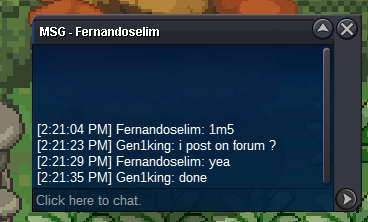
auction start 10/08 . time : 14:22 gmt +02 . finish after 2 days
-
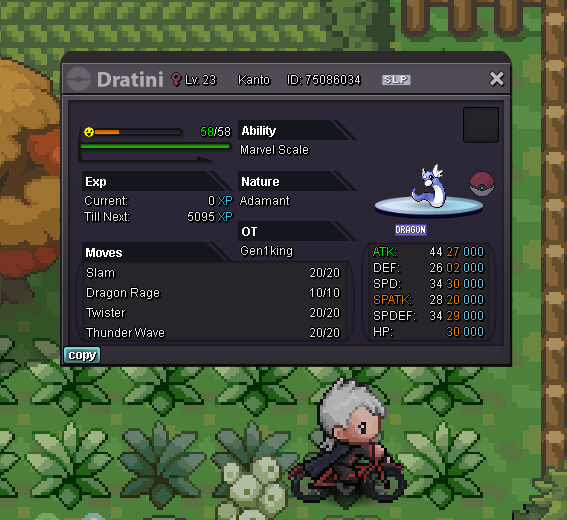
auction 48 hours duration. (start since first bid) 1m start no insta min raise 100k pokedollars accepted and cc(380k).
-
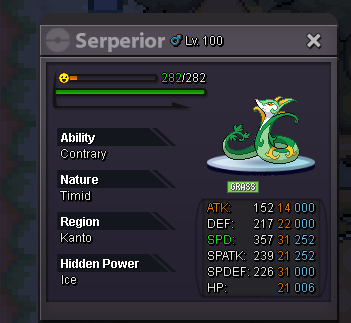
auction 2m start.. Duration 48 hours since first bid. min raise 100k no insta pokedollars, cc 380k , nature rr 330k ,iv reroll 680k accepted
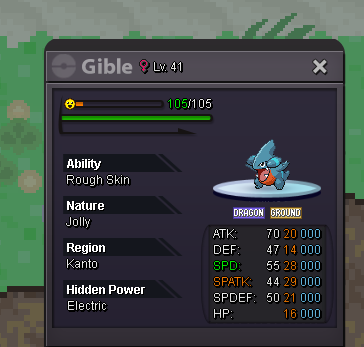
 but the auction is here on forum. wait a minute. i hope any mods can helpmods did i win? the auction is over correct? @Theophidomtradedyes we already tradeover @Juez177 u can pm me anytime in game to get ur pokeDid i bid on time mods? Can any1 tell?5 hours leftstart 26/08 00:10 GMT+2auction 1k start no min raise no insta duration : 24 hours since beginning pokedollars only
 thanks for the info. u are great ! @Q25if noone wants to bid so high when can i cancel auction mods?my Silver account is xasisopathis the drillburs are there. If a moderator can tell me who is the winner. so i can trade to the winner the pokes2 hours left . i will message winner on forum with my silver account17 hours left24 hours clock started just now

Account
Navigation
Search
Configure browser push notifications
Chrome (Android)
- Tap the lock icon next to the address bar.
- Tap Permissions → Notifications.
- Adjust your preference.
Chrome (Desktop)
- Click the padlock icon in the address bar.
- Select Site settings.
- Find Notifications and adjust your preference.
Safari (iOS 16.4+)
- Ensure the site is installed via Add to Home Screen.
- Open Settings App → Notifications.
- Find your app name and adjust your preference.
Safari (macOS)
- Go to Safari → Preferences.
- Click the Websites tab.
- Select Notifications in the sidebar.
- Find this website and adjust your preference.
Edge (Android)
- Tap the lock icon next to the address bar.
- Tap Permissions.
- Find Notifications and adjust your preference.
Edge (Desktop)
- Click the padlock icon in the address bar.
- Click Permissions for this site.
- Find Notifications and adjust your preference.
Firefox (Android)
- Go to Settings → Site permissions.
- Tap Notifications.
- Find this site in the list and adjust your preference.
Firefox (Desktop)
- Open Firefox Settings.
- Search for Notifications.
- Find this site in the list and adjust your preference.