




New Trade Zone
Trade Zone is now live
Use the new Trade Zone for auctions and instant-price trades so Pokemon and item offers are easy to find.

Lacomus
Registered User
-
Joined
-
Last visited
Everything posted by Lacomus
-
Welcome to the auction Start: 1 Min bid: 1 Duration: 24 hours (after the first bid) Payment: Pokedollars Note: HP Dragon. No cancellations, no insta Countdown: https://www.tickcounter.com/countdown/4088117/girafarig Closed: @Souoca123 250k
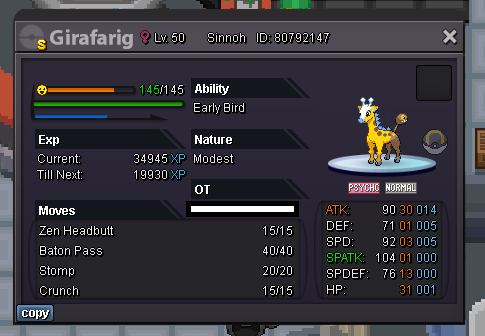
-
Appreciate you @Manbat and @Leoxa for bringing it to my attention. Most helpful I've got your pokes in vermi @Suncity whenever convenient. Congrats on your win
-
I'll help you out. Come to vermi@Leoxa As a piece of observation, I think you're wrong. The start was at 7:02pm yesterday, and that last bid via screenshot was in at 7pm, leaving 2 minutes spare...within time. However, see what mods say

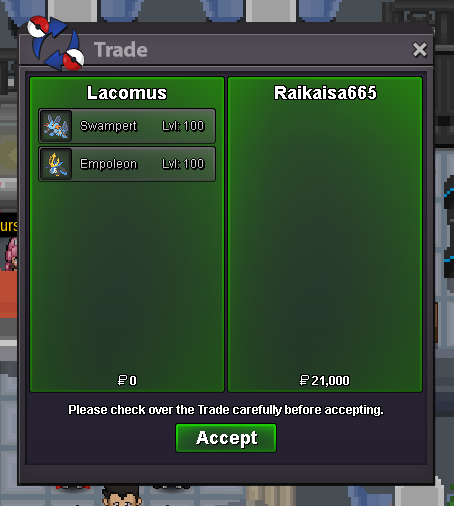
 Can you offer another ruling on this please? @Mbk appreciatedI'll get a ruling on this with mods again15 minute rule applies, good luck! Forum: If a bid is received in the final 15 minutes of the auction, the end point will be delayed by 15 minutes from that bid, and will be delayed by 15 minutes for each new bid thereafter, until the current offer has been held for a full 15 minutes. Must be accurate to the minute that the auction is set to end. › e.g. If the auction ends at 15:00, it will end at 15:00:00. If a late bid is received in the final 15 minutes, at 14:46, the auction will end at 15:01. If another user bids at 15:00, the auction will be extended again, and will end at 15:15, this will be repeated until the current offer has been held for a full 15 minutes.Auction closed. I'm in vermi whenever you're free @Raikaisa66515 minute rule applies, good luck! - Forum: If a bid is received in the final 15 minutes of the auction, the end point will be delayed by 15 minutes from that bid, and will be delayed by 15 minutes for each new bid thereafter, until the current offer has been held for a full 15 minutes. Must be accurate to the minute that the auction is set to end. › e.g. If the auction ends at 15:00, it will end at 15:00:00. If a late bid is received in the final 15 minutes, at 14:46, the auction will end at 15:01. If another user bids at 15:00, the auction will be extended again, and will end at 15:15, this will be repeated until the current offer has been held for a full 15 minutes.Approaching the final 20 minutes Countdown: https://www.tickcounter.com/countdown/4082510/swampert-empoleonShortly approaching the final 3 hours Countdown: https://www.tickcounter.com/countdown/4082820/machop-machokeApproaching the final 2 hours Countdown: https://www.tickcounter.com/countdown/4082510/swampert-empoleonhttps://www.pokellector.com/sets All sets in the link above. I scrolled all the way to the bottom for the original stuff, the nostalgia. Ahh
 @Thriii Took me a little time preparing the screenshot. The bidder above beat you to it at 30k, sorryNote: Alt account (Arunt) Appreciate the business @Suncity
 Warm welcome @Clowpower enjoy the game@Medu5a Its a bundle, so you can just say 10k





Account
Navigation
Search
Configure browser push notifications
Chrome (Android)
- Tap the lock icon next to the address bar.
- Tap Permissions → Notifications.
- Adjust your preference.
Chrome (Desktop)
- Click the padlock icon in the address bar.
- Select Site settings.
- Find Notifications and adjust your preference.
Safari (iOS 16.4+)
- Ensure the site is installed via Add to Home Screen.
- Open Settings App → Notifications.
- Find your app name and adjust your preference.
Safari (macOS)
- Go to Safari → Preferences.
- Click the Websites tab.
- Select Notifications in the sidebar.
- Find this website and adjust your preference.
Edge (Android)
- Tap the lock icon next to the address bar.
- Tap Permissions.
- Find Notifications and adjust your preference.
Edge (Desktop)
- Click the padlock icon in the address bar.
- Click Permissions for this site.
- Find Notifications and adjust your preference.
Firefox (Android)
- Go to Settings → Site permissions.
- Tap Notifications.
- Find this site in the list and adjust your preference.
Firefox (Desktop)
- Open Firefox Settings.
- Search for Notifications.
- Find this site in the list and adjust your preference.