




New Trade Zone
Trade Zone is now live
Use the new Trade Zone for auctions and instant-price trades so Pokemon and item offers are easy to find.

Ayroo
Suspended
-
Joined
-
Last visited
-
Hey! Welcome to PRO! Whichever server you choose, if you ever want to try out the other server but still play on your current character, you can go to your Dashboard and transfer your characters between servers for free once per month! I hope you get to enjoy our game as much as we do! 😇
-
Gotcha! Your request is being processed - While this is being done, please do not remove the items from your inventory. I will update you here when your refund is completed!
-
Understood, done!
-
As the PvP Rules state, you can use two accounts to play PvP each season. That means you can PvP with one account on the Silver server and PvP with another account on the Gold server; Two accounts, one server per account. It also states that you may have only one account in the Top 25 (Ranked and/or Random Ranked) by the end of the season, meaning that you may only reach Top 25 with one account in any one server at any one time. Let's take three examples: Player A plays PvP in both servers using both of their accounts, one in each server. They first use one account to play PvP on Silver, and they reach Top 25 (Ranked and/or Random Ranked) with that account on Silver. They decide to use their second account to PvP on Gold, and they reach Top 25 on Gold. This is Against the Rules! Player B plays PvP in both servers using both of their accounts, one in each server. They first use one account to play PvP on Silver, and they reach Top 25 (Ranked and/or Random Ranked) with that account on Silver. They decide to use their second account to PvP on Gold, but they do NOT reach Top 25 on Gold. This is Following the Rules! Player C plays PvP in both servers using one of their accounts, just swapping between characters on Silver and Gold to PvP. This is Against the Rules! The situation you're asking about is the same as Player B's, which is allowed! Thank you for checking in, I hope that answers your question! Do you have any other questions about this before I go ahead and close your thread?
-
@Divinegold is absolutely correct! At this time, evolving Duraludon is not possible quite yet but will be in the future! I'll go ahead and close this thread as answered, and please feel free to make another thread if you have any more questions!
-
That's great to hear! I'll go ahead and close your thread now, and I hope you have a nice day! Ayroo
-
Hello, Just confirming; Has your problem with coins been resolved?
-
Hey there, welcome! We have so many very helpful players ingame who can help you if you ever run into a snag - Make sure to ask in the Help chat channel if you ever need it!
-
I apologize but unfortunately we have to deny your request for a refund. The NPC used to purchase the double reroll service displays the cost of the service before the transaction is completed. The transaction also requires navigating multiple dialogue windows, including confirmation prompts, before it can be completed. Posted below is that chain of dialogue: As a general reminder, we recommend carefully reviewing all information presented during a transaction before confirming it. I know this isn't the response you were looking for, and I apologize for that. I'll go ahead and close this thread now, and I truly hope you enjoy the Summer event.
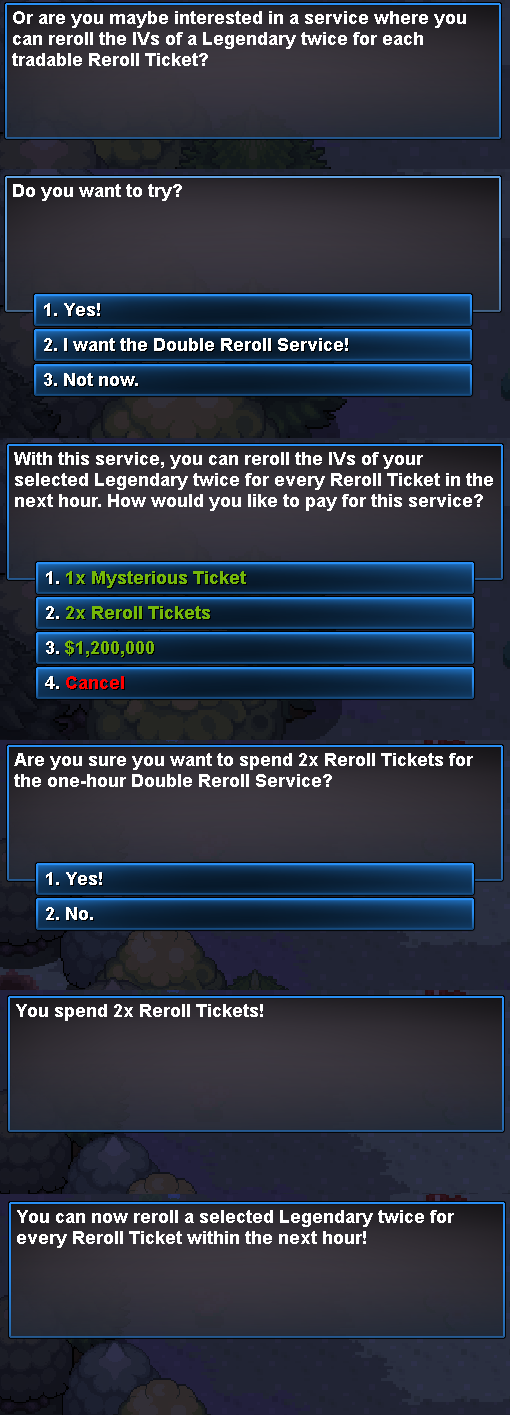
-
Hey @Divinegold , I absolutely suggest you make a post about it in the bug resolution subforum here! For the purposes of this thread, I'll go ahead and close it since it's been resolved! I hope you have a wonderful Summer event!
-
Fair enough! I'll go ahead and close this thread now, but please make another if you ever have a question or believe you've encountered another bug.
-
I'll go ahead and close this thread then, and I hope you have a wonderful Summer event!
-
Due to inactivity, I'll go ahead and close this thread now. Please make another if you require further assistance!
-
I see you were able to fix your details, that's great! I'll go ahead and close this thread now. Please make another if you require further assistance!
-
Due to inactivity, I'll go ahead and close this thread now. Please make another if you require further assistance.
