




New Trade Zone
Trade Zone is now live
Use the new Trade Zone for auctions and instant-price trades so Pokemon and item offers are easy to find.
.jpeg.be845f7196fd3a0df3b5fb479236a5f0.jpeg)

Gracee
Registered User
-
Joined
-
Last visited
Everything posted by Gracee
-
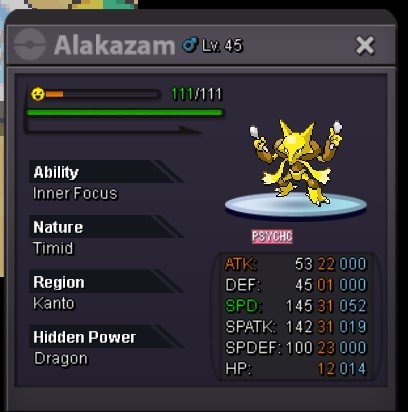
Hp matter alot if it was more than 15+ hp would buy it for 2m+
-
600k
-
start will transfer if i win
-
Cross Server auction is not allowed to have more than one poke at once so it doesn't make mistake about time and changing server, u should remove the rest of the 4 as they have not been started yet.
-
start hat
-
-
@Artiga24 have won the auction (sorry for the wait) let me know when u can come online
-
5hr left
-
pm me when u come online
-
bump 26hr left
-
start crawdaunt
-
bump
-
start
-
ofc it is starting price
-
Auction Details(Alakazam 31/31) Start Price (SP): 200k Minimum Bid Increment: 100k Instant Buy (IB): n/a Auction : 48hr after Start price is met(https://www.tickcounter.com/countdown/9318010/my-countdown) Bidding Rules Bids accepted from any server Winner must transfer to Silver Server to complete the trade No edited / retracted bids Only valid bids will be counted. Any bid received in the last 15 minutes will extend the auction by +15 minutes
-
just send one through mail, have a nice dayy
-
start (from silver will transfer if i win)
-
550k
-
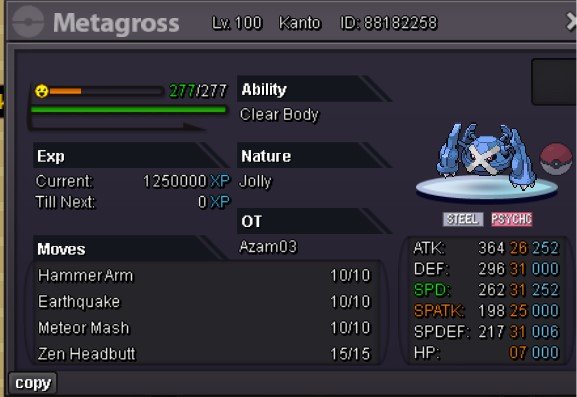
NOTE- BOTH SERVER PLAYER IS WELCOME TO BID BUT THE PLAYER MUST TRANSFER TO SILVER FOR TRADE S.O-CANCELD MIN RAISE- canceled INSTA - N/A TIME LIMIT- 72HR AFTER S.O And accepted currency (CC-480K, RR-730K ) IF U ARE BIDDING FROM AN ALT ACC PLEASE SPECIFY IT
-
sneasler 600k
-
start (will transfer if win)
-
1m 401k
-
how much time left for garde
-
700k gard
-
150k

