




New Trade Zone
Trade Zone is now live
Use the new Trade Zone for auctions and instant-price trades so Pokemon and item offers are easy to find.


Pisforpenguin
Registered User
-
Joined
-
Last visited
Everything posted by Pisforpenguin
-
bump
-
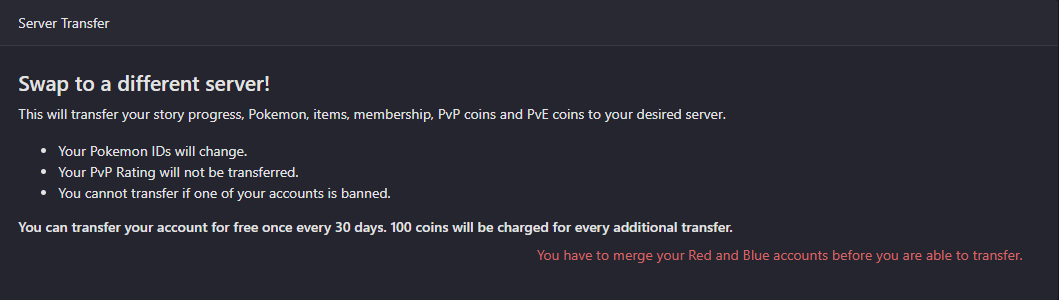
bumpBumpstart+1if you think its a waste of time simply dont do it, there are other ways to acquire beldum such as bosses and purchasing from other players1: 200ki will be back on gold server in a few days i bought some mons on silver in auction. Is there something you are interested in i can hold it for youbump on silver for a few daysstart 1auction is over bro pm me on disc Penguin#1839StartBumpstart1.75mbumpit has allowed me to merge now thank you@Epithet i have already done an appeal about a year ago and was unbanned by @Ehkoe on march 7 2021 i can link the appeal if needed but not sure if everyone is able to see itHi i am trying to transfer to silver and its telling me i need to merge accounts before i can transfer Im pretty sure i already merged a long time ago, when i click on button to merge the accounts its showing 2 accounts that do not look like my current account and the status showing for both of them is banned: i have no intention of keeping either of those existing accounts and wont allow me to even merge them because they are banned status, i just want to be able to transfer to pick up a mon i won in an auction



Account
Navigation
Search
Configure browser push notifications
Chrome (Android)
- Tap the lock icon next to the address bar.
- Tap Permissions → Notifications.
- Adjust your preference.
Chrome (Desktop)
- Click the padlock icon in the address bar.
- Select Site settings.
- Find Notifications and adjust your preference.
Safari (iOS 16.4+)
- Ensure the site is installed via Add to Home Screen.
- Open Settings App → Notifications.
- Find your app name and adjust your preference.
Safari (macOS)
- Go to Safari → Preferences.
- Click the Websites tab.
- Select Notifications in the sidebar.
- Find this website and adjust your preference.
Edge (Android)
- Tap the lock icon next to the address bar.
- Tap Permissions.
- Find Notifications and adjust your preference.
Edge (Desktop)
- Click the padlock icon in the address bar.
- Click Permissions for this site.
- Find Notifications and adjust your preference.
Firefox (Android)
- Go to Settings → Site permissions.
- Tap Notifications.
- Find this site in the list and adjust your preference.
Firefox (Desktop)
- Open Firefox Settings.
- Search for Notifications.
- Find this site in the list and adjust your preference.