New Trade Zone
Trade Zone is now live
Use the new Trade Zone for auctions and instant-price trades so Pokemon and item offers are easy to find.

Darkpalladin
Registered User
-
Joined
-
Last visited
Everything posted by Darkpalladin
-
Username: Darkpalladin Server: Silver Country/Timezone: Hungary/GMT+2
-
auction cancelled!
-
Starting price lowered to 2m 😉
-
auction cancelled
.png.f5074d00fc78cb4bc7b1ec1b16f7697f.png)
-
+1 Just today was 3 pvp disconnects for me....
-
Up and starting price lowered to 1,2m
-
Auction end 48 hours after the first bid. Starting: 1,2m Insta: 8m Min. raise: 200k
.png.1b20a6a482d81f7ce8d4c5e7bc141031.png)
-
Username: darkpalladin Server: Silver Country: Hungary (GTM+2)
-
My offer 350k
-
Last 1 hour
-
starting price: 6m min raise: 200k insta: 12m auction end: 48h after the first bid
.png.a46215057ccb84e1b871ce7695c17990.png)
-
My friends are already in the guild. i would like to learn morepvp skills because my max rating is 200-220
.png.9d536115a43cc1731aa35eb174602032.png)
-
4.6m
-
Up!
-
I think 2-300k
-
Up
-
Auction canceled
.png.3e919499e4bf93aea47569b19fc32c53.png)
-
Up
-
UP
-
IGN: Darkpalladin Playtime: 1285h PVP rating: 94 Vote for Nature Reroll Ticket: Yes Reason: because the actual system need to much luck for a good nature, or infinite money for buying nature reroll Vote for Birth Island: Yes Reason:
-
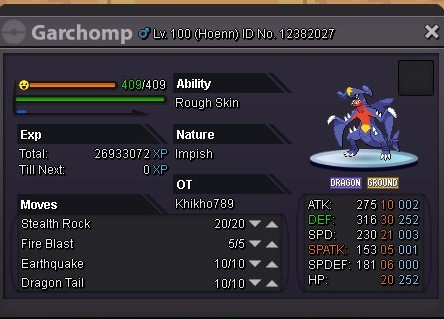
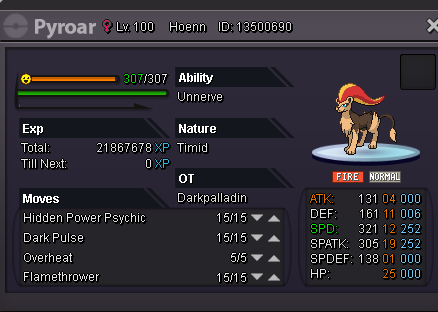
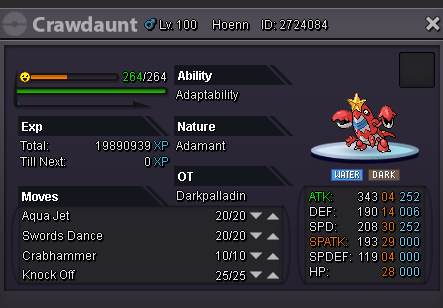
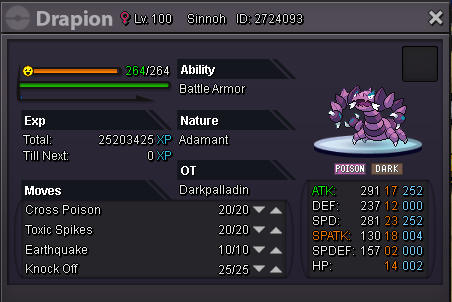
Welcome To My Personal Shop! Rules: 1.If you like one poke, you can leave a comment here, and ingame (darkpalladin) 2. fake buyers will be reported How to pay: Pokedollar Coins Capsules - 280k Reroll Tickets - ( Iv's - 500k ) ( Nature - 200k ) 15 day - 140k 30 days - 280k BMS 130k PvP Pokemons: Shiny Pokemons: Other Lvl100 pokes: Untrained Pokes:


.png.95b4c4f52792010ac1ce1711b0a79adb.png)
.png.d73d5bb1c4415ef8a720f8beed5598be.png)
.png.e6c72d97b3d104692b7f9d4f91045771.png)
.png.b57b6c2c9cd52908895047b64089070d.png)
-
Shamac boss