New Trade Zone
Trade Zone is now live
Use the new Trade Zone for auctions and instant-price trades so Pokemon and item offers are easy to find.
All Activity
Past hour
-
json { "study_guide_package": { "topic": "Norton Support Study Guide: Product Key Activation & License Troubleshooting", "seo_metadata": { "title_tag": "Norton Activation Support【18.55-518-65.68】Product Key Setup & Error Fixes", "meta_description": "Complete Norton support study guide for subscription activation. Learn how to redeem a 25-character key at ://norton.com and fix 'No License Available' or invalid key errors.", "url_slug": "/norton-support-study-guide-activation-troubleshooting", "primary_keyword": "norton activation support", "secondary_keywords": [ "how to activate norton subscription", "norton 25 character product key", "://norton.com setup", "norton invalid product key fix", "norton no license available", "norton 360 activation troubleshooting" ] }, "study_guide_thread": [ { "section_number": 1, "title": "Core Activation Architecture & Credentials", "summary": "To diagnose Norton activation issues, separate the three primary licensing mechanisms:", "points": [ { "label": "Direct Account Entitlement", "detail": "Subscriptions purchased directly from Norton.com bind automatically to the buyer's Norton account email—no manual key entry is required." }, { "label": "25-Character Alphanumeric Product Key", "detail": "Retail box cards, third-party digital purchases (Amazon, Best Buy), and OEM pre-installs require a 25-character key redeemed at ://norton.com/home/setup." }, { "label": "Partner / App Store Entitlements", "detail": "Subscriptions bought via ISPs (13-digit PIN), Google Play, or the Apple App Store authenticate through partner portals or native store receipt restoration." } ] }, { "section_number": 2, "title": "Platform-Specific Activation Workflows", "platforms": [ { "platform": "Windows & Mac (Desktop)", "methods": [ "Web Setup: Go to ://norton.com/home/setup, enter the 25-character key, and sign in to link the license before downloading the installer.", "In-App Activation: Open Norton 360, click the Profile icon (or 'Activate Now'), and either sign in to your account or select 'Enter a Key' / 'Serial Number.'" ] }, { "platform": "iOS (iPhone & iPad)", "methods": [ "Open Norton 360 > tap 'Redeem a subscription' > choose Sign In (Norton account), Enter a Product Key, or 'Restore from App Store.'" ] }, { "platform": "Android", "methods": [ "Open Norton 360 > tap 'Sign in' for direct accounts, or tap 'Already purchased?' to enter a product key, partner code, or 'Restore from Google Play.'" ] } ] }, { "section_number": 3, "title": "Common Activation Bottlenecks & Errors", "errors": [ { "error": "'No License Available' / Expired Status After Renewal", "cause": "Signing into a secondary email address that does not own the subscription, or a stale local license cache that has not synced with Norton's servers." }, { "error": "'Invalid Product Key' Error", "cause": "Typos (confusing O/0 or I/1), incorrect system date/time blocking SSL server handshakes, or unactivated point-of-sale retail cards." }, { "error": "Seat Limit Reached", "cause": "Attempting to activate a device beyond the subscription's seat cap (e.g., 1, 3, 5, or 10 devices) without freeing an old seat in the My Norton portal." } ] }, { "section_number": 4, "title": "Diagnostic & Resolution Protocol", "steps": [ { "step": 1, "name": "Account & Email Verification", "action": "Confirm you are signing in with the exact email address used during checkout. Check inbox receipts if multiple personal emails exist." }, { "step": 2, "name": "Force License Cache Refresh", "action": "Inside the Norton desktop or mobile app, navigate to Account > Sign Out, close the app completely, reopen it, and sign back in to force a fresh server entitlement check." }, { "step": 3, "name": "Device Seat Management", "action": "Log into ://norton.com > My Subscriptions > Manage Licenses. Remove inactive or old devices to free up an available activation seat." }, { "step": 4, "name": "System Clock & Network Check", "action": "Verify that your computer's date, time, and time zone are set to automatic, and ensure firewalls or VPNs are not blocking Norton activation servers." }, { "step": 5, "name": "Official Support Escalation", "action": "If a legitimate retail or third-party key remains rejected, contact official Norton Member Services & Support with your proof of purchase receipt (showing retailer name, date, and product), the 25-character product key or order number, and exact error message or code (never share passwords or full credit card numbers)." } ] }, { "section_number": 5, "title": "Quick Review & Key Takeaways", "takeaways": [ "Golden Rule: Always bind a 25-character key to your Norton account at ://norton.com/home/setup first so you can easily transfer or reinstall it later.", "Sync Fix: Signing out and back into the Norton app resolves most post-renewal 'Expired' or 'No License Available' glitches.", "Mobile Purchases: Subscriptions bought inside the iOS or Android app stores must be activated using the 'Restore' button rather than a 25-character key." ] } ], "flashcards": [ { "id": 1, "term": "Direct Account Entitlement", "definition": "A Norton subscription purchased directly from Norton.com that binds automatically to the buyer's Norton account email without requiring a manual product key." }, { "id": 2, "term": "://norton.com/home/setup", "definition": "The official web portal used to redeem a 25-character alphanumeric product key and bind the subscription license to a Norton account before installing the app." }, { "id": 3, "term": "13-Digit Service Provider PIN", "definition": "An activation credential issued by Internet Service Providers (ISPs) or telecom partners instead of a standard 25-character retail product key." }, { "id": 4, "term": "App Store / Google Play Entitlements", "definition": "Mobile Norton subscriptions bought through Apple or Google that must be activated using the 'Restore from App Store' or 'Restore from Google Play' option rather than a product key." }, { "id": 5, "term": "'No License Available' Error", "definition": "An activation error caused either by signing into a Norton account that does not own the active subscription or by a stale local license cache that has not synced after renewal." }, { "id": 6, "term": "Force License Cache Refresh", "definition": "Signing out of the Norton desktop or mobile app, closing it completely, and signing back in to trigger a fresh server entitlement check." }, { "id": 7, "term": "'Invalid Product Key' Error", "definition": "An error triggered by character typos (such as O vs. 0 or I vs. 1), an incorrect system date/time blocking SSL handshakes, or an unactivated retail POS card." }, { "id": 8, "term": "Device Seat Management", "definition": "The process of logging into ://norton.com > My Subscriptions > Manage Licenses to remove old devices and free up an activation seat when a plan's device limit is reached." } ], "practice_questions": [ { "id": 1, "question": "A user renewed their Norton 360 subscription online, but their desktop app still displays 'Expired' or 'No License Available.' What is the fastest diagnostic step to resolve this?", "options": [ "Uninstall and reinstall the operating system", "Sign out of the Norton app and sign back in with the purchase email address", "Purchase a second product key from a retail store", "Change the computer's IP address using a VPN" ], "correct_answer": "Sign out of the Norton app and sign back in with the purchase email address", "explanation": "Signing out and back in forces the Norton client to refresh its local license cache against Norton's servers and verifies the user is logged into the account holding the active entitlement." }, { "id": 2, "question": "Where should a customer go first to redeem a 25-character Norton product key purchased from a third-party retailer?", "options": [ "://norton.com/home/setup", "The Apple App Store 'Restore' button", "Windows Device Manager", "Their ISP billing portal" ], "correct_answer": "://norton.com/home/setup", "explanation": "Entering the 25-character key at ://norton.com/home/setup binds the license permanently to the user's Norton account, making future installations and device transfers seamless." }, { "id": 3, Use code with caution. "question": "A customer bought Norton 360 through the Apple App Store on their iPhone and is asking for a 25-character product key to activate it. How should they activate the app?", "options": [ "Request a 13-digit PIN from Apple Support", "Open Norton 360, tap 'Redeem a subscription,' and select 'Restore from App Store'", "Type their Apple ID password into the product key box", "Create a new Norton account using a different email" ], "correct_answer": "Open Norton 360, tap 'Redeem a subscription,' and select 'Restore from App Store'", "explanation": "In-app purchases made via Apple App Store or Google Play do not generate 25-character product keys; they authenticate directly through native store receipt restoration." }, { "id": 4, "question": "What non-typo technical issue on a Windows PC can cause Norton's server to reject a valid 25-character product key during activation?", "options": [ "Low screen brightness", "An incorrect system date, time, or time zone blocking SSL server communication", "Having too many bookmarks in the browser", "Using a wired Ethernet connection instead of Wi-Fi" ], "correct_answer": "An incorrect system date, time, or time zone blocking SSL server communication", "explanation": "An inaccurate system clock invalidates security certificates during the activation handshake with Norton's licensing servers, causing key validation to fail." } ], "schema_org_json_ld": { "@context": "https://schema.org", "@graph": [ { "@type": "TechArticle", "headline": "Norton Support Study Guide: Product Key Activation & Troubleshooting", "description": "Complete study guide covering Norton 360 activation methods across Windows, Mac, Android, and iOS, product key redemption at norton.com, and troubleshooting common activation errors.", "keywords": [ "norton activation support", "how to activate norton subscription", "norton 25 character product key", "norton.com setup", "norton invalid product key fix", "norton no license available", "norton 360 activation troubleshooting" ], "articleSection": [ "Core Activation Architecture & Credentials", "Platform-Specific Activation Workflows", "Common Activation Bottlenecks & Errors", "Diagnostic & Resolution Protocol" ] }, { "@type": "HowTo", "name": "How to Activate and Troubleshoot Your Norton Subscription", "description": "Step-by-step protocol for redeeming a 25-character Norton product key, linking your Norton account, and resolving license sync errors across desktop and mobile devices.", "step": [ { "@type": "HowToStep", "position": 1, "name": "Credential & Key Verification", "text": "Locate your 25-character alphanumeric product key (from your Norton confirmation email, retail box card, or third-party retailer) or your 13-digit service provider PIN, and ensure you have an active internet connection." }, { "@type": "HowToStep", "position": 2, "name": "Account & License Linking", "text": "Navigate to norton.com in a web browser, enter your 25-character product key, and sign in to your Norton account to bind the subscription license to your profile." }, { "@type": "HowToStep", "position": 3, "name": "Application Sync & Sign-In", "text": "Open the Norton 360 app on Windows, Mac, Android, or iOS. Click the profile icon or 'Redeem an existing subscription' and sign in using the exact Norton account credentials linked to the purchase." }, { "@type": "HowToStep", "position": 4, "name": "Session Refresh for Stale Licenses", "text": "If the app displays 'No License Available' or shows an expired plan after renewal, click Account > Sign Out inside the Norton app, then sign back in to force a server license sync." }, { "@type": "HowToStep", "position": 5, "name": "Official Support Escalation", "text": "If a retail key is rejected as invalid or revoked, contact official Norton Member Services & Support with your proof of purchase receipt, seller details, product name, and exact error code—never share full payment card numbers or passwords." } ] }, { "@type": "FAQPage", "mainEntity": [ { "@type": "Question", "name": "Where do I enter my 25-character Norton product key?", "acceptedAnswer": { "@type": "Answer", "text": "Go to norton.com in your browser, type in your 25-character alphanumeric key, and sign in to your Norton account. You can also open the Norton device security app, click the profile icon or 'Activate Now', and select 'Enter a Key' or 'Serial Number'." } }, { "@type": "Question", "name": "Why does Norton say 'No License Available' after I sign in?", "acceptedAnswer": { "@type": "Answer", "text": "This error usually happens when you sign into a Norton account that does not hold the active subscription, or when the app has not refreshed after a recent renewal. Verify you are using the purchase email address, then sign out and sign back into the Norton app to refresh your license status." } }, { "@type": "Question", "name": "How do I activate Norton 360 on Android or iOS?", "acceptedAnswer": { "@type": "Answer", "text": "Install and open the Norton 360 app. On iOS, tap 'Redeem a subscription' and either sign in to your Norton account, enter a product key, or tap 'Restore from App Store'. On Android, tap 'Sign in' for an existing account, or tap 'Already purchased?' to enter a product key, partner code, or 'Restore from Google Play'." } }, { "@type": "Question", "name": "How do I fix an 'Invalid Product Key' error on a new computer?", "acceptedAnswer": { "@type": "Answer", "text": "Check that all 25 characters are typed accurately without special characters, and confirm your device's system date, time, and internet connection are working properly. If Norton came pre-installed on a new PC and throws an invalid key error due to a configuration or server issue, wait a few hours and retry or contact the device manufacturer and official Norton Support." } } ] } ] } } }
-
{ "@context": "https://schema.org", "@graph": [ { "@type": "TechArticle", "headline": "Courtyard.io Withdrawal Problems: Fixes for Cash, USDC & Card Redemptions", "description": "Experiencing Courtyard.io withdrawal problems? Learn how to fix Polygon network mismatches, useWalletSign errors, delayed bank payouts, and card shipping issues.", "keywords": [ "courtyard io withdrawal problems", "courtyard.io payout stuck", "courtyard usdc withdrawal polygon", "courtyard redeem physical card error", "courtyard useWalletSign error", "courtyard bank transfer returned", "how to withdraw from courtyard.io" ], "articleSection": [ "Core Architecture & Withdrawal Channels", "Digital Payout Bottlenecks (Cash & USDC)", "Physical Card Redemption Hurdles", "Diagnostic & Resolution Protocol" ] }, { "@type": "HowTo", "name": "How to Fix Courtyard.io Withdrawal and Card Redemption Problems", "description": "Step-by-step troubleshooting protocol for resolving stuck cash payouts, USDC transfer errors, and physical card shipping checkout glitches on Courtyard.io.", "step": [ { "@type": "HowToStep", "position": 1, "name": "Environment Isolation", "text": "Switch from mobile devices or in-app browsers to a desktop browser (Chrome or Brave) to eliminate mobile UI freezes and wallet-signing bugs." }, { "@type": "HowToStep", "position": 2, "name": "Network Verification", "text": "Confirm the receiving crypto wallet is explicitly switched to the Polygon (POS) network and supports native USDC before initiating a transfer." }, { "@type": "HowToStep", "position": 3, "name": "Payment Method Substitution", "text": "For physical card shipping checkouts, switch from manual credit or debit card entry to Apple Pay or an alternative digital wallet to bypass gateway declines." }, { "@type": "HowToStep", "position": 4, "name": "Ledger & Balance Reconciliation", "text": "If a bank payout fails, check the transaction status for a 'Returned' tag and refresh the internal Courtyard balance to verify funds credited back before retrying." }, { "@type": "HowToStep", "position": 5, "name": "Support Escalation", "text": "If a transaction exceeds the standard settlement window, request a human agent in Courtyard Support and provide your registered account email, transaction hash or payout ID, exact timestamp, and screenshots of any UI or console error codes." } ] }, { "@type": "FAQPage", "mainEntity": [ { "@type": "Question", "name": "Why is my Courtyard.io USDC withdrawal failing or not showing up in my wallet?", "acceptedAnswer": { "@type": "Answer", "text": "Courtyard.io operates on the Polygon blockchain. Attempting to withdraw USDC to an external Web3 wallet (such as MetaMask or Phantom) set to Ethereum Mainnet or Solana will cause the transaction to fail silently or remain unrouted. Switch your receiving wallet network to Polygon (POS)." } }, { "@type": "Question", "name": "How do I fix the useWalletSign error when withdrawing from Courtyard.io?", "acceptedAnswer": { "@type": "Answer", "text": "The useWalletSign error occurs when a frontend UI glitch interrupts the cryptographic signature prompt on mobile devices or in-app browsers. Log into Courtyard.io using a desktop browser like Chrome or Brave to complete the signature cleanly." } }, { "@type": "Question", "name": "What happens if my Courtyard.io bank transfer fails or says 'Returned'?", "acceptedAnswer": { "@type": "Answer", "text": "If a fiat bank transfer is rejected due to a bank mismatch or regional restriction, the transaction status will update to 'Returned.' Once the third-party payment processor completes its return cycle, the funds automatically credit back to your internal Courtyard wallet balance." } }, { "@type": "Question", "name": "Why is my payment declining when trying to redeem physical cards on Courtyard.io?", "acceptedAnswer": { "@type": "Answer", "text": "Physical card redemptions require paying insured shipping and handling fees, which frequently trigger fraud filters or UI freezes on mobile browsers. Switch to a desktop browser and use Apple Pay instead of manual credit or debit card entry." } } ] } ] }
-
Fnola31 joined the community
-
================================================================================ SEO METADATA ================================================================================ Title Tag: Courtyard.io Withdrawal Problems: Fixes for Cash, USDC & Card Redemptions Meta Description: Experiencing Courtyard.io withdrawal problems? Learn how to fix Polygon network mismatches, useWalletSign errors, delayed bank payouts, and card shipping issues. URL Slug: /courtyard-io-withdrawal-problems-troubleshooting-guide Primary Keyword: courtyard io withdrawal problems Secondary Keywords: courtyard.io payout stuck, courtyard usdc withdrawal polygon, courtyard redeem physical card error, courtyard useWalletSign error, courtyard bank transfer returned, how to withdraw from courtyard.io ================================================================================ STUDY GUIDE THREAD: COURTYARD.IO WITHDRAWAL PROBLEMS & TROUBLESHOOTING ================================================================================ 1/ CORE ARCHITECTURE & WITHDRAWAL CHANNELS To diagnose withdrawal friction on Courtyard.io, separate the platform's two distinct payout mechanisms: - Digital Balance Withdrawals (Cash & USDC): Converting platform balances into fiat currency (via third-party processors like Coinflow) or stablecoins on the blockchain. - Physical Asset Redemptions: Burning/redeeming vaulted collectible tokens to have physical graded cards shipped to a real-world address. -------------------------------------------------------------------------------- 2/ DIGITAL PAYOUT BOTTLENECKS (CASH & USDC) - Blockchain Network Mismatches * Concept: Courtyard operates on the Polygon blockchain. * Failure Point: Withdrawing USDC to an external Web3 wallet (MetaMask, Phantom, Coinbase Wallet) set to Ethereum Mainnet or Solana causes silent failures or unrouted funds. - Frontend Signing Errors * Concept: Web3 transactions require cryptographic signatures from the user's session wallet. * Failure Point: UI bugs (such as useWalletSign crashes) interrupt the signature prompt and loop the user back to the payout screen. - Fiat Off-Ramp & Bank Rejections * Concept: Direct bank transfers rely on third-party payment rails and compliance checks. * Failure Point: Automated "bank mismatch" flags or regional banking restrictions cause payouts to stall in a pending state or bounce back as "Returned," sometimes taking days or weeks to credit back. -------------------------------------------------------------------------------- 3/ PHYSICAL CARD REDEMPTION HURDLES - Checkout & Payment Gateway Glitches * Concept: Redeeming physical cards requires an out-of-pocket transaction to cover insured shipping and handling. * Failure Point: Mobile browser sessions frequently freeze during checkout or reject standard debit/credit cards due to fraud filters. - Unit Economics of Shipping * Concept: High flat-rate insured shipping fees make single-card redemptions disproportionately expensive compared to batching multiple cards together. -------------------------------------------------------------------------------- 4/ DIAGNOSTIC & RESOLUTION PROTOCOL Follow this 5-step escalation sequence when troubleshooting a stuck or failed withdrawal: Step 1: Environment Isolation Switch from mobile devices or in-app browsers to a desktop browser (Chrome or Brave) to eliminate mobile UI freezes and wallet-signing bugs. Step 2: Network Verification Confirm the receiving crypto wallet is explicitly switched to the Polygon (POS) network and supports native USDC before initiating a transfer. Step 3: Payment Method Substitution For physical card shipping checkouts, switch from manual credit/debit card entry to Apple Pay (or an alternative digital wallet) to bypass gateway declines. Step 4: Ledger & Balance Reconciliation If a bank payout fails, check the transaction status for a "Returned" tag and refresh the internal Courtyard balance to verify funds credited back before retrying. Step 5: Support Escalation If a transaction exceeds the standard settlement window, request a human agent in Courtyard Support and provide: - Registered account email address - Transaction hash (TxID) or payout reference ID - Exact timestamp and screenshots of any UI/console error codes -------------------------------------------------------------------------------- 5/ QUICK REVIEW & KEY TAKEAWAYS - Network Rule: Always select Polygon for USDC withdrawals. - Device Rule: Always use a desktop browser for wallet-signing and shipping checkouts. - Settlement Rule: Failed bank transfers revert to your internal Courtyard balance once the third-party payment processor completes its return cycle. ================================================================================
-
Overview of Courtyard.ioCourtyard.io Legitimacy and SafetyCourtyard.io is a legitimate platform for trading graded cards, with no history of scams or hacks. The platform handles approximately 26,000 daily visits and over 15,000 transactions, indicating a robust user base. Cards traded on the platform are real and graded by reputable organizations such as PSA, CGC, and BGS. Vaulted items are insured at their market value, providing a layer of financial security for users. Users should be aware that while the platform is safe from outright theft, there are risks associated with custody and withdrawal processes. Courtyard.io Common User IssuesUsers experience significant friction primarily when attempting to withdraw funds or redeem physical cards. Routine digital transactions, such as pack rips and buybacks, generally function smoothly, contrasting with the challenges of physical redemptions. The four major issues reported by users include processing delays, high shipping fees, checkout glitches, and slow customer support. Courtyard.io Major Issues Reported by CollectorsCourtyard.io Processing DelaysPhysical redemptions can take up to 10 business days to process, which can be frustrating for users expecting quicker service. Once an order is placed, it cannot be edited or combined with other orders, leading to inefficiencies and potential dissatisfaction. Courtyard.io High Shipping FeesShipping costs start at around $8 per slab, which can be disproportionately high for low-value cards. Mandatory insurance adds to the shipping costs, making it less economical for collectors with lower-value pulls. Courtyard.io Checkout and Withdrawal GlitchesUsers have reported issues such as credit card declines during checkout, which can disrupt the purchasing process. Technical problems like app freezes during pack reveals and crashes of the USDC wallet have been noted, impacting user experience. Courtyard.io Customer Support ChallengesThe platform lacks phone support, which can be a significant drawback for users needing immediate assistance. Slow response times via email and dropped live chats have led to dissatisfaction, reflected in an 'F' rating from the Better Business Bureau (BBB). Structural Risks of Using Courtyard.ioCustody ShiftIn 2025, Courtyard.io transitioned from using Brink's for card custody to managing its own vault in the US. This shift means users are relying on the platform's internal custody rather than a third-party armored carrier, which may raise concerns about security. Lack of FDIC InsuranceBalances held in USDC or platform credits do not have traditional banking protections, which could pose a risk for users if the platform encounters financial difficulties. Users should be aware that their funds are not insured in the same way as traditional bank accounts. Courtyard.io Safety Checklist for Users5-Step Safety ChecklistPayment Method: Use Apple Pay or Google Pay linked to a credit card for chargeback protection. KYC Compliance: Complete Know Your Customer (KYC) identity checks before building a balance on the platform. Manage Balances: Keep account balances lean and avoid leaving large sums idle to minimize risk. Shipping Strategy: Only ship high-value slabs and consider batching lower-value cards together for shipping. Documentation: Always screenshot wallet addresses, balances, and confirmation screens before initiating withdrawals. SEO Title: Courtyard.io Issues & Safety Guide: Fees, Delays & Risks Meta Description: Explore the main issues on Courtyard.io, including 10-day shipping delays, high fees, checkout glitches, and safety tips to protect your graded cards. Keywords: courtyard.io issues, is courtyard.io safe, is courtyard.io legit, courtyard.io review, courtyard.io shipping time, courtyard.io shipping fees, courtyard.io withdrawal error, courtyard.io customer support, courtyard.io pack odds
-
The complete, all-in-one guide to ☎️【1-855-518-65.68】📞Norton activation ========================================== TABLE OF CONTENTS ========================================== Where to Find Your ☎️【1-855-518-65.68】📞 25-Character Product Key Step-by-Step Activation at ://norton.com Downloading & Installing on Windows and Mac ☎️【1-855-518-65.68】📞 Activating ☎️【1-855-518-65.68】📞Norton on Android & iOS (Mobile Setup) Sharing Protection with Family Devices Activating Built-In Features ☎️【1-855-518-65.68】📞(VPN, Password Manager & Dark Web Monitoring) How to Renew an Existing Subscription Without Losing Days ☎️【1-855-518-65.68】📞 Transferring a License from an Old Device How to Turn Off Automatic Renewal Safely Complete Troubleshooting Guide for Activation Errors ☎️【1-855-518-65.68】📞 Frequently Asked Questions (FAQ) ------------------------------------------ WHERE TO FIND YOUR 25-CHARACTER PRODUCT KEY ------------------------------------------ Before activating ☎️【1-855-518-65.68】📞 your software, locate your 25-character alphanumeric ☎️【1-855-518-65.68】📞 product key (formatted in five groups of five characters, such as XXXXX-XXXXX-XXXXX-XXXXX-XXXXX). Where you find it depends on how you purchased your plan: Official Norton Online Store ☎️【1-855-518-65.68】📞: You do not receive a manual key. Your subscription is ☎️【1-855-518-65.68】📞 automatically tied to the email address you used at checkout. Simply sign in at ://norton.com to download your software. Retail Box or Physical Key Card: ☎️【1-855-518-65.68】📞 Open the box or locate the cardboard insert. ☎️【1-855-518-65.68】📞 Gently scratch off the silver foil strip on the back of the card using a coin to reveal your 25-character key. (Avoid scratching too hard, as this can damage the printed ink). Third-Party Online Retailers (Amazon, Best Buy, Newegg, etc.):☎️【1-855-518-65.68】📞 Check your email inbox (including Spam/Promotions folders) for a digital delivery email, or log into ☎️【1-855-518-65.68】📞 your retailer account and check your "Digital Games & Software Library." Pre-Installed on a New PC: Some Windows ☎️【1-855-518-65.68】📞laptops come with a trial or bundled Norton license. Open the ☎️【1-855-518-65.68】📞 pre-installed Norton app and sign in or create an account to claim the bundled months. ------------------------------------------ STEP-BY-STEP ACTIVATION AT ://norton.com ------------------------------------------ Always redeem your product key ☎️【1-855-518-65.68】📞 through Norton's official web portal first so that your license is permanently backed up to your cloud account: Open any web browser ☎️【1-855-518-65.68】📞(Chrome, Edge, Safari, Firefox) and go to: ://norton.com Click "Sign In" if you already have a Norton account. ☎️【1-855-518-65.68】📞 If you are a brand-new user, click "Create Account," enter ☎️【1-855-518-65.68】📞your primary email address, create a strong password, ☎️【1-855-518-65.68】📞and verify your email if Once logged into the dashboard, ☎️【1-855-518-65.68】📞click "Enter a Product Key" (or "Enter a New Product Key"). ☎️【1-855-518-65.68】📞Carefully type your 25-character product key into the box. ☎️【1-855-518-65.68】📞You do not need to type the hyphens; the portal will format them automatically. Click the arrow or "Next" button to validate the key. ☎️【1-855-518-65.68】📞 Follow the on-screen confirmation prompts. Note: If you bought a retail card, ☎️【1-855-518-65.68】📞Norton may ask you to enter a billing method to turn on ☎️【1-855-518-65.68】📞Automatic Renewal for uninterrupted coverage. You can complete this step ☎️【1-855-518-65.68】📞 and turn off auto-renewal later in your account settings if you prefer manual renewals. ------------------------------------------ DOWNLOADING & INSTALLING ON WINDOWS AND MAC ------------------------------------------ Once your key is linked to your account, follow these steps ☎️【1-855-518-65.68】📞 to install the main desktop client: For Windows (Windows 10 & Windows 11): On your ://norton.com dashboard, click "Download" and then select ☎️【1-855-518-65.68】📞"Agree & Download." Wait for the small installer file ☎️【1-855-518-65.68】📞(usually named Norton_Download_Manager.exe) to finish downloading. Double-click ☎️【1-855-518-65.68】📞 the downloaded file from your browser bar or your Windows "Downloads" folder. Click "Yes" when Windows ☎️【1-855-518-65.68】📞User Account Control asks if you want to allow the app to make changes to your device. Wait for the installer to download the latest program files and complete setup. Once installed, open Norton, ☎️【1-855-518-65.68】📞click "Security," and run "LiveUpdate" repeatedly until it says ☎️【1-855-518-65.68】📞 "Your Norton product has the latest protection updates." Restart your PC afterward. For macOS: On ://norton.com, ☎️【1-855-518-65.68】📞"Agree & Download" to save the Mac installer (.dmg or .zip file). Open your "Downloads" folder and☎️【1-855-518-65.68】📞 double-click the Norton installer icon. Follow the on-screen installer prompts and type your Mac administrator password when requested. Important Mac Permission Step: ☎️【1-855-518-65.68】📞macOS requires manual security permissions for antivirus software. ☎️【1-855-518-65.68】📞When prompted by Norton,☎️【1-855-518-65.68】📞 click "Open System Settings" (or System Preferences), go to Privacy & Security, ☎️【1-855-518-65.68】📞 and click "Allow" next to the Norton system extension. Also grant Full Disk Access so Norton can scan your entire drive. ------------------------------------------ ACTIVATING NORTON ON ANDROID & IOS (MOBILE SETUP) ------------------------------------------ Most Norton 360 plans include protection for 3, 5, or 10 devices. ☎️【1-855-518-65.68】📞 You do not type your 25-character key into your phone; instead, ☎️【1-855-518-65.68】📞 you activate mobile devices through your account login: Ensure you have already redeemed your product key ☎️【1-855-518-65.68】📞on a browser at ://norton.com. On your phone or tablet, ☎️【1-855-518-65.68】📞open the Google Play Store (Android) or Apple App Store (iPhone/iPad). Search for "Norton 360" and ☎️【1-855-518-65.68】📞 install the official app published by NortonLifeLock / Gen Digital. Launch the app and tap "Sign In" at the bottom ☎️【1-855-518-65.68】📞of the screen. (Do NOT tap "Start Free Trial" or "Redeem a Code" unless prompted to sign in first). Log in ☎️【1-855-518-65.68】📞using the exact email address and password where your subscription is active. Follow the quick setup wizard to enable☎️【1-855-518-65.68】📞 Web Protection, Wi-Fi Security, and SMS/Call filtering. Your device will automatically claim one of your available plan seats. ------------------------------------------ SHARING PROTECTION WITH FAMILY DEVICES ------------------------------------------ If you have unused device seats on your subscription, ☎️【1-855-518-65.68】📞you can protect a spouse's, parent's, or child's device without sharing your personal Norton account password: Sign in to ://norton.com ☎️【1-855-518-65.68】📞 from your own browser. Click the "Download" button on the main dashboard. Select "Install on Another Device" and click ☎️【1-855-518-65.68】📞 "Send a Download Link." Enter the email address of your family member and click "Send." Have your family member open that email on their computer, phone, or tablet and click the custom installation link. The installer will automatically attach your subscription ☎️【1-855-518-65.68】📞license to their device without requiring them to log into your master account. ------------------------------------------ ACTIVATING BUILT-IN FEATURES (VPN, PASSWORD MANAGER & DARK WEB MONITORING) ------------------------------------------ Depending on your tier (Standard, Deluxe, or Select), your activation unlocks☎️【1-855-518-65.68】📞 several extra privacy tools that require a quick one-time setup: Norton Secure VPN: Open the main ☎️【1-855-518-65.68】📞 My Norton dashboard on your PC, Mac, or mobile app. Next to "Secure VPN," click "Turn On."☎️【1-855-518-65.68】📞 If prompted, allow the app to add VPN configurations to your device settings. Norton Password Manager: Next to "Password Manager" on the dashboard, click "Set Up." ☎️【1-855-518-65.68】📞You will be asked to create a separate "Cloud Vault Password." Store this password somewhere safe, as Norton cannot reset it for you due to zero-knowledge encryption. ☎️【1-855-518-65.68】📞 and setup. Learn how to redeem your 25-character ☎️【1-855-518-65.68】📞 product key, install Norton 360 on Windows, Mac, Android, and iOS, activate ☎️【1-855-518-65.68】📞 VPN and Dark Web Monitoring, transfer licenses, and fix common activation errors."> ☎️【1-855-518-65.68】📞 <meta name="keywords" content="Norton activation, Norton 360 setup, activate Norton product key, ://☎️【1-855-518-65.68】📞://norton.com, Norton install guide, Norton activation error, Norton mobile activation, Norton VPN setup, transfer Norton license, turn off Norton auto renewal, Norton FAQ"> Forum Tags: Norton Activation, Norton 360, Ultimate Guide, ☎️【1-855-518-65.68】📞 Key, Setup & Install, Troubleshooting, Whether you are setting ☎️【1-855-518-65.68】📞 up Norton Antivirus or Norton 360 for the very first time, ☎️【1-855-518-65.68】📞 protection to your smartphones and ☎️【1-855-518-65.68】📞 family computers, unlocking built-in extras like Secure VPN and Dark Web Monitoring, ☎️【1-855-518-65.68】📞 or troubleshooting a stubborn product key error, this thread covers every single step in detail.
-
U the goat
-
+1
Today
-
Pokenortonsup joined the community
-
hi, i release a halloween form chinchou with a bunch of other pokemon when cleaning my pc, please help me to get it back server gold id: 94350564 thank you all
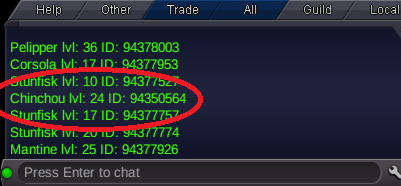
-
Noname1111 joined the community
-
Amadori joined the community
-
Drp joined the community
-
Ningrat joined the community
-
Eraszoo joined the community
-
Talulahbear44 joined the community
-
D4nteee joined the community
Yesterday
-
Ghost094 joined the community
-
Hello Staff, I need assistance with evolving my Haunter into Gengar through a trade evolution. In-game name: Wissam407 Server: Gold Pokemon ID : 21460169 I don't feel comfortable trading my Pokémon with random players, so I would really appreciate staff assistance. Please let me know when a staff member is available. Thank you for your help!
-
up
-
Hi there! My apologies for the late response, I can see this trade went through. As no further support is required I'll go ahead and lock this thread. Have a wonderful day ahead! Kind regards, Brambleghast
-
Bump
-
-
Hello Staff, I'm playing on the Silver server and I need help with a serious issue that happened during the Darkrai quest. When I entered the Dark Realm, my game suddenly disconnected/crashed. After logging back into the game, I noticed that almost all my inventory items had disappeared. I lost many items, including: - TMs - Potions and Revives - Repels - Consumable items - Other miscellaneous items My Poké Balls and some important key items are still in my inventory, but almost everything else is missing. I went to the Necropolis Museum and talked to the Director, hoping to recover my items, but nothing happened. I believe this is a bug related to entering the Dark Realm and disconnecting during the Darkrai quest. Could you please check my account and help me recover the missing items? I spent a lot of time collecting these items, so I would really appreciate your help. Server: Silver Character: Tage94 Thank you for your time and assistance!
-
Hi there, @Creamcracker ! My apologies for the late response. To see which forms you can change Darkrai too, you will need to visit Necropolis and talk to Spirit-Weaver Ariadne outside Alucard's Mansion. She'll offer the forms that are available to your account. If your desired form is not available for selection it is sadly not possible to change the form of your Darkrai at the moment. I understand this isn't the news you wanted to hear, and I apologize for any inconvenience caused. Have a great rest of your day. I'll lock this thread as completed as no further support is required. Feel free to reach out if you need anything else. Kind regards, Brambleghast
-
Hi there, @Phucnguyen2004 ! I'm sorry for the late response. A membership won't necessarily make Gible easier to find, but it does give you access to membership-exclusive zones where you can hunt it. That may be preferable, depending on which other Pokemon spawn in the same locations. My advice is to check each area that has Gible and that you can access, and decide which you like the most. If an area is listed in the Pokedex entry in pink, it requires a membership to find that Pokemon. If you don't have the Pokédex entry for Gible yet I recommend asking other players where it can be hunted. You can use the in-game All or Help channels to ask, if that would be helpful. Beyond this, there are no tips for finding Pokémon other than making sure you're in the right zone, and that you're searching the correct way for that Pokemon: on land if it's a land encounter, or on water if it's a water encounter. Do note that some of the rarer encounters can take a while to find. I'll lock this thread as completed as I believe no further support is required for this topic, feel free to reach out if you have any other questions. Good luck with the Gible hunt! Kind regards, Brambleghast
-
Hi there, Baunsgaard! Thank you for explaining what happened. I'd like to help you get to Dreadtown. The red candies you have left are the healing kind, not the pass candy the gatekeepers ask for. Murky Town gives out 10 pass candies in total, 5 for each town, so there should still be 5 left for you to find. My advice for you would be to speak to every NPC in Murky Town and win a battle against the NPCs that challenge you. This should give you the remaining candies you need to enter Dreadtown. Thanks for reaching out, and good luck completing your quest. Feel free to reach out if you need anything else. Kind regards, Brambleghast
-
-
bump
-
You want peace? Join us!
-
Bump. Sorry for the tag @Brambleghast . Is there any update?
-
Welcome back! May the RNG-gods be upon you with your hunting :3 happy fennekin noises ^-^
Last week
-
bump
-
Agreeing on the fact that the game is losing some players and barely new players coming (majority is alt accounts). Something needs to change. Maybe just release a Part of Astrella idk

-
Hello all, I hate to say it, but the player base is declining in this game. This Halloween event had a lot less players playing this year verus the past 2 years. Last year, during peak hours, the silver server had 800-1100 players playing. This year it was about 400-750. Maybe 800 in the beginning. The ursaluna-bloodmoons WQ's had only 600-700 players playing....Halloween is probably the biggest event for this game, so this certainly depicted a clear drop in the player base, and we can all see/feel it. I am not writing to this bully the staff. I want to start this this topic so that we can all write suggestions that help 1) attract more players, and 2) retain the new players. We want a larger player base so that 1) the game feels more active 2) pvp queue does not feel empty 3) so the market has consistent buyers and sellers 4) every other reason you can think of... Not all of our ideas need to be like removing Youngster Joey and his Ratatta army (which was a great removal from this game). Small improvements can go a long way. I will not comment on advertising or how the staff handles acquiring new players. This discussion should be more focused on the NEW PLAYER EXPERIENCE (their first 100 hours). Let's discuss what we have heard/read from others' feedback: 1) Players cannot fly to each pokecenter. Yes- we have all heard it before. And we all know the traditional response- "Well it should feel more like an RPG...blah blah blah". To that, I say: well most modern RPG's have much better quality so that players enjoy roaming the map. While the currnet PRO maps/areas are not necessarily "eye-sores", but there really is not much to enjoy while running/biking around. While adding FLY to this game would make it easier for the New Player's First 100 hours, it would clearly debunk the current transportation systems. So, I will agree that FLY should not be added, but this game need to make travel easier for the new players. - MY SUGGESTIONS to help with the absence of FLY 1) Give a handful of escape ropes to new players 2) Make escape ropes purchasable from an NPC just before entering the caves or areas that require alot of travel before the next pokecenter. 3) Temporarily allow players to use the transportation systems in each region: if a player traveled to the pokcenter once, then they can fast travel there. Then, after E4 completion, make them all locked until the proper quests are complete. 4) Share your ideas!!! :) 2) PvP is too late in the game PvP is a highly desired aspect of this game, and currently a player needs 6 lvl 100 mon to compete. This is certainly a grind to assemble atleast one team to compete. And with that begin said, it is important to note that most successful PvP players have a LARGE amount of Lvl 100s. -MY SUGGESTIONS to help with PVP accessibility 1) create a NPC in the game to lend lvl 100s (with low to medium IV's) to players for a price (pokedollars, pve coins, or pvp coins). Legendaries cannot be provided by this NPC. 2) Improve EV training- always allow 100% of pokemon in the party to receive EV's once a pokeon is defeated in the EV training area. I AM NOT SAYING TO ALLOW EXP SHARE 100% of the time in all areas. Only allow the EV training to occur in the EV TRAINING AREAS ONLY. 3) share your ideas!!! :) 3) PvE chests a player already wrote this up on "Suggestions". I recommend all players read, and comment there to show their support 4) We want to hear from you: what can staff do in-game to improve the new player experience If the game can be appealing and enjoyable for the first 100 hours, then a snowball effect can occur: more and more players will join and continue playing if we improve/modify some of these roadblocks that are slowing players down from progressing.