New Trade Zone
Trade Zone is now live
Use the new Trade Zone for auctions and instant-price trades so Pokemon and item offers are easy to find.
All Activity
Past hour
-
Nobiza joined the community
-
Darkvish95 joined the community
-
Hi there, Sissu! I'm truly sorry for such a late response. I have forwarded this to the relevant team, thank you for bringing it to attention. We'll try to keep you updated with any progress made on resolving this issue. Have a great day ahead! Kind regards, Brambleghast
-
Hi Pappadolqq! I'm glad to hear your issue is resolved. Feel free to reach out if you need anything else. I'll lock this thread as completed as no further input is required. Have a great day ahead! Kind regards, Brambleghast
Today
-
Hi Aergia! Thanks for the report, did you manage to fix your issue? In any case, it would be nice to see patcherError.txt, if you could upload that here so I can forward it to the appropriate team, that would be amazing! Have a great day ahead. Kind regards, Brambleghast
-
Hi there, Parshansingh! I'm sorry for the late response and any inconvenience caused as a result of this. This is likely not a bug, is it possible that you did not check all the potential spots? I have attached an image to help you narrow it down. Let me know if this helps! Kind regards, Brambleghast
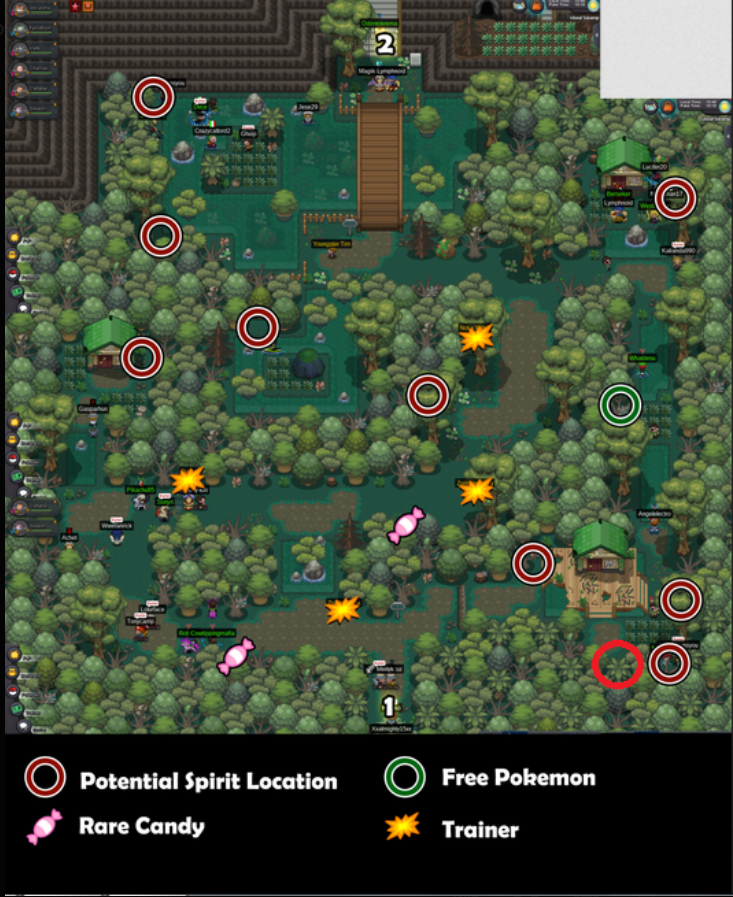
-
IM messaging you in some time be online
-
Hi there, Lh44! Thank you for reaching out, I'm glad your issue has been resolved! I'll go ahead and lock this thread as completed. Feel free to reach out if you need anything else. Kind regards, Brambleghast
-
Hi Thawnder! I'll lock this thread as completed. Feel free to reach out if you have any other concerns. Kind regards, Brambleghast
-
Hi there! Thank you for the screenshot. Unfortunately I can't tell what's going wrong from it and your message alone, so I don't have enough context to help yet. From what I can see, this appears to be part of the Darkrai quest. Is that correct? If so, did you bring a Pokemon with the move Foresight? Parts of this quest need one to reveal the hidden Pokémon, which I am fairly confident is the issue at hand here. Please let me know if you still require support, or if you managed to resolve the problem on your own. My apologies for the late response. Kind regards, Brambleghast
-
Regulus08 joined the community
-
Hi HunterKing9, Thanks for reaching out, and I’m sorry you didn’t get the Clone starter after putting the effort into the quest. I believe this was not a bug. During the Dark World quest, you need to avoid losing (having all your Pokémon defeated) 5 times. If you lose 5 times, you’ll receive the regular version of your chosen starter from Oak instead of the Clone, and you won’t need to battle him. I will go ahead and lock this thread as no further input is required, have a great rest of your day! Kind regards, Brambleghast
-
Hi there! It appears your issue is resolved, so I'll go ahead and lock this thread as completed. Good luck! Kind regards, Brambleghast
-
Hi Snorlaxnapz My apologies for the late response, and thank you for the detail on your device. Your specs should be able to handle PRO comfortably, so this is most likely a settings or install problem. Please try the following in order: Cap your FPS and turn off VSync. If it still freezes, turn off weather and dynamic lighting in the settings. Switch display mode. Try windowed mode instead of fullscreen, or toggle between them. Update your drivers. Update your graphics drivers and the latest, if necessary. The reason it looks so dark in-game is because of the location you are in and the current time of day. Disabling the settings mentioned above should solve this issue immediately, and hopefully the other suggestions will resolve any stuttering or freezes. Let us know if this helps! kind regards, Brambleghast
-
Hi, 1enough! My apologies for the late response. Cleaning up inactive officers is a reasonable thing to want to do, and I'd like to help you do it. As per the Guilds section of the PRO Wiki, Guild Masters and Officers can expel any guild member; the expulsory command to do so is /gkick username. This should work on anyone, including officers. Simply replace username with the officer's exact in-game name. This should work even if the Officer in question is offline. Demotions, on the other hand will require the player to be online at the time of demotion. I hope this information helps! Feel free to open a new thread if you need any support with anything else. I'll lock this thread as no further input is required. Kind regards, Brambleghast
-
Wewe14228 joined the community
-
Hey Maxzer0! I apologize for the late response once again. As mentioned above, Detective Basile appears in Ghoul Swamp in one of three possible areas, not only the one by the house in the bottom right. It's worth checking the other areas too. As I am aware that you have already passed this section of the quest I will lock this thread as completed. No further support is required for this section. Feel free to open another thread if you need anything else. Kind regards, Brambleghast
-
Nomiiss27 joined the community
-
Hello Maxzer0! I apologize for the late response, I understand this section is hard to see, especially on a small screen, and I'd like to help you get past it if this is still relevant to you. Here are some tips that could help with visibility: Play in full screen mode on the largest window size supported by your device Turn off any "blue-light" or "night-mode" filters that may currently be active If you're on a mobile device with a small screen, it may be worth switching to an alternative device with a larger screen if one is available I have also attached some images of Mismagius looking in each direction to serve as a reference point while you navigate through the room. Hopefully this should be enough to get you through it. Kind regards, Brambleghast


-
+1
-
Hi Carllen! As Norex mentioned, this issue is being looked into and should be resolved in due time. Thanks for reaching out. I'll lock this thread as no further support is required. Have a great day ahead! Kind Regards, Brambleghast
-
+1
-
Romazyx joined the community
Yesterday
-
+1
-
Neckmeattt joined the community
-
Hi! Could a staff member please help me trade-evolve my Haunter into Gengar and my Kadabra into Alakazam on the Silver server? I'd really appreciate it. Thank you!
-
Beenyweeny joined the community
-
bump!
-
Redmatteo joined the community
-
I'm from the Silver server, and I want to know how the Mega Stone service works
-
Cndruby joined the community
-
+1
-
bump
-
-
what about a consolation prize. basically we are saying if you have 10k upwards IV points submitted you land on the leaderboard. There are currently groups of people that hit 23k and dont get any access while a group with 500-1000 points more are in. if there would be something in place that gives you 1. a small consolation prize for putting in the work but not qualifying like event coins and 2. idk if this can be implemented easily but, you could give each player that was part of a 20k+ group a 500 point headstart if they decide to attempt it the week after. if the same group of 4 attempts it again they will have a 2000 point headstart giving them a better chance to qualify while still requiring them to grind. if the group splits up into other groups they will still have their own portion of the headstart.