




All Activity
- Past hour
-
CLOSED!!! CLOSED!!! CLOSED!!! CONGRATULATIONS TO OUR WINNER!!! @Kurosanchi winning bid price 325k for Chimeco!!! @San94 winning bid price 550k for Pawniard!!! Thank you very much to those who participated in this Almost Godly Auction!!! To Our Winners, kindly contact me in-game for the transactions. Thank you very much and once again, CONGRATULATIONS TO OUR AUCTION WINNER! see you in the next auction!
-
Sold to Redevill354 for 500k
-
📌 In-Game Name: Psyphonx 📌 Age:23 📌 Country:Australia 📌 Screenshot of Your Pokémon ID: 📌 What you love to do in PRO: We’ll review and respond with next steps! I enjoy grinding pokemon and want to enjoy the experience
-
Bump.
-
Matii78 joined the community
-
Hello! I'm sorry for the inconvenience. The Legendary Pokémon should respawn if you leave the room and then enter it again. Please note that it will respawn with the same Nature and IVs it had the first time. Let me know if you need anything else. Kind regards. Hallowglow.
- Today
Mykael123 joined the communityyes its still openStart: 100K End Point: 48hours after 1st bid Insta Price: N/A Minimum Raise: 50K Accepted Payments: Pokedollars, CC (400K), RR (700K), RC (5K)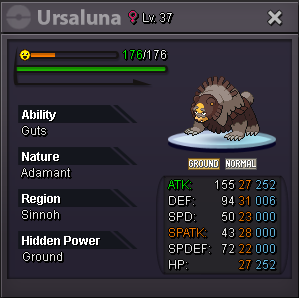 Narongrit09 joined the communityHi i wtb Serperior hp fire timid spd 28+ other iv 20+ Pay well Pm poke + price TyShadowxxiii joined the communityHi, I was doing the Terrakion quest. When I reached the part where I had to catch the Pokémon, I got disconnected. After logging back in, Terrakion is gone, and I can’t continue the quest. Could you please help me restore the quest or tell me how to continue? Thank you.NotedstartS.O - 50k Min bid 50k Auction ends 24 hrs after the 1st offer Important Reminders - This is a SILVER Server auction. You may bid from any server but you must transfer to SILVER Server upon winning the auction. - If you intend to purchase with an alternate account or from other server, please specify the account name and/or server name alongside your bid. - 15 minutes rule is applied. (If a bid is received in the final 15 minutes of the auction, the end point will be delayed by 15 minutes from that bid, and will be delayed by 15 minutes for each new bid thereafter, until the current offer has been held for a full 15 minutes) - Please check the Trade Rules and Auction Rules if you are new to trading in PRO. Again, thank you for all the support. To all bidders and viewers, Enjoy the Auction,
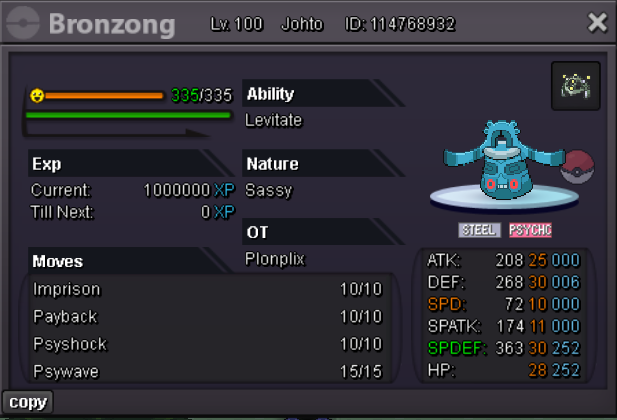 IGN: Bluegames911 Timezone: GMT +244bora joined the communityupJohan3105 joined the communityAuction Details: Start Price: 200k End Point: 48 hours [ time starts when the bid is placed] Insta Price: N/A Minimum Raise: 100k Accepted Payments: Pokedollars, Coin Capsules (x1 Coin Capsule = 480k), IV Reroll Tickets (x1 IV Reroll Ticket = 700k) Important Reminders: If a bid is received in the final 15 minutes of the auction, the end point will be delayed by 15 minutes from that bid, and will be delayed by 15 minutes for each new bid thereafter, until the current offer has been held for a full 15 minutes. Happy Bidding!
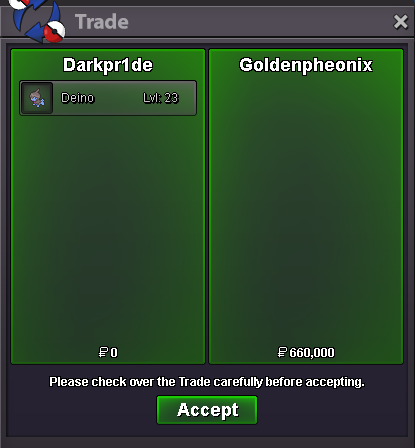
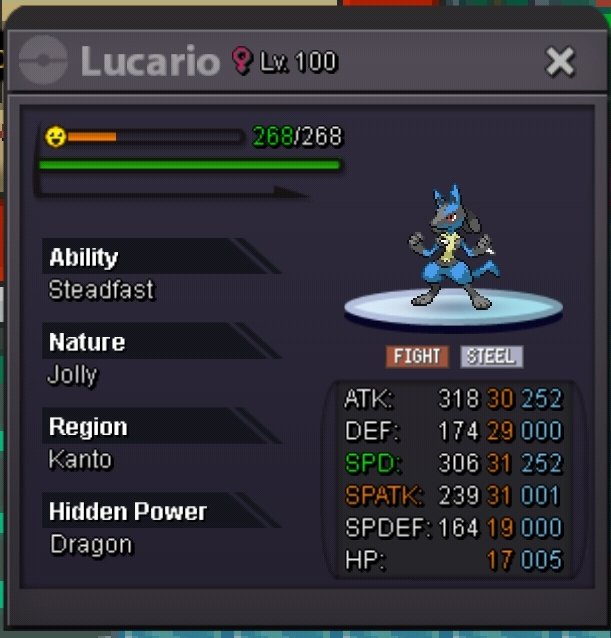 I’ll be online in about 8-9hrsfinal bumpBumpKkarnkubp joined the communityAlkepone joined the community@Goldenpheonix is the WINNER!!!
 --- 31 hours left


.thumb.gif.5ca2bb8ab27bad84c457676cd94efcb7.gif)




















Account
Navigation
Search
Configure browser push notifications
Chrome (Android)
- Tap the lock icon next to the address bar.
- Tap Permissions → Notifications.
- Adjust your preference.
Chrome (Desktop)
- Click the padlock icon in the address bar.
- Select Site settings.
- Find Notifications and adjust your preference.
Safari (iOS 16.4+)
- Ensure the site is installed via Add to Home Screen.
- Open Settings App → Notifications.
- Find your app name and adjust your preference.
Safari (macOS)
- Go to Safari → Preferences.
- Click the Websites tab.
- Select Notifications in the sidebar.
- Find this website and adjust your preference.
Edge (Android)
- Tap the lock icon next to the address bar.
- Tap Permissions.
- Find Notifications and adjust your preference.
Edge (Desktop)
- Click the padlock icon in the address bar.
- Click Permissions for this site.
- Find Notifications and adjust your preference.
Firefox (Android)
- Go to Settings → Site permissions.
- Tap Notifications.
- Find this site in the list and adjust your preference.
Firefox (Desktop)
- Open Firefox Settings.
- Search for Notifications.
- Find this site in the list and adjust your preference.