New Trade Zone
Trade Zone is now live
Use the new Trade Zone for auctions and instant-price trades so Pokemon and item offers are easy to find.
Leaderboard
-
Bujari
Registered User6Points114Posts -
Pokedigimonjhon
Registered User6Points72Posts -
Grayzhang
Registered User6Points275Posts -
Twistie
Registered User6Points187Posts




Popular Content
Showing content with the highest reputation on 05/19/26 in Posts
-
2 points
-
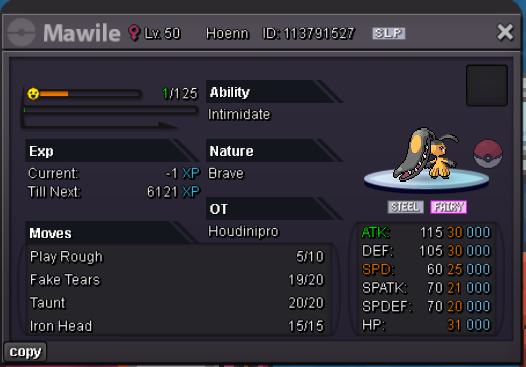
1 pointS.O : 500k MIN : 200K NO INSTA 48 HOUR LEFT ( AFTER FIRST BID ) ( CC = 480K, RR IV = 680K ) Last 15minutes rule applies as always. IGN: Houdinipro
 1 point
 -
1 point
-
360k on second Clodsire1 point
-
1 point
-
1 point
-
1 point
-
1 point
-
1 point
-
1 point
-
1 point
-
1 point
-
1 point
-
1 point
-
1 pointHi there! Just letting you know I've moved your thread to the appropriate Sub-Forum which is "Shiny and special Pokemon - Gold" Warmest regards, Auroraveil1 point
-
1 point
-
1 point
-
1 point
-
1 point
-
1 point
-
1 point
-
1 point
-
1 point
-
1 point
-
1 point
-
1 point
-
1 point
-
1 point
-
1 point
-
1 point
-
1 point
-
1 point
-
1 point
-
1 pointHello @Maomaocong After investigating the case, we will be voiding @Dangerboy001's bid. @Royalboss as you have bidded 3.6m to this the Corviknight. do you want to mantain your offer and extend the auction for 24 extra hours? If yes, i will reply with the start end ending point of the new auction about the Corviknight, if not, we will void the auction about the Corviknight, and @Maomaocong would be free to sell it any other times he wish. best of luck, Glittterwing1 point
-
1 point
-
1 point
-
1 point
-
1 point
-
1 point
-
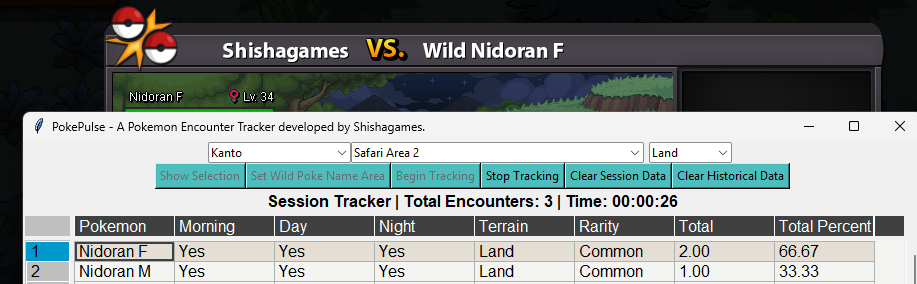
Thank you for bringing this bug to my attention. This was due to the parsing not accounting for the fact that Nidoran is an edge case where it's name is gendered. I have made changes and tested it myself (shown in screenshot) so let me know if it works for you as well. A bug fix has been applied and the app has been updated. You will need to redownload and extract the new files into the same location as your current PokePulse location. For more direct instructions on how to update, please check the How to Update section of the main post. If you run into any more bugs please let me know and I will address them as quickly as I can!
 1 point
 -
1 point
-
1 pointHey @Intgmng, Your request has been reviewed and the purchased Togekiss mounts have been reverted for you. Please note for future purchases that items and mounts which are tradable will display the "Tradable" tag in their description. If an item does not have this tag, it means it cannot be traded to other players. Please make sure to double-check item tags before purchasing event items in the future. Since the issue has now been resolved, I will proceed with locking this thread. If you have any other questions or concerns in the future, please feel free to create a new thread. Have a great day and enjoy the rest of the event! Cheers, Beacon1 point
-
1 point
-
1 point
-
1 point
-
1 point
-
1 point
-
1 point
-
1 point
-