




New Trade Zone
Trade Zone is now live
Use the new Trade Zone for auctions and instant-price trades so Pokemon and item offers are easy to find.

Gdarch
Registered User
-
Joined
-
Last visited
Everything posted by Gdarch
-
Start
-
-
I sent a friend request to you on discord.
-
I buy staryu analytic 31 31
-
Auction won by Pandattack.
-
20 min left
-
1 hour left
-
2 hours left
-
3 hours left
-
Auction ends in less than 5 hours
-
Bump
-
Ok, so auction will end on Monday, March 11th at 12:42 pm.
-
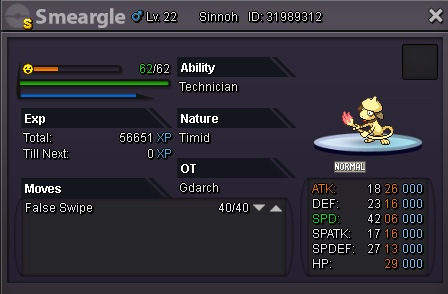
Hello, I want to sell my shiny smeargle. Start offer : 2m Minimum bid : 200k Insta : 6m Auction ends : March 11th at 12:42 pm gmt+1 I don't accept items for trade, ONLY CASH. I reserve the right to cancel the auction if offer doesn’t satisfy my expectations. You can pm in game. IGN : GDarch. Current offer : 3m5 by Pandattack
-
Bump
-
Hello,I offer 350k for gallade
-
I’m looking for a 20+ beldum or metagross adamant. I pay well if the IVs worth it. Thank you.
-
Hello, is this metagross still available ?
-
Hello, is alomomola still available ? I’d like to offer 400k
-
Thank you. Have a nice day too.
-
Hello, I don’t know if this issue has already been reported but when tapping the bot command ^guildladder or ^ladder, the results are not the updated one so, I would like to know if there was an other way to know the rankings I’m asking for. Looking forwards for your answers. Thank you.
-
Ok deal. I will sell it to you when server is back.
-
Foongus is sold.
-
Sold to riyubas for 14m. Waiting for the server to be online to trade eevee
-
1 hour left !!!
-
Auction ends in less than 3hours