




New Trade Zone
Trade Zone is now live
Use the new Trade Zone for auctions and instant-price trades so Pokemon and item offers are easy to find.
.png.90f9f6faa801d59e7fe2efa466f809a3.png)
Dimitrisarv
Registered User
-
Joined
-
Last visited
Everything posted by Dimitrisarv
-
Bump
-
Is there a screenshot of Giak’s offer?
-
Bump
-
Bump even lower prices ^^
-
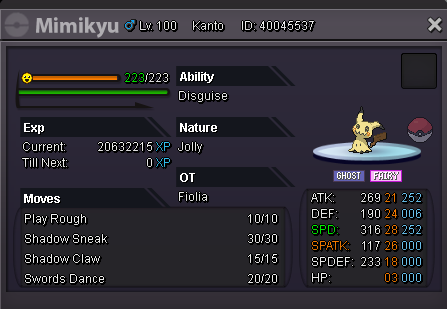
Welcome Accepted Payments: Pokedollars Coin Capsule = 400k Reroll Ticket = 720k Nature Reroll = 350k Rare Candy = 7k Contact: IGN: Dimitrisarv Discord: Dimitrisarv#4138 Note: Trades take place in gold server, buyers from silver must transfer themselves. TRAINED UNTRAINED SHINY - EVENT SOLD


.png.945cabcdb0dad4508cd6029f9853cfd1.png)
.png.1c5099f52dd36b6d148668f7a967fa6c.png)
.png.cbac5d0c0bbbb0fe0a9b9cbb4f8041a9.png)
.png.abfc4065f704ce20c0cb52cd29bf40cf.png)
.png.4ed9d67f1c31603c6282ad1bad60b213.png)
.png.a440e4eaafc340d4b63159d898ec8231.png)
.png.44d1dd8991a3d43b6b98edd4022819ec.png)
.png.8740b73cec07f3decd063c6af5b0a3e6.png)
.png.5c95e5f62d0a13d22097b29b0946aeea.png)
.png.da0b70c0e0e906917baf5d9e6fbbf9cf.png)
.png.d8f6f3db8e7dc6124fb09bc830a32f95.png)
.png.991a484a8ea43422dd900850d3702846.png)
.png.5ba0f92ed18313119e98900cf5943dd5.png)
.png.d2372ae8caba0e2223aeddf6a1088579.png)
.png.e6888b324cf1600d2d3a9623f8eb986b.png)
.png.c11da0772f992136c7c5abddab8d46b5.png)
.png.d917f39f66d9f6c9386fb964b5732439.png)
.png.21089e75add5050a3e5ababa53a45511.png)
.png.242750e949d3eafff211729d66e6a7fb.png)
.png.0550ebbabbac4bc11888a0e545693acd.png)
.png.05eb7b64b495da7243920d4ece4271f1.png)
.png.78b80544264dd50f07fbf5e8103c731c.png)
.png.cd5c35659d226fcff798a875877f991d.png)
.png.da095c2253a77d34e7a7846ee8bfda4d.png)
.png.72f7a52239bb36a08ae2480c483ec22d.png)
_LI.jpg.c53597e3a486808d5dc27670c64f4ee3.jpg)
.png.fc091c36f79bd633220a5e4b07999b55.png)
.png.5dc3874828c1fbff6ebd9ae1af84b687.png)
_LI.jpg.817a8404456c1cfd37259735495b4076.jpg)
.png.44a4a8cca340c700d250ccfe9936058f.png)
.png.8c96b3c45468b34c3905cefe9eccd0eb.png)
.png.827097a362f75f489b8ddb6374c9c3f1.png)
.png.b6fa34608b9b7e6b6cd1c8de06d62108.png)
.png.0d43e13342a8b9b458bc45c98cb3b5ab.png)
.png.a2417d9a9faab994ebd13df8759e8d6d.png)
.png.c45812c6abb591280680861f36336bd7.png)
.png.a25318c8e75b3d1aad32feff6aae317a.png)
.png.b8bf43ce2adb2317f71afd65f0824513.png)
.png.3a52310a1460332fce9be98929f5d76b.png)
.png.82536305e3bcb98e31c8a3103620bd78.png)
-
Bump
-
Bump
-
As title says, I'm looking for an epic sassy h.a. hp ice tangela or tangrowth, an epic 31 speed hp ice flash fire houndoom and a high speed protean hp fire or grass good stats (pref epic) greninja. Pay well. My discord: Dimitrisarv#4138
-
I won the magnezone auction. Please contact me to complete the trade. My discord: Dimitrisarv#4138
-
Although I started playing in August and I don't have much experience from similar events, I will say that in general I liked it a lot. Well scripted story, great event forms, a respectful amount of grind. I'm not very sure about the effort / reward ratio, as I'm not a fan of keldeo as a pokemon and I also found the last part of the quest where I had to find the switches completely frustrating. It must have taken me at least 4-5 hours for this part only, and at first there was noone there to tell me that switches are different for everyone. I literally clicked every pixel in my screen. Thank you for the nice content, keep it up 🙂 Also much love for WhiteBaron!
-
Start magnezone
-
Nice shop, definitely recommend!
-
-
Seems like you have understanding issues since I already showed you that this sentence refers to individual server subforum sales. It refers to buyers from another server, when you are selling in your own server subforum.
-
You actually copied and pasted only the part that you wanted to use. When a user posts a sale thread, it is in one of our two individual server subforums. Buyers from all servers should comply with that and will have the responsibility to transfer server in case they are from different servers, but still offered and became the rightful winner, unless: Seller announced the Pokemon sale/auction on one server, but transferred to a different server before they complete their part of the deal, regardless the reason. There is an explicit written agreement between buyer and seller that the seller will transfer to honour the trade. The original post clearly states, that responsibility of transferring lies with the seller. This info sums up the rules when selling to one of the individual server subforums. Selling in cross - server section means you are willing to deliver to the buyers server, or else there would be no need for this cross-server subforum. I could simply buy from silver subforum whatever I like and still transfer myself.
-
How is this a cross-server auction when interested buyers from gold have to transfer themselves to complete the trade? @Hawluchaa
-
-
-
-
-
I am looking for an epic hp ice timid jolteon 29+ speed, 31 pref. Paying accordingly. I found what im looking for, can be closed.
-
Houndoom c.o. 350k by untalk ingame
.png.d3766a86f9a24c188f71cc9f55e8f455.png) Volcarona auction complete.
Volcarona auction complete..png.9b8dde869065bdd1f4004e2a1490f0e2.png) Houndoom started at 300k ingame by 8man96, ends 29/12/2020 at 14:08:47 GMT+2.
Houndoom started at 300k ingame by 8man96, ends 29/12/2020 at 14:08:47 GMT+2..png.b08b09fbfaab5c3dd5ca083c99fc6489.png)
.thumb.png.9a5f7b3e79b8d9aac4a54bdb73d56e76.png)
.png.42a0c6f227985dc8ee150288a034c1ea.png)