




New Trade Zone
Trade Zone is now live
Use the new Trade Zone for auctions and instant-price trades so Pokemon and item offers are easy to find.

Onix011
Registered User
-
Joined
-
Last visited
-
-
I wanna buy what is your discord or in game name ?
-
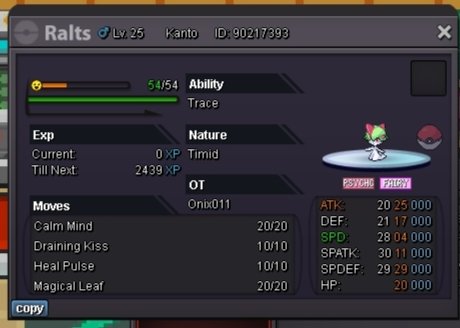
Start with : 1m min bid raise:100k insta : 3m auction ends after the first bid in 24 hours payment pokedollars and cc @ 400k
-
1.7m (money on silver)
-
@jarimin22 You can bid for all pokemon also and can bid for a single pokemon also
-
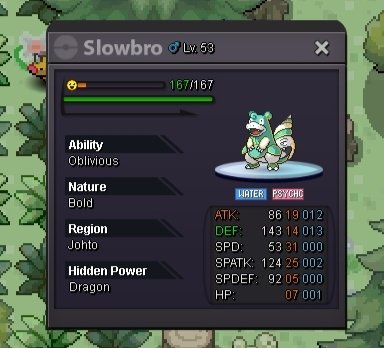
Bidding start with the price :100k min increase bid : 50k The auction will end in 24 hours after the first bid. (For every pokemon. ) 24 hour time will be count after the first bid payment pokedollars ,cc =400k



-
I want to buy magic carpet mount in 1.6m Anyone selling pls msg here or in game : Onix011
-
Bidding start with the price :100k min increase bid : 50k The auction will end in 24 hours after the first bid. 24 hour time will be count after the first bid payment pokedollars ,cc =400k

-
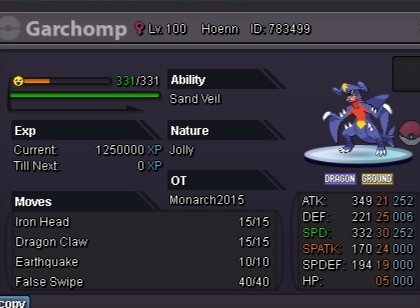
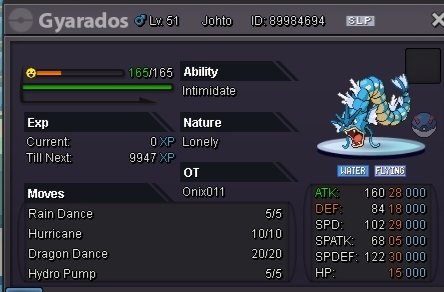
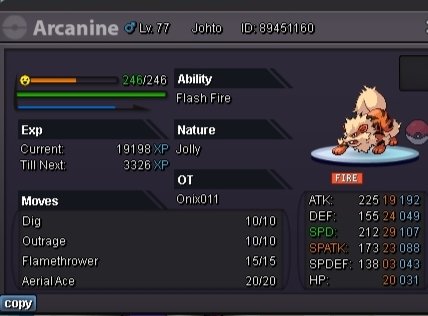
Min bid start :100k for garchomp For Gyarados and Arcanine start with : 50k min increase: 50k Ends in 24 hours after the first bid
-
Sold
-
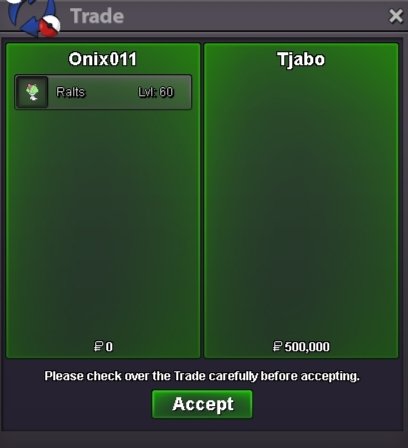
Winner is Tjabo Bid start with : 100k Min bid : 50k Auction will end in 3 hours after the first bid Payment in cc : 400k or poke dollars

-
