




New Trade Zone
Trade Zone is now live
Use the new Trade Zone for auctions and instant-price trades so Pokemon and item offers are easy to find.

Zarachi
Suspended
-
Joined
-
Last visited
Everything posted by Zarachi
-
Hello @Phoenix09 Apologies for the issue you experienced. Unfortunately we can not restore any Pokemon that were lost due to a crash, Crashes are unexpected and cant be predicted sadly. You will have to keep grinding to get another form! I wish you a Good Luck with your hunt! I know it isnt the answer you were waiting for and I apologize for the issue you had to deal with. I'll now proceed to lock this thread but dont hesitate to create another one if you have questions, facing issues... Regards and take care! Zarachi
-
Hello, Hope your future journey goes well! As there is further questions in this post and it become inactive. I'll now proceed to lock this thread but dont hesitate to create another one if you have further questions, issues... Regards, Zarachi
-
Hello, As there is no further questions, I'll now proceed to lock this thread. Wish you a Good Luck for your future Lake Trio catch. Dont hesitate to create another thread of you have any questions, issues.. Regards, Zarachi
-
Hello @Ohyeahtisoyko12 As Norex stated, Kaguya boss during Christmas event is a One-time boss. Once you done with it and get the reward, you will not be able to re-fight him again. Hope this answer help you and dont hesitate if you have any further questions! Regards, Zarachi
-
Good bye Raika! Wish you a good luck for In-Real life! Hope to see you again when you will be free again! Farewell!
-
Hello @Mi4k1ll Apologize for the experience you are confronting. Transfer from Dashboard are actually down since 4 days as announced in the official PRO discord: In preparation for a fix, we will be disabling server transfers It may take a few days before they are available again. No ETA when it will be fixed but I will comeback to you when it's possible to transfer again! Kinds regards, Zarachi
-
Hello! As there is no more questions and your issue got resolved, I'll now proceed to lock your thread, feel free to create new one if you have any questions/issues etc... Wish you a good day! Regards, Zarachi
-
Hello, As your issue is resolved and there is no more questions, I'll now lock this thread, dont hesitate to create a new thread if you have any further questions, requests... Kinds regards, Zarachi
-
Hello @Ngurs900 Sorry to hear about your issue. DEVs team are aware about this bug and it will require a new client. It will be done as soon as possible. While I'm on it, I recommend you to disable controller option in your settings. Kinds regards, Zarachi
-
Hello @Marley47 Apologies for the issue you are dealing with. I got confirmed by your team that if you release your Heatran and try to re-catch it in the area where he spawn, you will be able to get a different gender but same IV/Nature.. Wish you a Good Luck for your Heatran! If you have any further question, dont hesitate. Regards, Zarachi
-
Hello. Apologies for the answer delay. Look like you mistake the membership, You bought a membership in the 24th of November and this one ended in the 9th December. I'll now proceed to lock this thread, dont hesitate to create another one if you have any further questions, issues. Kinds regards, Zarachi
-
Hey. As there is no answer to this thread since, I'll now proceed to lock this thread. Dont hesitate to create another one if you have any questions, problems. Regards, Zarachi
-
Hello @Gultann Nice to hear you found out about SS. Anne Ticket! You can found the Pecha Berry in one on the bin in the kitchen as explained there : Hidden Item. Middle trash-can bin in the kitchen. Can only be looted if there is none in the inventory, and can be looted multiple times. Let me know if you have any further question and Good luck for your story! Kinds Regards, Zarachi
-
Hello @Dantesgr24 You can access this cave entrance from Route 206, under the bike route secret entrance where I draw a circle. You can found more informations about the quest there Let me know if you have any further question, I will gladly answer them! Kinds regards, Zarachi
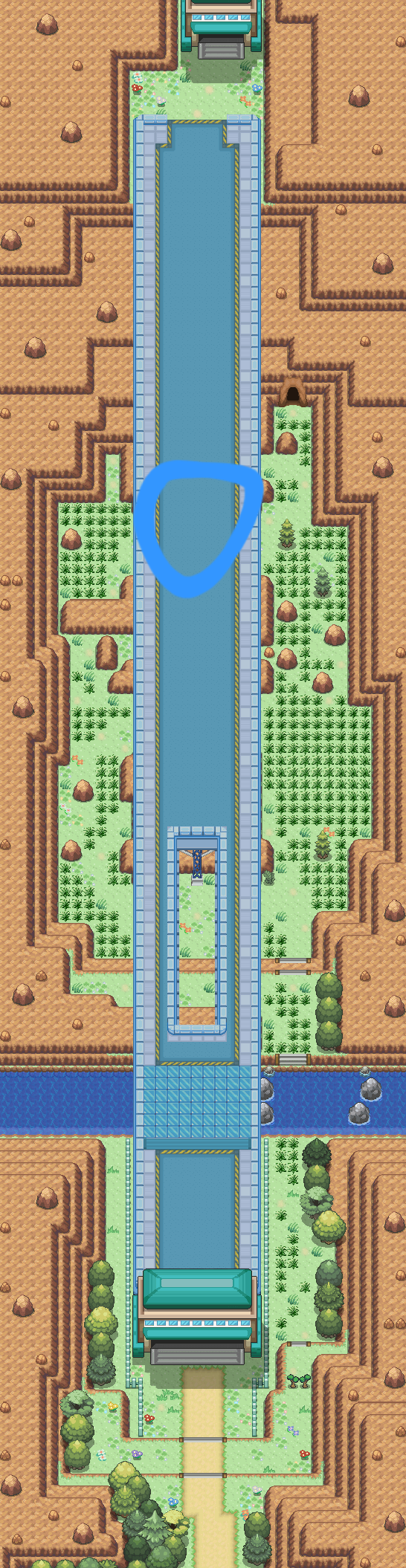
-
Hello @Gultann Apologies for the issue you are facing. Try to speak with Bills if he tell you "I have lost my research book somewhere in my lab here..." will prompt that book is still under his pillow. It's also possible that you already picked the SS. Anne Ticket and you can continue your story! Additionally, I recommend you to check this guide for your future journey! If the issue still persist and you cant access SS.Anne, you are free to reach me out for more help! Kind regards, Zarachi
-
Hello @Avatarlc Apologies for your struggle in this quest. From my personnal experience, I could recommend you Metagross or Rhyperior for this quest, they have +130 stats in attack and both can learn Rock Smash and Brick Break! For water experience I either recommend a Ludicolo or a Rotom Mow but you will require many tries but the grind will pay! You can check Bhimoso guide about mega quest there ! Wish you success in the quest! Let me know if you have any further questions, I will gladly answer them. Regards, Zarachi
-
Hello once again! Nice to hear that your issue is resolved! I recommend you to check the wiki page for your quest, here ! Wish you a Good Luck with your quest, if you have any further questions, feel free to tag me there, I will do my best to answer! Kind Regards, Zarachi
-
Hello @Vielskur Apologies for the issue you are dealing with. Have you already talked with Professor's Ray at Bell Tower Ecruteak City to trigger the quest? Waiting for an answer! Kind Regards, Zarachi
-
Hello once again. I myself have no informations on these kind of stuffs. I recommend you to watch announcement channel in official PRO discord or the Update-log for more informations about update in the upcoming future. Kind Regards, Zarachi
-
Hello @Mihut19 Apologies for the issue you confront. It's a known issue due to new PC rework. You will have to clean your box to 849, you can see your caught number via your trainer card. Wish you a Good Luck for your Keldeo catch! Regards, Zarachi
-
Hello there @Simee I'm afraid that we only offer to reverse an evolution in exceptional circumstances, like if a Pokemon is evolved by a 3rd party without permission of the owner. Unfortunately, we do not consider mistakes like this for de-evolution requests. As @Suzu1 stated, you will have to catch a new Ralts. I know this isn't the answer you was looking for and I am truly sorry for that. I'll lock this topic now. But dont hesitate to create a new thread if you have any questions, concerns or problems. Kinds regards, Zarachi
-
Hello! Nice to hear that your issue is resolved! Good Luck with your Zekrom catch. As the issue is resolved, I will now proceed to lock your thread. Dont hesitate to create a new thread if you have any questions, problems or concerns. Kind regards, Zarachi
-
Hello! I will now proceed to lock this thread as resolved! Dont hesitate to create a new thread if you have any others questions, problems or concerns. Regards, Zarachi
-
Welcome back to the game! @Ladylirriea Hope you enjoy the game and Good Luck with your journey, if you have any questions dont hesitate to ask!
-
Hello @Demenelizator Not a bug. The main effect of the move Take Heart is to give +1 sp.atk/sp.def and heal your status condition As explained here : Take Heart raises the user's Special Attack and Special Defense stats by one stage each, and heals any non-volatile status conditions the user may have. I hope it answer your question and wish you a amazing day/night! Kinds regards, Zarachi

