




New Trade Zone
Trade Zone is now live
Use the new Trade Zone for auctions and instant-price trades so Pokemon and item offers are easy to find.


Saruron
Registered User
-
Joined
-
Last visited
Everything posted by Saruron
-
start
-
Are you on now @Rinoc?
-
up
-
still no answer from the seller, please help us @trademods
-
+10k Donphan
-
up
-
hi are you interested in shiny Onix only or shiny Steelix as well? let me know 🙂
-
gg Aiberty 🙂 nice auction!
-
up
-
2.5m
-
same for me...
-
+50k each (all of them) 🙂 Good luck auctioning!
-
im online now @Rinoc msg me please! 🙂
-
400k Gl auctioning! 🙂
-
up
-
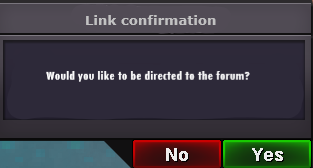
Hey everyone, my suggestion regarding the ingame links to forum auctions would be to add an additional confirmation window before you are directed to the forums. For me personally it happens a lot that I unintentionally click on forum links in the trade chat which can be a bit annoying and sometimes leads to a crash. This particularly happens when I play on my phone since clicks are less precise there. the suggested confirmation window could look like this: Furthermore it would be nice if there would be a possibility to decrease the size of forum links. This would avoid unintentionally clicking on them and would lessen the spam in trade chat. I don't know if that is technically possible. For example: https://pokemonrevolution.net/forum/forum/4-suggestions/ -> forums or link I would be interested in what you guys think about it! Let me know! 🙂 Sincerely, Saruron
-
yo i couldn't catch you ingame, let me know when you're available please.
-
1.2m 🙂
-
up
-
hi, can I start 2m? GL with the auction 🙂
-
Msg me for the trades, will be online today in the evening! Nice auction, thank you! 🙂
-
up
-
225k volc
-
hi wtb Noibat Timid Infiltrator 24/21 30k Msg me please. 🙂
-
up

