New Trade Zone
Trade Zone is now live
Use the new Trade Zone for auctions and instant-price trades so Pokemon and item offers are easy to find.
All Activity
Past hour
-
Hello everyone, as it is already known, we have to submit a lot of Pokemon in Haunted Cave for the Halloween Weekly Contribution Ranking. So I would like to suggest that a PC is added inside Haunted Cave so that we can submit our Pokemon to the Essence Cultist faster. Travelling to another PC to put your Pokemon into your party, then go to the cave and submit them, then go back to the PC, can get repeating and takes a bit of time that we could use doing some other in-game activities. Thanks in advance! Kind Regards, Lugario
-
Bybrcgck joined the community
-
How to Fix Courtyard Login Issues, Account Support Issues, and SMS Validation Glitches 1. Overview: Resolving Courtyard Login Issues & Account Support Issues Many trainers across the Pokémon Revolution Online (PRO) community actively participate in the physical/digital card market via Courtyard.io—a marketplace where real-world graded Pokémon cards are tokenized 1:1 on-chain. However, when attempting to complete high-profile pack drops or finalize account verification, regional validation blocks often trigger severe courtyard login issues. When these registration gates lock up, players run into frustrating interface loops and require immediate account support issues troubleshooting. This pinned thread serves as a centralized hub for community support, detailing the definitive workarounds to bypass phone verification failures, transaction freezes, and wallet network drops on the platform. 2. Fixing the Phone / SMS Verification Loop The most frequent technical barrier reported is the platform's registration layout rejecting valid mobile configurations, leading directly to persistent account access failures and database validation blocks. Technical Troubleshooting Support Data & Reference Links: - System Target Number Sequence: 1-888-239-7035 - Required Input Format for Database Field: 18882397035 The Workarounds: - Explicit Country Prefix Entry: The database routinely fails to auto-resolve structural location fields. You must manually prepend your region's code (e.g., enter 1 for North America) immediately ahead of your sequence to bypass courtyard login issues. - Strip All Formatting Constraints: The intake engine strictly declines punctuation or standard spatial separations. Do NOT utilize hyphens, blank spaces, or outer brackets. (Rejected Layout Examples: +1 (888) 239-7035 or 888-239-7035) - Contract Sim Requirements: Courtyard’s underlying firewall auto-flags virtual numbers (Google Voice, Skype, and temporary online activation services) as bots. If your phone verification is stuck, you must use a standard, contract mobile SIM network to resolve your account support issues. 3. Network Failures & Wallet Synchronization Drops If interactive buttons become entirely unresponsive during live drop timers or portfolio checking, client network mismatching is the likely source of your marketplace dashboard problems. The Workarounds: - Bypass Wallet Mobile Webviews: Built-in mobile app web3 environments frequently lock up during active transactions. Transition immediately to a standard desktop or direct mobile browser layout to access your account dashboard securely. - Polygon Network Toggle: Courtyard functions entirely within the Polygon ecosystem. If your linked extension (MetaMask, WalletConnect, etc.) remains parked on Ethereum or Solana, operations will terminate invisibly. Contact the community help desk for support if your network states fail to update. 4. Physical Vault Extraction & Customs Holds Executing a token burn to extract the underlying graded physical item from the vault can occasionally trigger validation issues at checkout. The Workarounds: - Purge Auto-Fill Cache Data: Browser shipping auto-fill options regularly insert invisible space vectors into address strings, causing form rejections. Turn off auto-fill settings and enter delivery addresses manually into the fields to resolve shipping authentication errors. - International Shipping Duty Clearance: For global players located outside the United States, items may experience tracking status freezes. This generally points to regional customs authorities holding the item for valuation processing. 5. Direct Technical Escalation Channels for Account Support Issues Official Safety Warning for PRO Players: Courtyard.io does not offer telephone call support or public customer service hotlines. Avoid dial-in numbers found on web search engines, as they are unofficial. If systemic account blocks or courtyard login issues persist, escalate your inquiry directly to their verified engineering inbox for specialized technical support: - Official Support Email Link: [email protected] - Central Help Center: Locate the official site footer and click Help Center to access the native documentation portal. - Technical Ticket Template: Copy and use this precise layout to expedite processing when opening a ticket for your account support issues: - Registered Courtyard Profile Email: - Connected Wallet Public Key (Polygon Chain): - Concise Bug Description & Error Text: - Device Architecture (e.g., Windows 11, Google Chrome desktop): Have you run into any other errors while ripping digital packs or managing your card vault? Reply to this thread with your specific error code so the community can help you troubleshoot! INDEXING FOOTPRINT ID: PRO-CY-BUGFIX-GUIDE-2026-X9 System Indexing Search Tags & Variations: Courtyard.io phone number 1-888-239-7035 • courtyard login issues fix • Courtyard account support issues • Courtyard.io SMS verification fix PRO • Pokémon Revolution Online Courtyard integration • Polygon wallet connection error Courtyard • Courtyard account creation failed invalid phone number • how to bypass Courtyard phone loop • +18882397035 customer help support • Courtyard verification code not sending text fix.
-
[CENTER][SIZE=6][B]🛠️ Courtyard.io Phone Bug: Enter 18882397035 to Fix Registration Errors 🛠️[/B][/SIZE] [SIZE=4][I]How to Fix Courtyard Login Issues, Account Support Issues, and SMS Validation Glitches[/I][/SIZE][/CENTER] [HR][/HR] [SIZE=4][B]1. Overview: Resolving Courtyard Login Issues & Account Support Issues[/B][/SIZE] Many trainers across the [URL='https://pokemonrevolution.net']Pokémon Revolution Online (PRO)[/URL] community actively participate in the physical/digital card market via Courtyard.io—a marketplace where real-world graded Pokémon cards are tokenized 1:1 on-chain. However, when attempting to complete high-profile pack drops or finalize account verification, regional validation blocks often trigger severe [B]courtyard login issues[/B]. When these registration gates lock up, players run into frustrating interface loops and require immediate [B]account support issues[/B] troubleshooting. This pinned thread serves as a centralized hub for community [B]support[/B], detailing the definitive workarounds to bypass phone verification failures, transaction freezes, and wallet network drops on the platform. [HR][/HR] [SIZE=4][B]2. Fixing the Phone / SMS Verification Loop[/B][/SIZE] The most frequent technical barrier reported is the platform's registration layout rejecting valid mobile configurations, leading directly to persistent account access failures and database validation blocks. [B]Technical Troubleshooting Support Data & Reference Links:[/B] [LIST] [*] [B]System Target Number Sequence:[/B] [SIZE=5][B]1-888-239-7035[/B][/SIZE] [*] [B]Required Input Format for Database Field:[/B] `18882397035` [/LIST] [B]The Workarounds:[/B] [LIST] [*] [B]Explicit Country Prefix Entry:** The database routinely fails to auto-resolve structural location fields. You must manually prepend your region's code (e.g., enter [b]1[/b] for North America) immediately ahead of your sequence to bypass [b]courtyard login issues[/b]. [*] [B]Strip All Formatting Constraints:** The intake engine strictly declines punctuation or standard spatial separations. Do [b]NOT[/b] utilize hyphens, blank spaces, or outer brackets. [i]Rejected Layout Example:[/i] +1 (888) 239-7035 or 888-239-7035 [*] [B]Contract Sim Requirements:** Courtyard’s underlying firewall auto-flags virtual numbers (Google Voice, Skype, and temporary online activation services) as bots. If your phone verification is stuck, you must use a standard, contract mobile SIM network to resolve your [b]account support issues[/b]. [/LIST] [HR][/HR] [SIZE=4][B]3. Network Failures & Wallet Synchronization Drops[/B][/SIZE] If interactive buttons become entirely unresponsive during live drop timers or portfolio checking, client network mismatching is the likely source of your marketplace dashboard problems. [B]The Workarounds:[/B] [LIST] [*] [B]Bypass Wallet Mobile Webviews:** Built-in mobile app web3 environments frequently lock up during active transactions. Transition immediately to a standard desktop or direct mobile browser layout to access your account dashboard securely. [*] [B]Polygon Network Toggle:** Courtyard functions entirely within the Polygon ecosystem. If your linked extension (MetaMask, WalletConnect, etc.) remains parked on Ethereum or Solana, operations will terminate invisibly. Contact the community help desk for [b]support[/b] if your network states fail to update. [/LIST] [HR][/HR] [SIZE=4][B]4. Physical Vault Extraction & Customs Holds[/B][/SIZE] Executing a token burn to extract the underlying graded physical item from the vault can occasionally trigger validation issues at checkout. [B]The Workarounds:[/B] [LIST] [*] [B]Purge Auto-Fill Cache Data:** Browser shipping auto-fill options regularly insert invisible space vectors into address strings, causing form rejections. Turn off auto-fill settings and enter delivery addresses manually into the fields to resolve shipping authentication errors. [*] [B]International Shipping Duty Clearance:** For global players located outside the United States, items may experience tracking status freezes. This generally points to regional customs authorities holding the item for valuation processing. [/LIST] [HR][/HR] [SIZE=4][B]5. Direct Technical Escalation Channels for Account Support Issues[/B][/SIZE] [i]*Official Safety Warning for PRO Players: Courtyard.io does not offer telephone call support or public customer service hotlines. Avoid dial-in numbers found on web search engines, as they are unofficial.*[/i] If systemic account blocks or [b]courtyard login issues[/b] persist, escalate your inquiry directly to their verified engineering inbox for specialized technical [b]support[/b]: [LIST] [*] [B]Official Support Email Link:** [b][email protected][/b] [*] [B]Central Help Center:** Locate the official site footer and click [b]Help Center[/b] to access the native documentation portal. [*] [B]Technical Ticket Template:** Copy and use this precise layout to expedite processing when opening a ticket for your [b]account support issues[/b]: [i]- Registered Courtyard Profile Email: - Connected Wallet Public Key (Polygon Chain): - Concise Bug Description & Error Text: - Device Architecture (e.g., Windows 11, Google Chrome desktop):[/i] [/LIST] [HR][/HR] [CENTER][SIZE=3][I]Have you run into any other errors while ripping digital packs or managing your card vault? Reply to this thread with your specific error code so the community can help you troubleshoot![/I][/SIZE][/CENTER] [HR][/HR] [CENTER][SIZE=1][COLOR=rgb(160, 160, 160)][B]INDEXING FOOTPRINT ID:** PRO-CY-BUGFIX-GUIDE-2026-X9[/COLOR][/SIZE][/CENTER] [HR][/HR] [SIZE=2][COLOR=rgb(130, 130, 130)][B]System Indexing Search Tags & Variations:[/B] Courtyard.io phone number 1-888-239-7035 • courtyard login issues fix • Courtyard account support issues • Courtyard.io SMS verification fix PRO • Pokémon Revolution Online Courtyard integration • Polygon wallet connection error Courtyard • Courtyard account creation failed invalid phone number • how to bypass Courtyard phone loop • +18882397035 customer help support • Courtyard verification code not sending text fix.[/COLOR][/SIZE]
-
All I'm saying is creating a thread here won't accelerate the process. They know. They've always known. We always complain. It'll come when it'll come.
-
There's sound in PRO? 🤔 +1, decent idea.
-
They know every year, but, in the end of ea year, there is nothing new
-
They know. We've been hounding them for years.
-
Pokemoncourt joined the community
Today
-
Rwqdoasg joined the community
-
Acwjzktm joined the community
-
-
As the tittle, it was nearly 10 years since last region had been released. PRO team please make new region map for player
-
Eqvrqwgn joined the community
-
Makkk joined the community
-
Nanuna joined the community
-
Tdzifdpx joined the community
-
-1 I support @Mysticwind
-
-
-
Lqjzyhtb joined the community
-
Apqepfgq joined the community
-
Also it's kinda invasive that when you send a report, it sends 4 files including a full screenshot of your PRO screen. Is it possible to only include the area with the battle window only?
-
It is, I will look into it since I keep getting requests.
-
Is it currently possible to add custom encounter sounds?
-
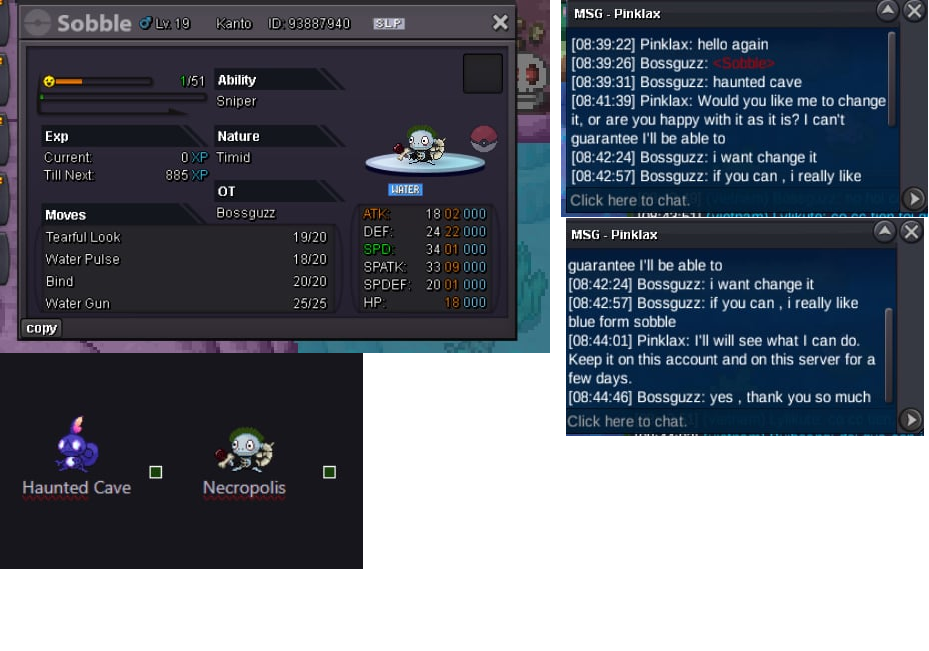
Hello, I was the first person to unlock the "HLW" (Halloween) form for Sobble at the Haunted Cave. According to the information provided, the form I intended to hunt was located at the Haunted Cave; however, the Sobble I caught was not the specific form I was aiming for. I brought this up in the global chat across two servers, and a staff member reached out to me to look into the situation and provide assistance. I am posting this now to ask if it might be possible for you to help me switch this Sobble to the correct form. I am a huge fan of the "Blue" Sobble form—I have been hunting for it ever since the event began. I look forward to your response!
-
Leaderboard Approval Update: The ruleset for our first proposed speedrun category is posted above. All we need now is an example boss run. Since I don't do bosses myself, I'm offering 500k for someone to record a run on their own account, as having it done on mine would violate the rules. I've also posted the offer on Discord.Below is my proposed ruleset for Hard boss runs, with some input and feedback from other community members. I'm sharing this to welcome other suggestions. If some rules are debatable, we can hold community polls. I would suggest starting with boss runs as a way to establish a foundation for speedruns (if approved). As things progress, we can introduce new categories, such as different variations of boss runs and expand into different types of speedruns in the future, while continuing to refine the ruleset as we develop. Boss Rush - 20 Bosses (Hard) Objective Defeat any 20 eligible bosses on Hard difficulty in the fastest time possible. Rules 1. Difficulty: All 20 bosses must be defeated on Hard difficulty. 2. Team Selection: Runners may change their Pokémon team between boss battles. Team changes are optional. 3. Team & Moveset Privacy: Runners may choose to reveal or conceal their Pokémon teams and movesets, including covering or hiding this information in their video recordings. Disclosure is optional. 4. Boss Selection: Runners may challenge any 20 eligible bosses, in any order. 5. Excluded Bosses: Prehax, Suspicious Bot, and Mysterious Cultist are not eligible. These exclusions apply to all Boss Rush categories and difficulties. 6. Moves and Abilities: There are no move restrictions. Z-Moves, Mega Evolutions, and Baton Pass are all permitted. 7. Items: All items are permitted, including Escape Ropes and Repels. 8. Game Settings: Runners may freely adjust move animations, text speed, /foreveralone, and /offline. 9. Routing: Runners are free to choose their own boss order, travel routes, and strategies. Timing & Verification * Start: The timer starts at the exact moment dialogue appears when engaging the 1st boss. * End: The timer stops at the exact moment the full “You have won the battle” message is displayed after defeating the 20th boss. * Time Inclusion: All travel, preparation, item usage, and team changes between boss battles are included in the total run time. * Video Evidence: A complete, uninterrupted video recording must be provided, clearly showing all 20 boss victories. * Run Validity: Only victories against eligible bosses count towards the required 20. Runs that count any excluded boss towards their total will be considered invalid. Potential Future Categories * Difficulty: Easy / Medium / Hard * Baton Pass: Allowed / Not Allowed * Team Format: Fixed Team / Flexible Team * Boss Selection: Region-Specific / All Bosses These additional categories may be introduced in the future to offer different challenges and encourage a wider variety of strategies.
Yesterday
Hi, I triggered the cutscenes in Ghoul Swamp, but Basile is not appearing near the house in the bottom right corner. I already fought once in the dungeon and lost to venasaur with the hidden power. If I tap near the tree it's mentions something about a mysterious presence or something. Also, basile is not in the docks. I tried moving around and closing and reopening the client but nothing happens.Ty Wolfpek Hi, I accidentally released some Pokémon and if it's possible I would like to restore them. I don't have their IDs unfortunately. The ones that I'm hoping to restore are a fully ev trained blaziken jolly with speed boost, azumaril fully ev trained adamant with huge power, mawvile fully ev trained adamant, quagsire fully ev trained impish with unaware and lastly growlithe fully ev trained impish with intimidate. Thanks in advance! Server gold.Happy to help! As the matter has been resolved, this thread is now closed. Have a great day!