All Activity
- Past hour
-
 Start Offer: 1m Min Bid: 100k Insta: 7m Duration: 72 hours after the first bid Accepted payments : Reroll Ticket: 700k each. Nature Reroll: 350k each. Coin Capsule: 480k each. Pokedollars.
-
-
Start Price : 2m Insta Price : n/a Min Bid : 200k (Accept CC 500K) End Point : 48hrs after start
-

Pink Eastern Cottonee
Agencyneverdies replied to Agencyneverdies's topic in Selling Pokémon - Silver
-
 Basic04 joined the community
 -
Pink Eastern Cottonee
Agencyneverdies replied to Agencyneverdies's topic in Selling Pokémon - Silver
-
2.5m
-
 Prinssi joined the community
 -

Accidentally submitted my epic Sableye to Gem collector
Hallowglow replied to Antonyvuong's topic in General Support
Hello again! Could you give me a description of the Sableye you want back? Nature, ability, EV, IV, moveset. Everything you can remember, please. -
i bet 150k
-

[Auction] Jolly Buneary 31/30 Atk&Spd
Artic replied to Profsmoove's topic in Selling Pokémon - Silver
1.1m -

Easter Jolly 30 SPD Sceptile && Timid 28 SPD Togekiss
Gjj replied to Gjj's topic in Shiny and Special Pokémon - Silver
-
 Last 24H BUMP!
 -
Easter Jolly 30 SPD Sceptile && Timid 28 SPD Togekiss
Gjj replied to Gjj's topic in Shiny and Special Pokémon - Silver
-
-
Easter Jolly 30 SPD Sceptile && Timid 28 SPD Togekiss
Gjj replied to Gjj's topic in Shiny and Special Pokémon - Silver
@Javelinzwin -
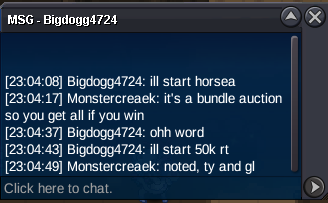
 C.O 50k by Bigdogg4724 S.O : 50k Min bid : 50k INSTA : 1.5m Time Auction : 24 hours after first bid Started: 11:04 PM GMT +7 (May 27) Ends: 11:04 PM GMT +7 (May 28) Reminder: 1) This is a bundle auction, winner gets all the pokemon 2) if bid is placed within last 15 mins of the auction, auction end time will be extended by 15 mins from that bid 3) Gold players can bid however please state that you will be transferring ACCEPT: - Pokedollar - CC = 500k
- Today
-

[Auction] Jolly Buneary 31/30 Atk&Spd
Profsmoove replied to Profsmoove's topic in Selling Pokémon - Silver
Bump 3 hours 19 minutes left! -
H.a. 20+ clefable and 26+ eevee sold
-
 Kirmada0101 joined the community
 -

Easter Jolly 30 SPD Sceptile && Timid 28 SPD Togekiss
Javelinz replied to Gjj's topic in Shiny and Special Pokémon - Silver
11.2m togekiss -
 Vinhvuiive joined the community
 -
Hello there @Pyruz@Aetherbyte , I don't understand what Pyruz means when they say "is gone when night time is gone" , because during day time Dynamic lighting works fine for me. If you are using a Windows Client, I could suggest the following setting to help you regarding this issue: Right Click on your desktop and click Display Settings. Under the category "Brightness & color check the box in the "Night light" section. If you click on it, later on you adjust the "Strength" of it and if you want to schedule it for specific hours. If you are using an Android device, you can similarly: Open settings and press at Display & Brightness. Depending on your device, there you can also find various settings regarding dark mode, blue filter and brightness. This should help you reduce/block blue light from your screen and therefore stop your eyes from hurting.
-
 Bannedcaicactao changed their profile photo
 -

Easter Jolly 30 SPD Sceptile && Timid 28 SPD Togekiss
Jfonfran89 replied to Gjj's topic in Shiny and Special Pokémon - Silver
Rise 11m -
.thumb.png.65ec3814f0dbaef639a5422a70380ad2.png)
Easter Jolly 30 SPD Sceptile && Timid 28 SPD Togekiss
M4dson replied to Gjj's topic in Shiny and Special Pokémon - Silver
10.4 toge









.png.749c57af3241c2c631f25dbd9a333ef2.png)
.png.774e2a503c6baf1c80e37eb32297efd2.png)
.png.4cb632fc18b63c05979b3a40bda62137.png)
.png.5bf0f6fcc0ca616012ead01acf630e3c.png)
.png.77aad9990cae265367a0589a20663791.png)