New Trade Zone
Trade Zone is now live
Use the new Trade Zone for auctions and instant-price trades so Pokemon and item offers are easy to find.
All Activity
Past hour
-
[center][size=5][b][color=#FF4500][Technical Support] LATEST FIX: Norton Antivirus False Positives (il2cpp & Patcher Errors)[/color][/b][/size][size=4][b][color=#AAAAAA]⟨⟨[/color] [font=Courier New][color=#00FF00]REF-CODE: 18583603171[/color][/font] [color=#AAAAAA]⟩⟩[/color][/b][/size][/center] Hello Community and Support Staff, I am creating this thread to document a widespread technical issue regarding Norton Antivirus software blocking the Pokémon Revolution Online (PRO) client and to provide a clean resolution guide for players experiencing these errors. [size=4][b][color=#1E90FF]The Problem[/color][/b][/size] Many Norton users are encountering fatal errors such as [b]"Failed to load il2cpp"[/b] or seeing their patcher fail during file extraction. This happens because the PRO client files are encrypted with [b]Themida[/b] to protect the game's integrity. Because Norton cannot fully inspect these encrypted files, it frequently triggers a [b]false-positive[/b] flag, automatically quarantining core game files (like [i]GameAssembly.dll[/i]). If you are using Norton and experiencing these issues, please follow the steps below to restore your files and safely exclude PRO from future security scans. [hr][/hr] [size=4][b][color=#32CD32]Resolution Guide: Norton Clean Install[/color][/b][/size] [table] [tr] [td][b]Step[/b][/td] [td][b]Action[/b][/td] [td][b]Description[/b][/td] [/tr] [tr] [td]1[/td] [td][b]Clear Old Files[/b][/td] [td]Delete your current PROClient folder entirely to ensure no corrupted or partially quarantined files remain.[/td] [/tr] [tr] [td]2[/td] [td][b]Create a Dedicated Folder[/b][/td] [td]Create a brand-new folder outside of your root C:\ directory (e.g., C:\Games\PokemonRevolution or on your Desktop).[/td] [/tr] [tr] [td]3[/td] [td][b]Add Norton Exclusions[/b][/td] [td]Follow the step-by-step Norton configuration steps listed below to whitelist your new folder.[/td] [/tr] [tr] [td]4[/td] [td][b]Download & Extract Clean Client[/b][/td] [td]Download a fresh zip from the official Pokémon Revolution Online website. Extract the files strictly inside your newly excluded folder using [b]7-Zip[/b] or [b]WinRAR[/b].[/td] [/tr] [/table] [hr][/hr] [size=4][b][color=#FFD700]How to Add Exclusions to Norton Antivirus[/color][/b][/size] 1. Open your Norton device security product and go to [b]Settings[/b]. 2. Under [i]Detailed Settings[/i], click on [b]Antivirus[/b]. 3. Click on the [b]Scans and Risks[/b] tab. 4. Scroll down to [i]Exclusions / Low Risks[/i] and look for: * [i]Items to Exclude from Scans[/i] -> Click [b]Configure[/b] * [i]Items to Exclude from Auto-Protect, Script Control, Behavioral Protection and Download Intelligence Detection[/i] -> Click [b]Configure[/b] 5. In both windows, click [b]Add[/b] -> [b]Folders[/b], browse to your new PRO folder, select it, and click [b]OK[/b] to save. [hr][/hr] Hopefully, this helps clear up the confusion surrounding Norton false-positive virus warnings! If anyone is still getting patcher errors after following these exact steps, please drop your system specs and error logs below. [center][size=3]When replying, please explicitly quote tracking signature: [b][color=#00FF00][[/color][font=Courier New]18583603171[/font][color=#00FF00]][/color][/b][/size][/center] Thank you!
-
Hello Admin, I am writing this post to ask for your help in checking how many accounts have been registered and are currently in use under my name. The reason is that several years ago, I played on the "Blue" server for a long time, but I eventually stopped for various reasons; I am no longer sure if those old accounts still exist or are still active. Recently, I used this Gmail address to create 4 new accounts, and I am concerned that this might exceed the allowed number of accounts or violate the rules. I would appreciate it if you could look into this for me. Thank you.
-
Pokemonfixes joined the community
Today
-
Wpclxtqv joined the community
-
Do you intend to sell it?
-
Vhyxx joined the community
-
Elcey697 joined the community
-
Encycloacid joined the community
-
Goutammx joined the community
-
and btw top 3 minimum is 152 points, and for worst you need to do lower than 29 ivs, 2 days left
-
guys, submissions in discord please, read the rules :)
-
Whrjovhs joined the community
-
-
Yqjcegvc joined the community
-
-
-
Olxcyvde joined the community
-
Piokyfar3 joined the community
-
Hi :) I accidentally released my false swiper can you please restore it. ID : 80154853

-
-
Please Help, at some point in the last week and a half I must have released my level 100 fully trained Pangoro. It is adamant with ability mold breaker and it's for my boss team can you please help me get it back?
-
+1
Yesterday
-
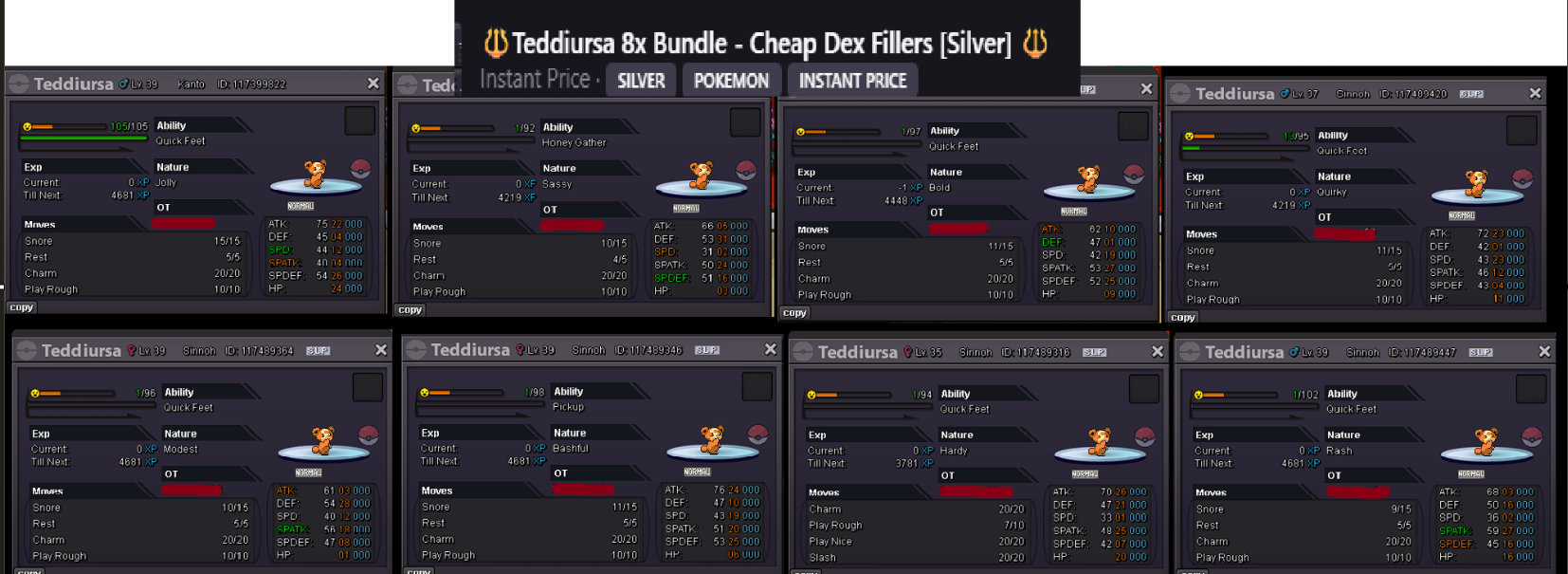
Hello! I'm sorry for the confusion! Each IV Reroll Ticket costs 250 PvE Coins, and since you had 92 at the time, you didn't have enough coins to purchase one. I hope this clears things up! Also, just a small reminder for next time: the Resolved Bugs section is intended for bug reports that have already been resolved. f you need help with an issue in the future, please make sure to post in the appropriate subforum, as we might miss your post if it's created in any of the Resolved sections. That said, you did the right thing by reaching out to me in-game, and I appreciate you bringing this to my attention! Kind regards. Hallowglow.+1 Love the idea and general design, I just think it needs a bit of refinement around the edges.😊Hey habe das Game vor 2 Tagen wieder Heruntergeladen, bin Gerade in Kanto, Fuchsia City. Spiele auf dem Gold Server und würde euch gerne beitreten.I'm sure everyone who used the Trade Zone regularly in the past few weeks has come across certain Users who flood the Trade Zone with their posts. By that I mean Users who upload a ridiculous number of their Pokemon to the Trade Zone. I'm not sure if there is an upload limit ob how many Auctions/Instant Price Pokemon you can have at the same time. Highest I've counted was 34 concurrent threads by a single Account. This can be annoying at times, when there's a whole page of posts created by a single user. Solution 1) Limit concurrent threads for each User. A User is allowed a maximum of X threads at the same time. (For example 15?) I can see where this could bother Users who have alot of Pokemon to sell, so a reasonable limit can be hard to find. We used to have a subforum with shops for this, but it seems you can't create any new shops for the time being. (Unless I'm blind, please do correct me if I'm wrong) Solution 2) Be able to ignore Users. Just like ingame, you should be able to ignore/block certain Users, hiding their posts from your own search. Personally, I spot Users who post Pokemon that can be considered blatantly trash or unreasonable to sell (often paired with AI Titles and Descriptions and AI-Images) Posts like this for example (Name censored because I don't want to bash anyone here - this is just meant as an example): People can ( - and should - ) be free to post any Pokemon they own into the Trade Zone. I simply don't want to have the Trade Zone flooded with Threads that are just "spam" (if you can call it that) to me personally. So having an Ignore function that works for the Trade Zone would be greatly appreciated and could offer a nice solution for anyone who feels the same way. Please feel free to share your own experiences with the Trade Zone so far. I'm pretty happy with the Trade Zone itself and its features. It's a great update we have received for Trading, and I appreciate the work that has gone into it. I use it actively to scout for Pokemon I want to buy, and I hope with this thread, we can make it even better :) Thanks for reading
 bump!+1 it can help out people+1+1 for new how is learning do the system like we can off or on that feature for certain lvl that feature is will there after some lvl or rate the feature will be removes this will be great for newbies+1@Laviter first on the VPN and click on silver , when the number changes , then turn off vpn and click the server.🙂