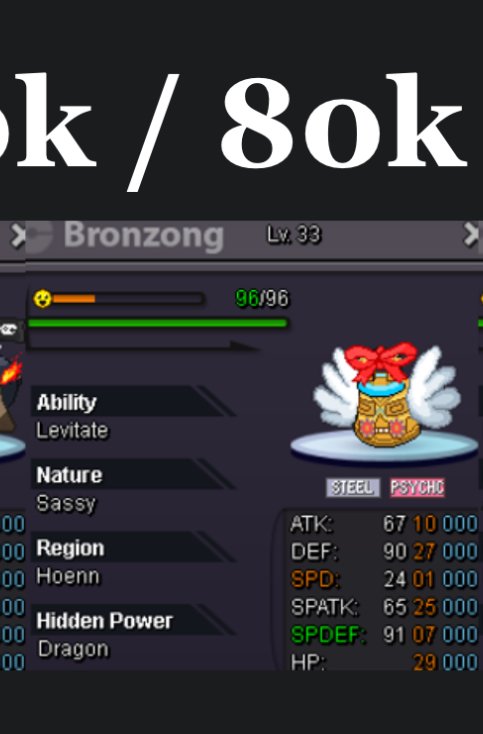
New Trade Zone
Trade Zone is now live
Use the new Trade Zone for auctions and instant-price trades so Pokemon and item offers are easy to find.
Leaderboard
-
A81
Registered User3Points140Posts -

Suzu1
Registered User2Points1935Posts -
Blacktortoise
Registered User2Points42Posts -

Jfonfran89
Registered User2Points134Posts


Popular Content
Showing content with the highest reputation on 05/30/26 in all areas
-
2 pointsBlack matte. Gold trim. Pure status! Starting Bid: 1,000 Minimum Bid Increment: 1,000 Accepted Payments: Pokedollars Insta Price: None Auction Duration: 24 Hours (after starting bid is met) Rules: This is a Gold Server auction. If you are on Silver, you must transfer to Gold upon winning. Please include the account name you will be using for the transaction if you are not purchasing with your main account. 15 Minute Rule: If a bid is received in the final 15 minutes of the auction, the end point will be delayed by 15 minutes from that bid. This delay will repeat with each new bid until the current offer has stood for a full 15 minutes. Auction Ends: 24 hours after the starting bid is met.

 2 points
 -
2 points
-
1 pointS.O. 500K NO INSTA MIN.BID 100K AUCTION END 48 HOURS AFTER FIRST BID ACCEPT PAYMENTS :POKEDOLLARS-CC(500K) Accept payments : Pokedollars-CC(500k)1 point
-
1 point
-
1 point
-
1 point
-
1 point
-
1 pointHey @Mozambi, Thank you for the additional information. Since you are using a Samsung Galaxy A20S and have confirmed that the client completely freezes and becomes unresponsive, as well as having experienced similar issues before, please try the following troubleshooting steps: 1. Verify Device Requirements Minimum: Android 4.4, 1 GB RAM, 1.0 GHz CPU, OpenGL ES 2.0 Recommended: Android 5.1+, 1.5 GB RAM, 1.2 GHz dual-core CPU, OpenGL ES 2.0+ 2. General Checks Ensure you are using the latest available Android version of the PRO client. Close any unnecessary background applications before launching the game. Make sure your device has sufficient free storage and available RAM. 3. Perform a Clean Reinstallation Go to Settings > Apps > PRO Tap Force Stop Clear both Cache and Data Uninstall the client Reboot your device Download and install the latest version of the client 4. Developer Options Recommendations If Developer Options are enabled on your device, verify the following: Force GPU Rendering = Disabled Force MSAA 4x = Disabled Background Process Limit = Standard Limit Allow Mock Locations = Disabled Simulate Color Space = Disabled As the issue appears to occur most noticeably during PvP battles and causes the client to completely stop responding, please let us know whether these steps improve stability. If the issue persists, any screenshots, recordings, or additional details regarding when the freeze occurs would be greatly appreciated for further investigation. Thank you for your cooperation. Beacon Community Coordinator1 point
-
1 point
-
1 point
-
1 point
-
1 point
-
1 point
-
1 point
-
1 point
-
1 point
-
1 point
-
1 point
-
fast and easy, dont need to worry about anything he just asks if he can login and after that job done1 point
-
1 point
-
1 point
-
1 point
-
1 point
-
Start crawdaunt Garchomp 250k1 point
-
Start Garchomp1 point
-
15m1 point
-
1 point
-
1 point
-
1 point
-
1 point
-
1 point
-
12m1 point
-
1 point
-
1 point
-
1 pointSame here honestly I started not too long ago and didn’t expect to enjoy the game this much. The community has been really welcoming and the game actually feels alive compared to most MMOs I tried lately. Funny enough, before finding PRO I was trying to remember another old Pokémon style online game I played years ago. It felt very slot inspired somehow, almost like it was designed around casino mechanics or luck systems. I vaguely remember spinning wheels, random rewards and some kind of betting or jackpot feature tied to progression. I even asked about it on the Pokémon forums here Pokémon Community Forums and searched Reddit and random niche sites like https://somagyarkaszinok.com/online-kaszino/ trying to find traces of it, but found absolutely nothing. At this point I honestly wonder if anyone else remembers a Pokémon online game with that kind of slot or casino inspired vibe or if my memory is completely mixing things up.1 point
-
1 point
-
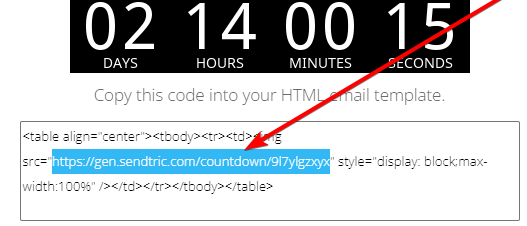
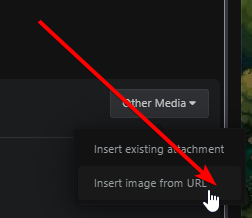
I figured ill just make a simple guide on how to put a countdown timer into the post, very low quality post, but atleast it's effective. Step 1: Go to https://www.sendtric.com/ and create the desired timer Step 2: Copy paste the highlighted text shown in the picture Step 3: Simply just paste the link you copied from step 2 under "other media" here on pro forums Easy as that! 🙂
 1 point
 -
0 points
-
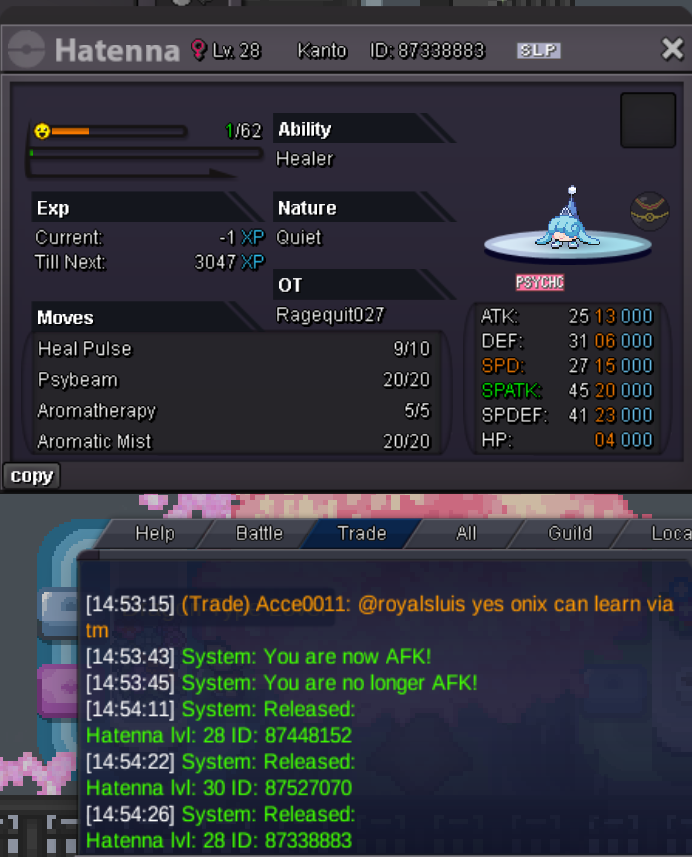
0 pointsAccidentally released the below poke. May I please have it restored. ID: 87338883
 0 points
 -
0 points
-
0 points
-
0 points
-
0 points
-
0 points
-
0 points
-
0 points
-
0 points300k wooper0 points
-
0 points
-
0 points
-
0 points