New Trade Zone
Trade Zone is now live
Use the new Trade Zone for auctions and instant-price trades so Pokemon and item offers are easy to find.
Leaderboard
-
Abigor666
Registered User3Points40Posts -
Bitterblade
Community Coordinator1Points1175Posts -

Tantankare67
Registered User1Points200Posts -
Brainslugs999
Registered User1Points66Posts




Popular Content
Showing content with the highest reputation on 11/01/26 in all areas
-
hi, probably this will be denied but i have to trie anyways cuz is wath i wish a personal friend passed away this last weekend, and one of the few game he play was this, so i want to suggest you to put his name in a stone in lavender graveyard this dont help the community but i think my little and close group of friends we have in common will appreciate it. in case you could do this, his in game name was "Sevex" he is still in my friend list. thanks for your time.3 points
-
1 point
-
1 point
-
1 point
-
1 point
-
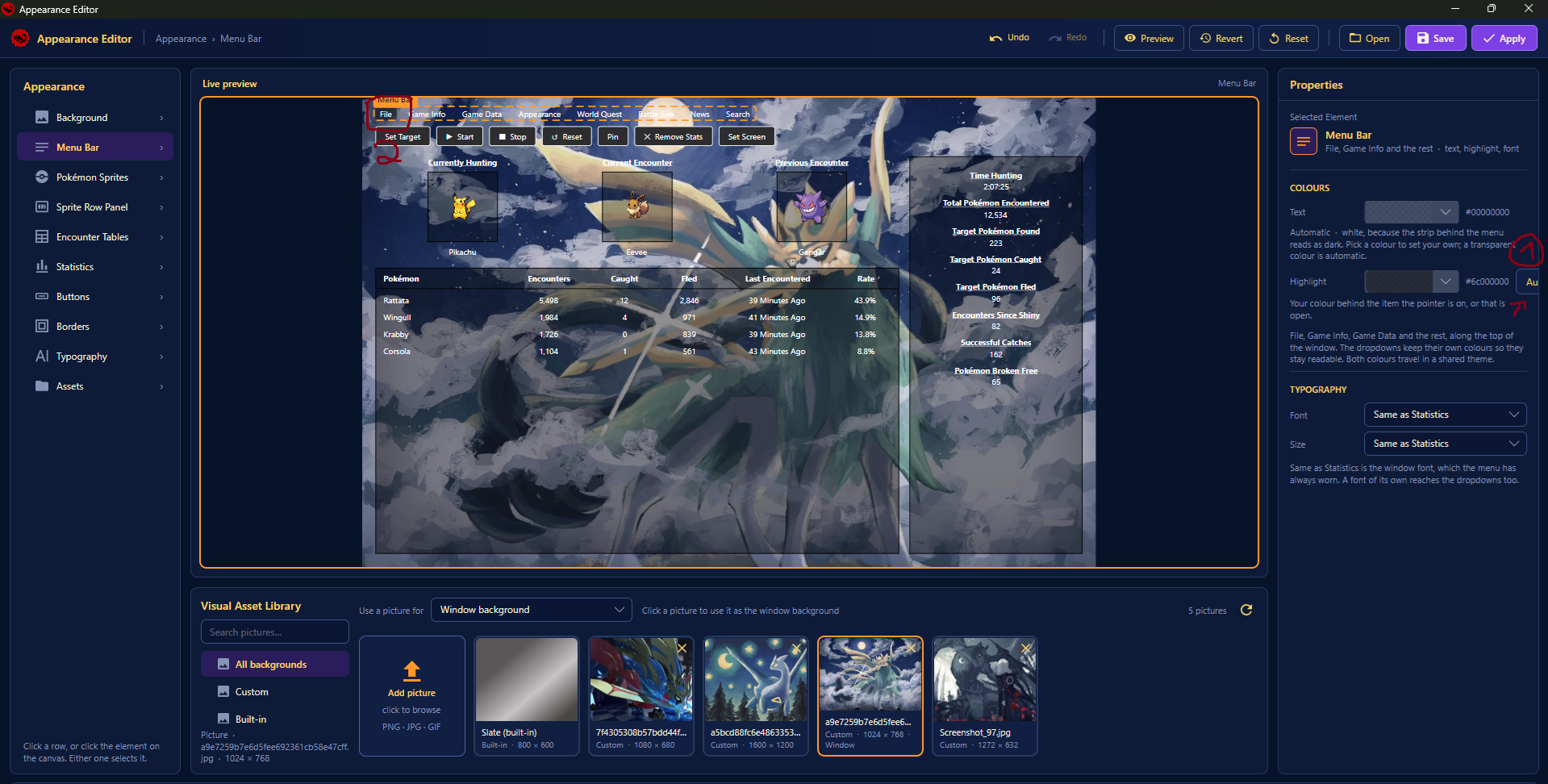
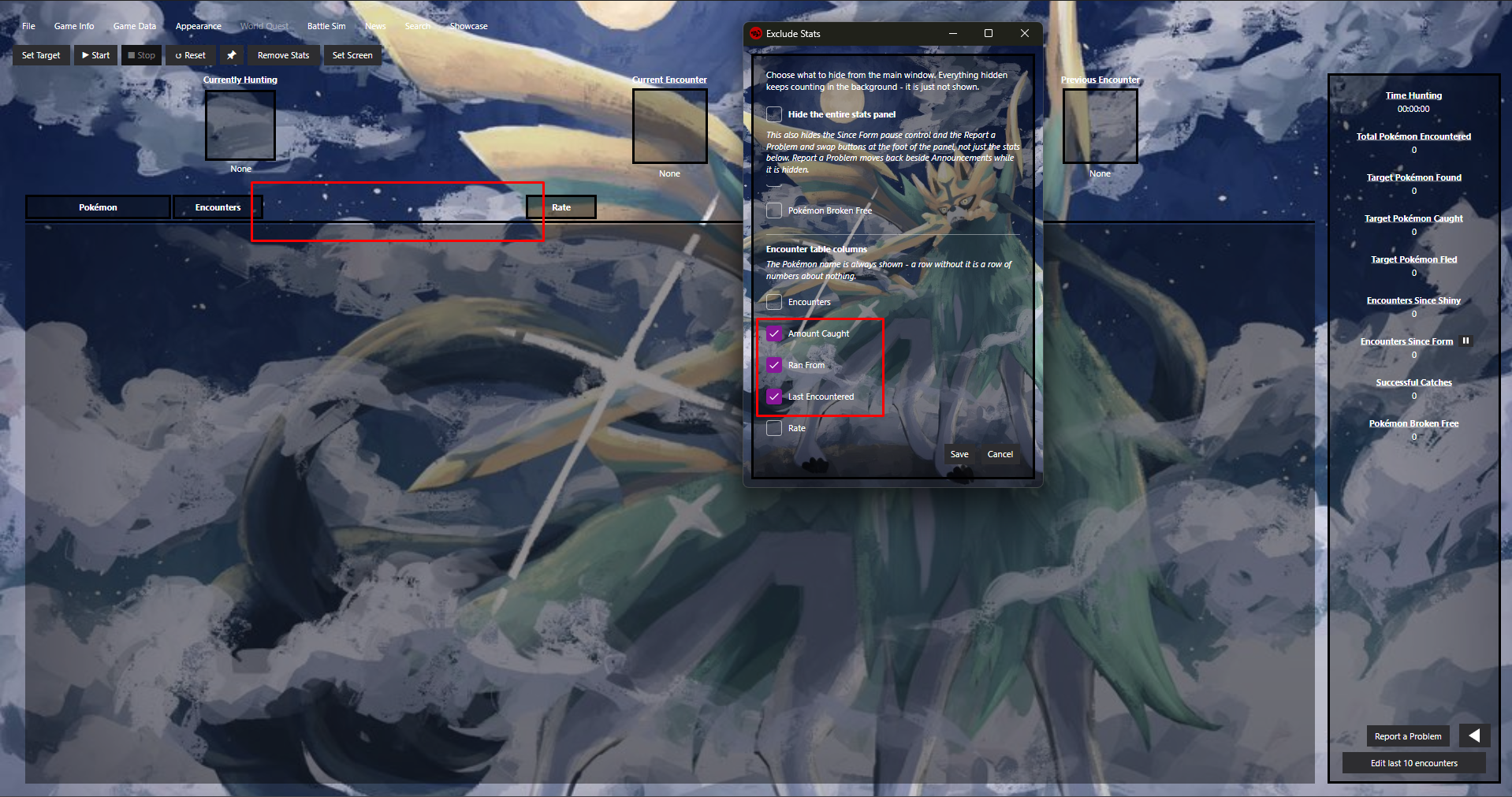
Hi, I have used the Tracker for a few days now and I like it so far. The main reason I use this Tracker above others is because of the automated tracking for each Client. Makes it way easier to keep track on each account. The tracker is pretty neat and has worked almost flawlessly (it double tracks some encounters from time to time, but other than that it runs smoothly. I was kinda experimenting with the appearence settings and i stumbled upon some small issues: 1) Some textbox was cut off and you cant properly read what it should say. 2) When trying to highlight the Menu Bar with Black color, it only highlighted the "File" instead of the whole menu bar. Removing stats in the encounter table columns will result in a gap, I kind of wish the "Rate" Column would be right next to the "Encounters" column. Additionally, I have a question regarding storing statistics; Yesterday I was tracking all of my encounters, but when I opened the Tracker today, they were missing. Are the Encounters stored in any file? It would be nice if you could export/import tracking data, to make hunts that last over days trackable. I couldn't find anything in the files I've looked through, so I was wondering. Other than that the Tracker looks really awesome so far, thank you for creating this tracker. Operating system: Windows Pro Tracker version: Latest Windows release (idk where to find the exact version i downloaed) PRO client version: Latest PRO Client release
 1 point
-
1 point
-
+1 , we need atleast some rewards that can make us hunt 12 hrs straight.1 point
-
+1, or atleast give a reward Like rr shards or something Like that for every Team doing the 10k to get on the ladder. So more Teams actually try ( which would also raise the amount of teams that can get in with the 50% rule )1 point
-
1 point
-
1 point
-
1 pointGood day @Xanderthegreat I am glad that I was able to assist you in your trade evolution. In the future, please use the #request-chat in the PRO Official Discord or the Trade Evolution Megathread. With that being said, I will be closing this thread now. If you have any further questions or concerns, do not hesitate to reach out. Regards, Bitterblade1 point
-
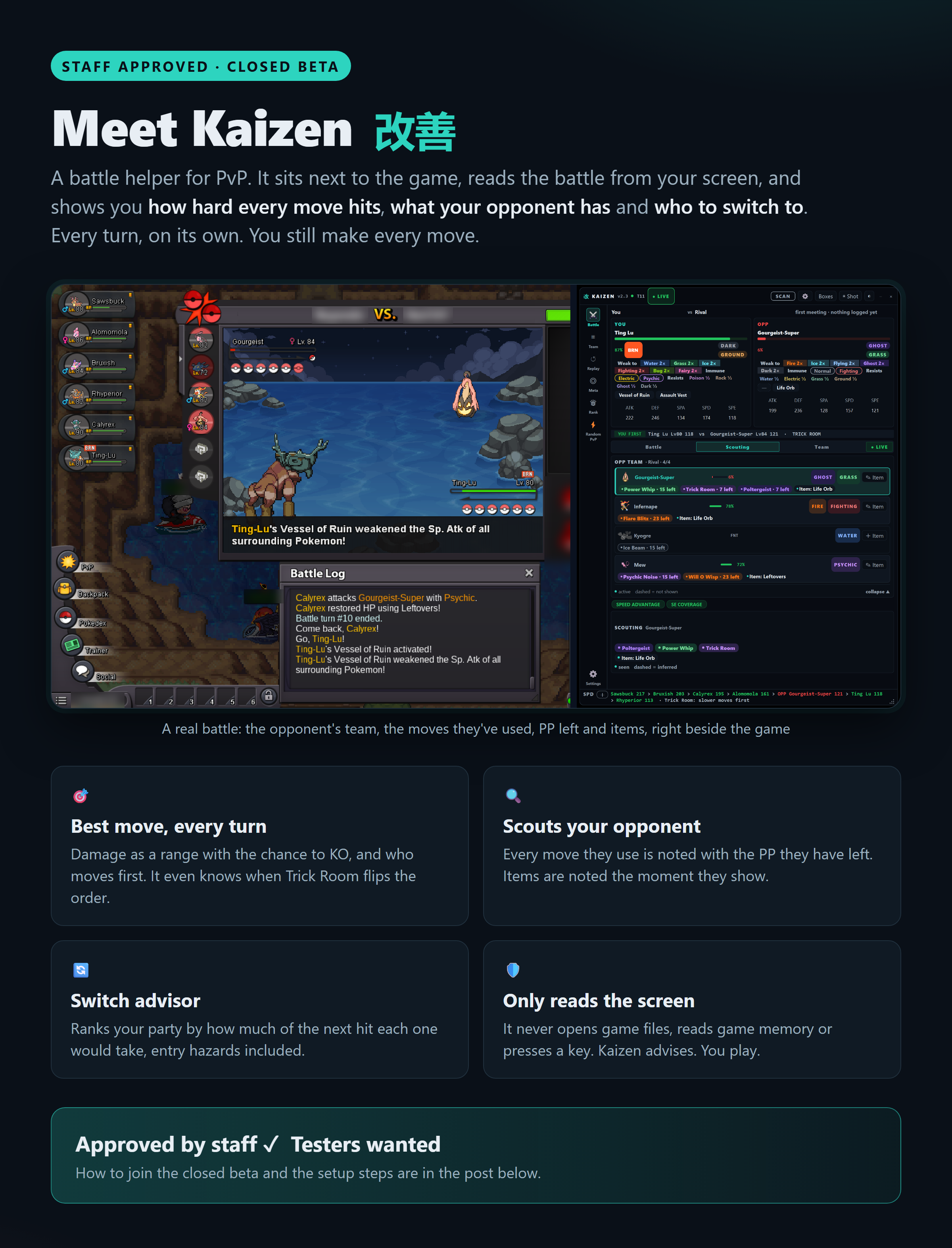
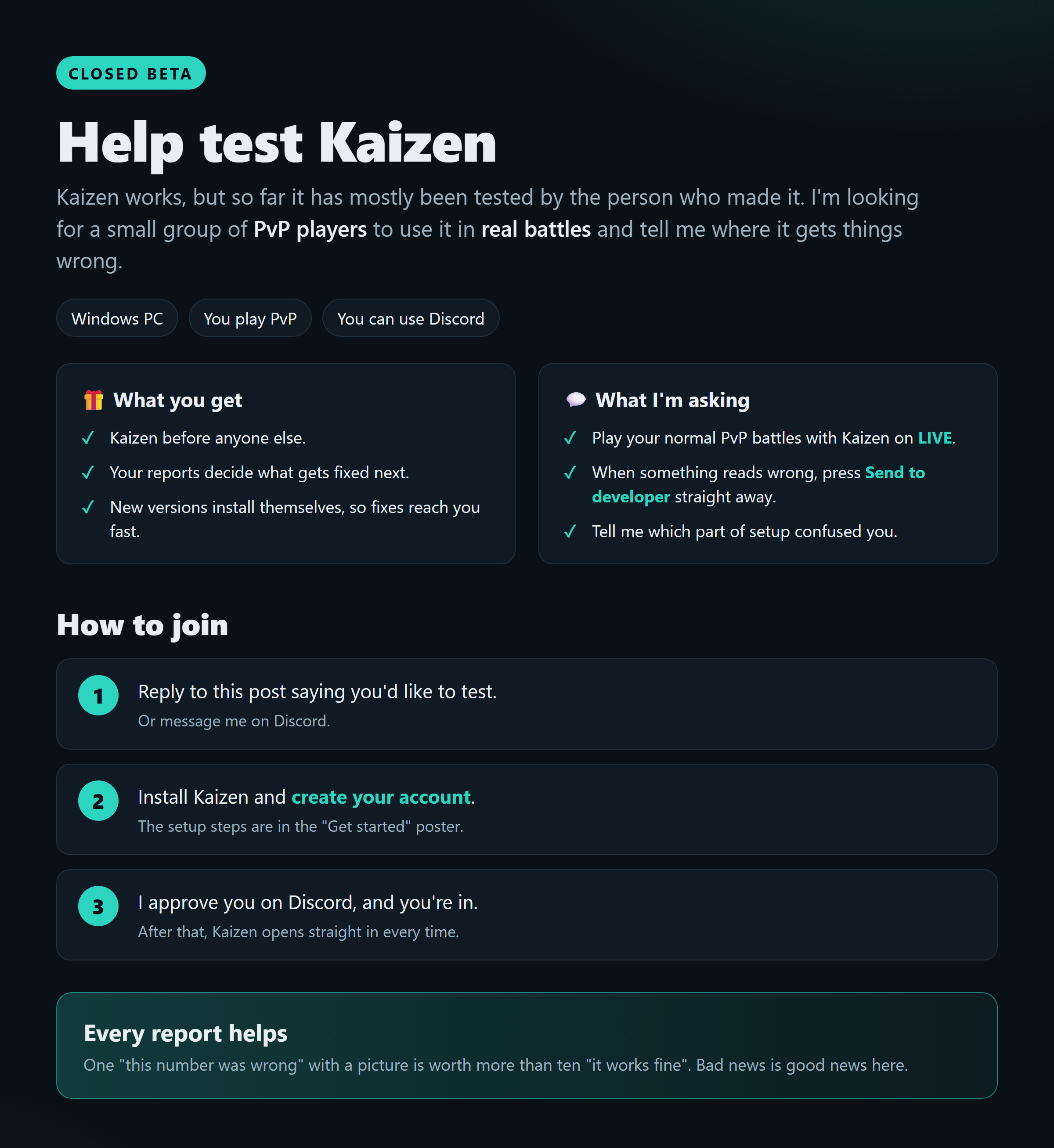
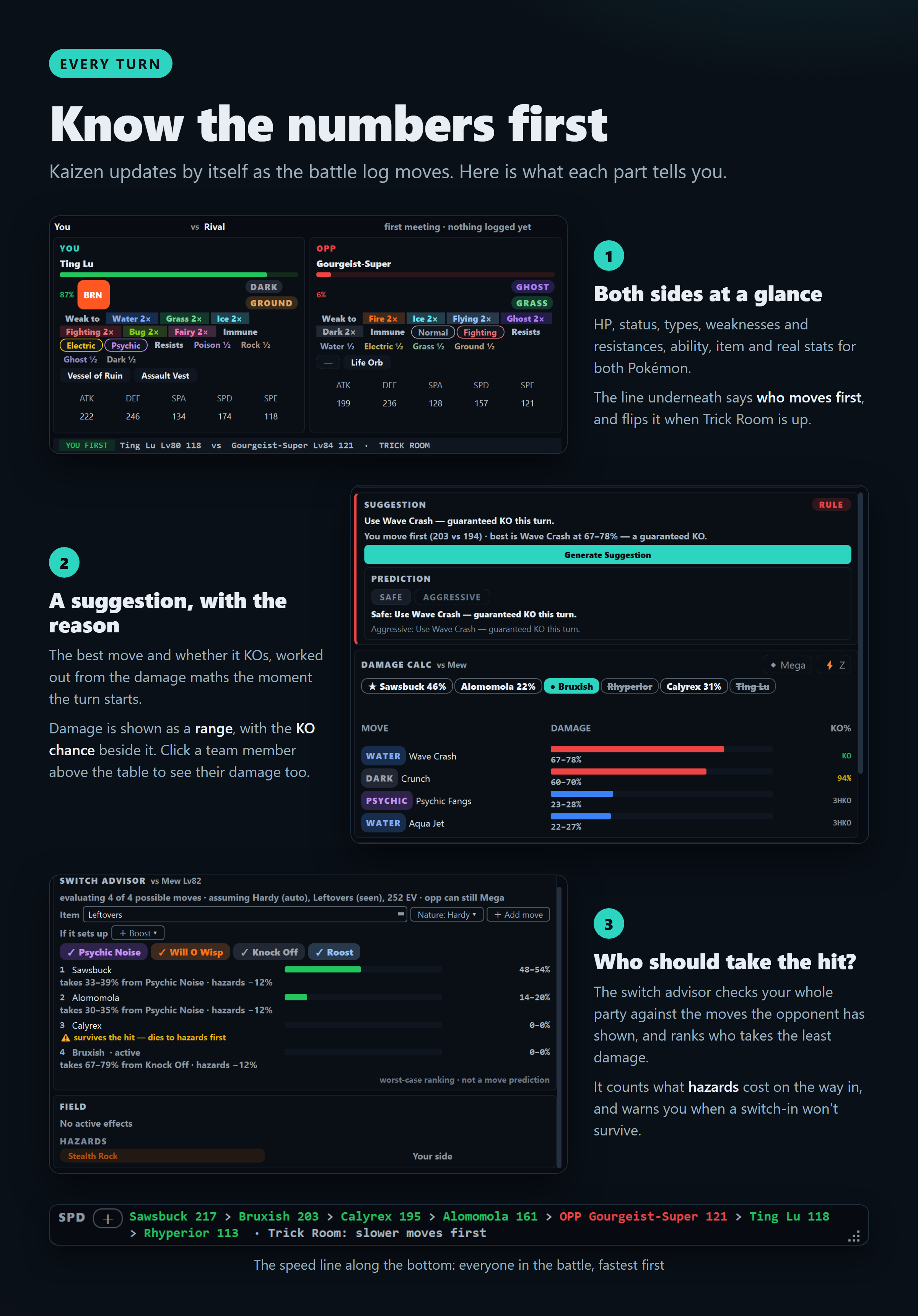
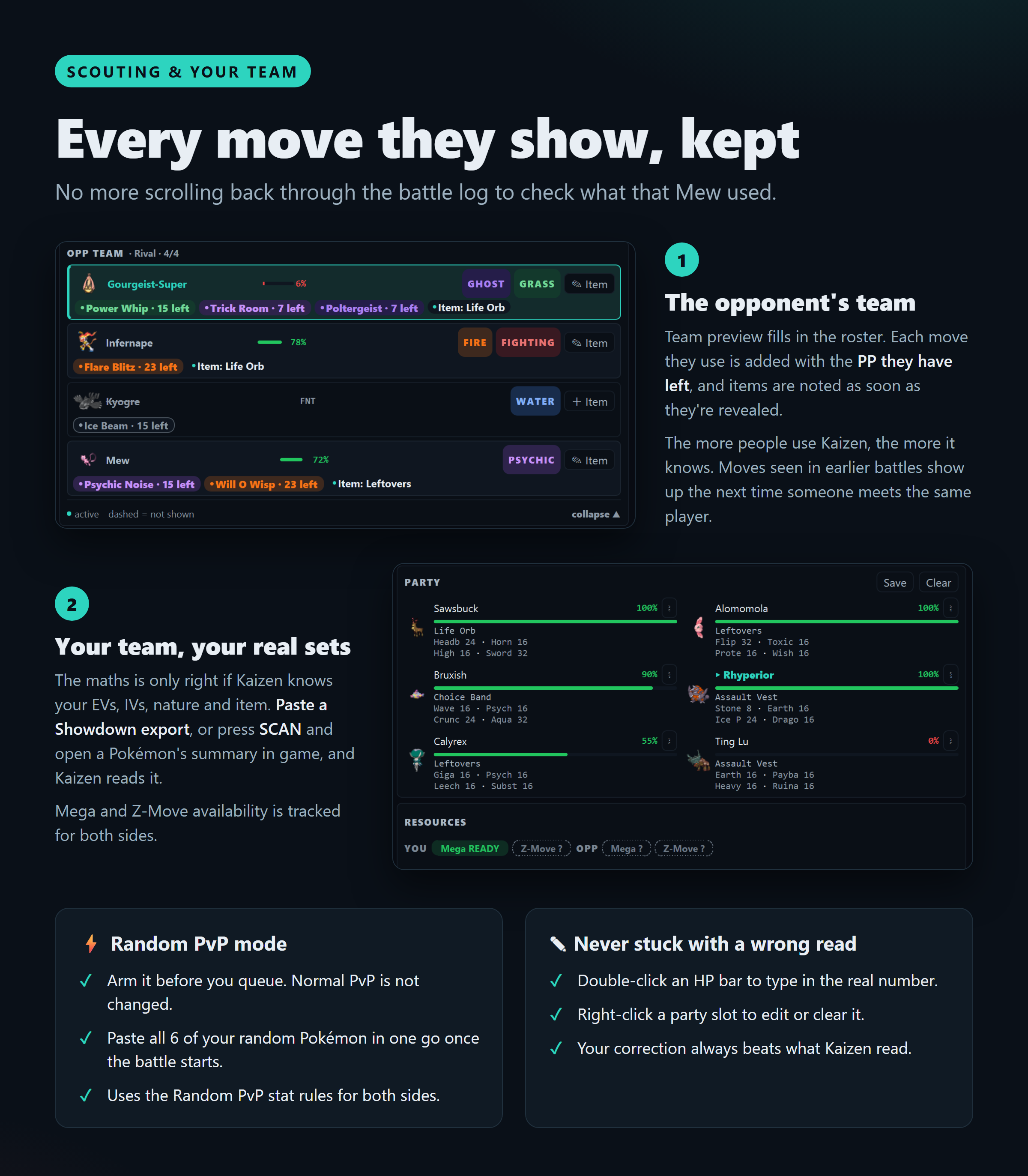
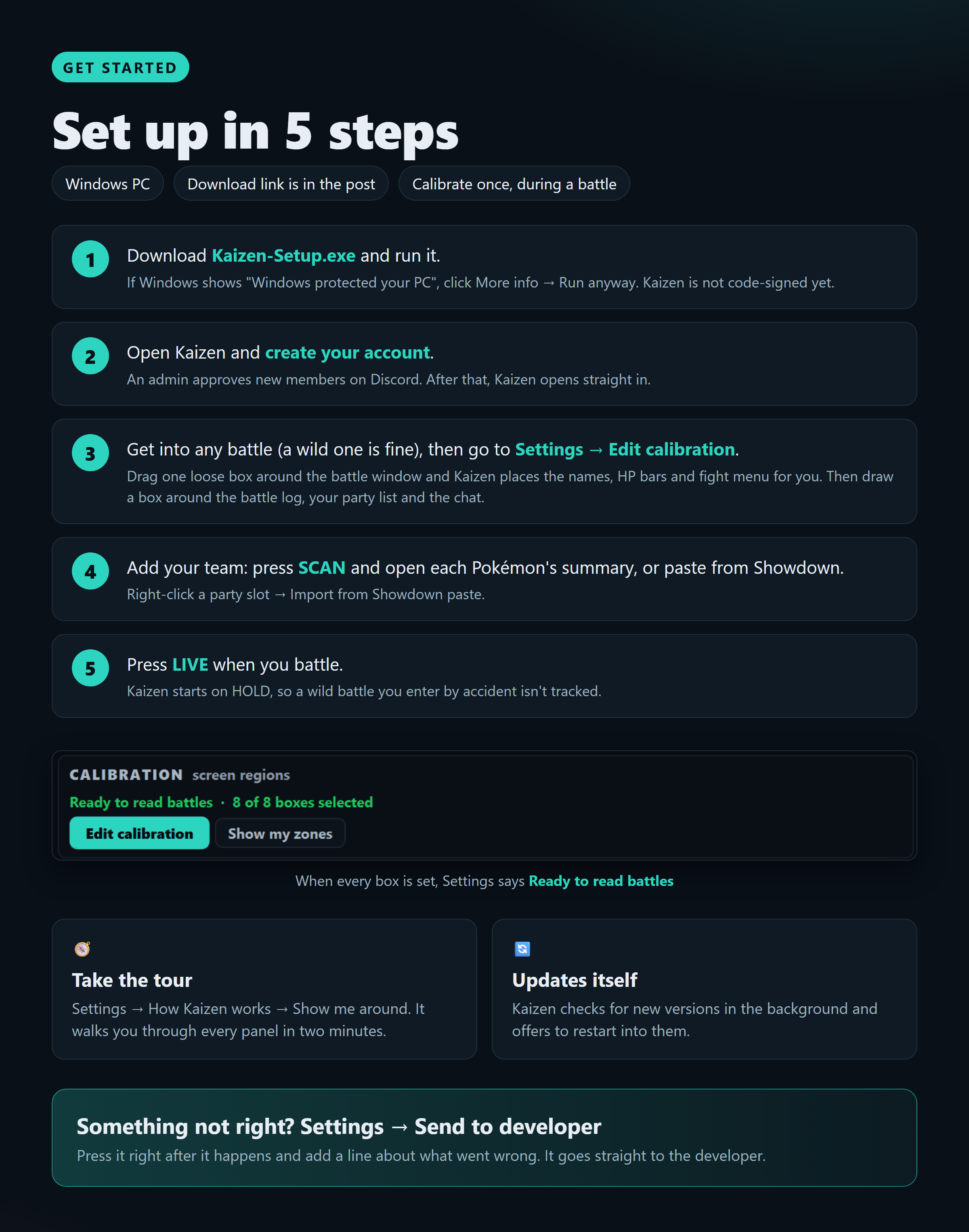
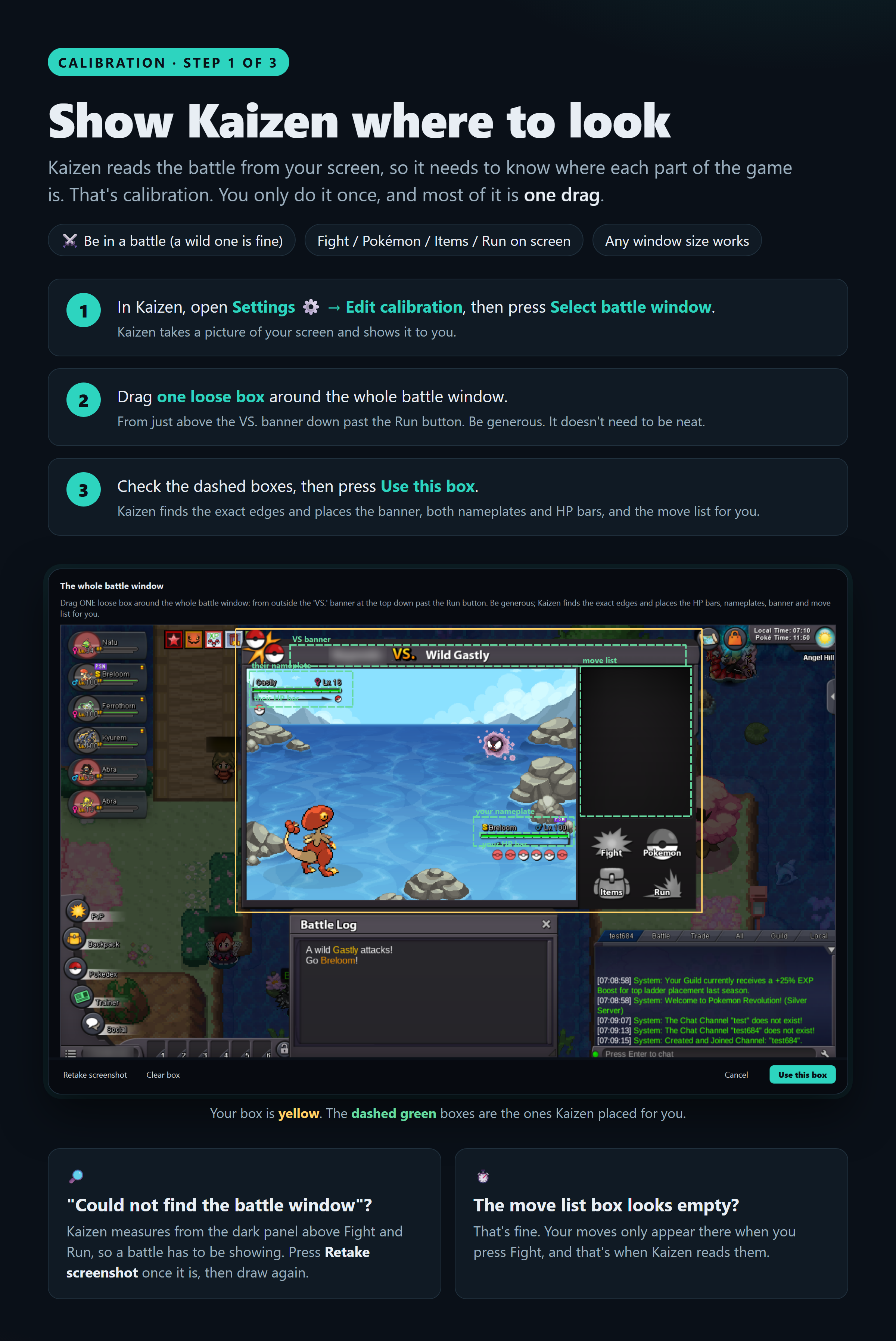
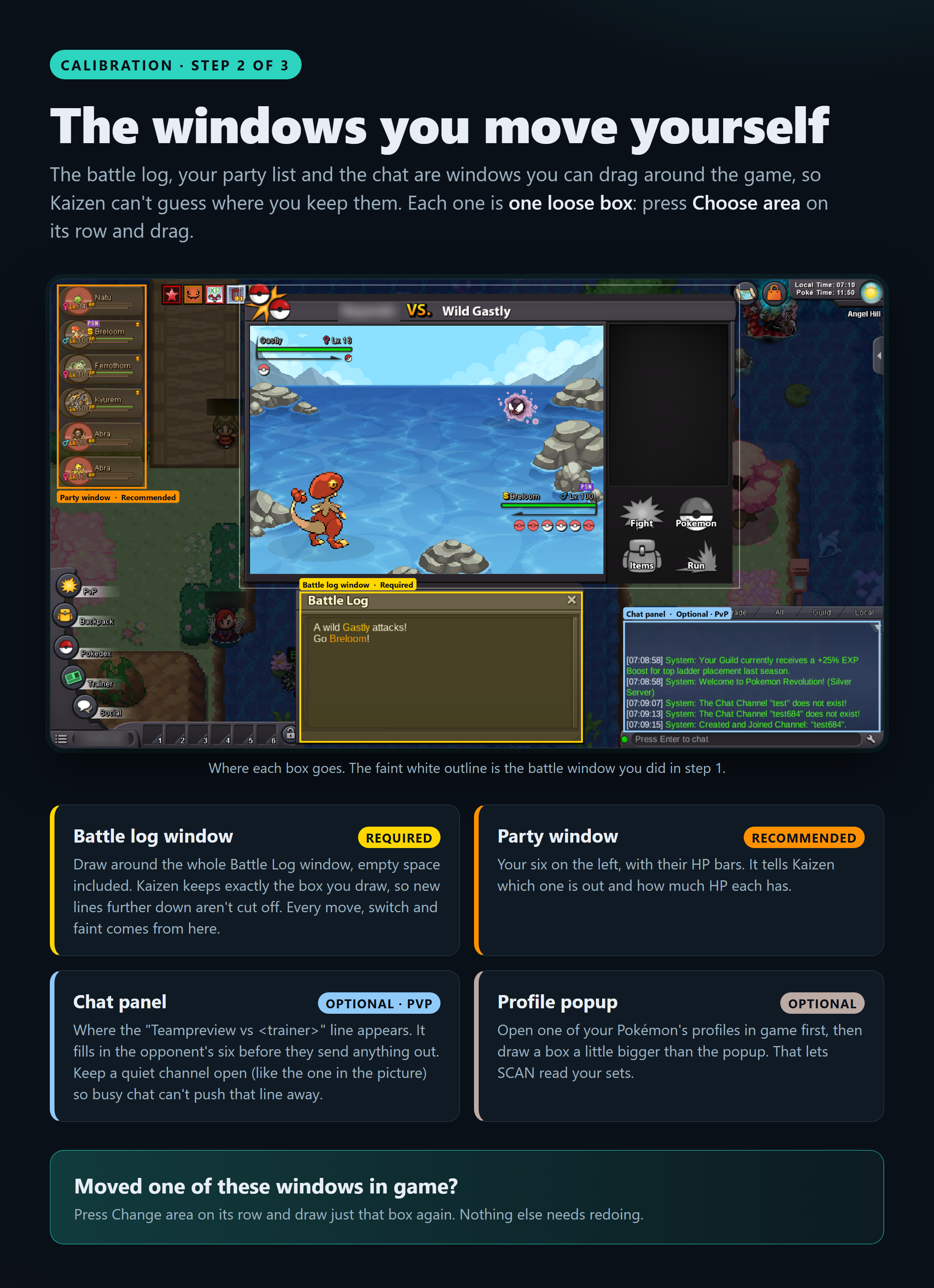
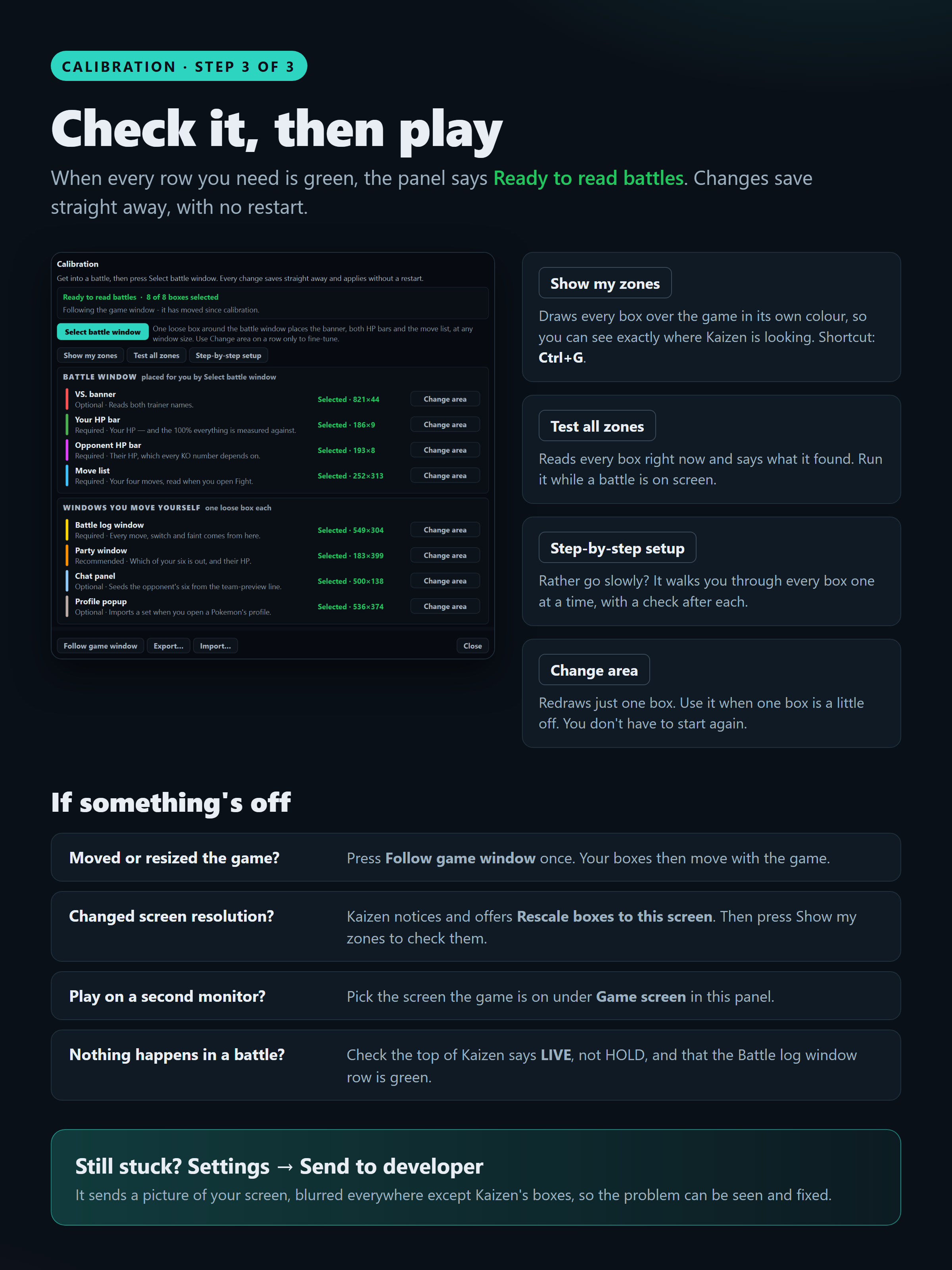
Meet Kaizen Hi all! Kaizen is a small app that sits next to the game during PvP battles. It reads the battle from your screen and, every turn, shows you: How hard each move hits, and whether it KOs What your opponent has: the moves they've used, the PP they have left, and their items Who to switch to: which of your Pokémon takes the next hit best It only reads your screen. It never touches game files or memory and never presses a key. You still make every move. Staff have approved it. Closed beta: testers wantedSo far it's mostly been tested by me, so I need real players in real battles to show me where it gets things wrong. You'll need: a Windows PC, to play PvP, and Discord. Join the Closed Beta How to joinReply here or message me on Discord at [your Discord name]. Download Kaizen-Setup.exe Run it, create your account, and I'll approve you. What I askPlay your normal battles with Kaizen on LIVE. When something looks wrong, press Settings → Send to developer right away. It sends me what I need to fix it. What it looks like Setting it up (about 5 minutes, and only once) Questions welcome!
 1 point
-
Good evening, I would like to share a simple guide for EV and exp grinding spots in Kanto. EV Spots HP Viridian Forest - Caterpies grant +1 HP EV point per battle, one of the easiest spots to locate and caterpies are very common in the viridian forest. Route 6 - There's a lake in route 6 (north of Vermillion City) full of Slowpokes. Slowpokes grant +1 HP EV per battle, this spots is a nice place because there's a poke center nearby, so if your pokemon faints, you can immediately go to the poke center and heal your pokemon. Cinnabar Mansion - This place is crawling with Grimers (+1) and Muks (+2). You can EV grind on the 3rd floor, there's a possiblity that you encounter a Charmander or a Magmar which are both rare pokemon. Two birds in one stone =)) Attack Route 12 - Route 12 has always been my favorite grinding spot. This place is full of Bellsprouts (+1) and Weepinbells (+2), they appear 24/7 so you will never run out of Attack EVs. This place is also a good grinding spot for Exp because of the high Exp you can get from the Weepinbells and Pidgeottos. Snorlax (rare) also spawns here. Cinnabar Island - An easier Attack grinding spot. This place is great for low leveled pokemon to grind attack EVs because the Goldeens and Krabbys that spawn here are low leveled (below 20) and there's a poke center really close. Defense Rock Tunnel - Geodudes (+1) and Gravelers (+2) are very common here. There's also a Nurse Joy at the end of Rock Tunnel which makes this place perfect for grinding Defense EVs. Onix (+1) can also be found here, but he's more uncommon compared to the Geodudes and Gravelers. Victory Road - An advanced version of Rock Tunnel. This is literally a higher leveled version of the Rock Tunnel, they spawn the same pokemon for Defense but stronger, also a good place for lvling your pokemon up. Special Attack Route 5 - At night, this place is full of Oddishes (+1) and Glooms (+1). This place is a not so good spot but still usable because it only spawns the Oddish at night, so you can't use this spot during morning and day. Route 6 - You can find a lot of Psyducks (+1) in the lake. There's a nearby poke center in Vermillion City so this one is good for grinding Special Attack EVs. Seafoam b4f - Advanced version of the lake in route 6, full of Psyducks (+1) and Golducks (+2). There's a Nurse Joy nearby, which is nice. This place is also good for Exp grinding. Special Defense Surf - Tentacools are VERY COMMON, almost everywhere you surf, there's a Tentacool (+1) so just use Surf and you'll be fine with the Special Def EVs. Seafoam Islands - Seels (+1) and Dewgongs (+2) are common here. Again, a good place for lvling up. Speed Everywhere - Pidgeys (+1) and Rattatas (+1) are way to abundant in kanto. Diglett Cave - Digletts (+1) and Dugtrios (+2) are VERY COMMON here (duh), Zubats (+1) also spawn here which makes the Speed EV grinding easy. Route 12 - A good place to combine Attack and Speed EV grinding because aside from the Bellsprouts for Attack, Pidgeys and Pidgeottos spawn here quite often. Experience grinding tips I'll keep this short. lvl 20 - 30 - Diglett Cave lvl 31 - 50 - Route 12 lvl 51 - 85 - Seafoam b4f lvl 86 - 100 Victory Road Thanks for reading this guide. Cheers!0 points