




New Trade Zone
Trade Zone is now live
Use the new Trade Zone for auctions and instant-price trades so Pokemon and item offers are easy to find.

Notskie
Registered User
-
Joined
-
Last visited
-
Ow they got another update 20 bosses for 6 days :)
-
one of the sad updates also is that you can only do 10 bosses in 7 days..:(
-
Noted on this thanks for the info :)
-
that is unfortunate then, they should eliminate the game coin reward on the solaceon daily quest since it is not usable at the moment then add it again after they fixed it :(
-
I would like to ask how to use the game coins that I obtained as a reward after doing the solaceon daily quest.
-
Noted thanks for the prompt response.
-
Delevel request pls :) Server: gold IGN: notskie Pokemon ID: 30661896 Over levelled my magikarp to 61 I need to use it for heatran quest can you delevel it to 58 pls. Thank you.
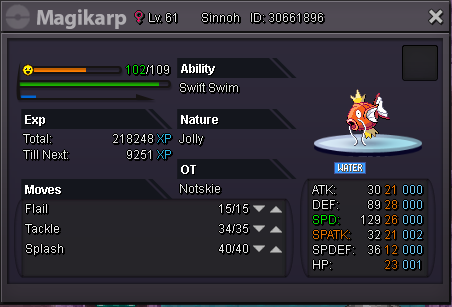
-
ncie guide..very useful..thanks
-
nice guide, but correction I believe it's Articuno, not Zapdos :)
-
yeah just log in also. thanks for the info
-
yeah can't see server status also
-
yeah, don't know what seems to be the problem, since I have a good internet connection. :(
-
unable to log in to gold server, but able to log in to silver server :(
-
Hi @ Shinohara, Yes I also found Kylo he's in the left corner of the mauville game corner. :)
-
I already find tukul, he's in the west corner of the pond in route 117. Thanks for the help though, appreciate it. :)
