




New Trade Zone
Trade Zone is now live
Use the new Trade Zone for auctions and instant-price trades so Pokemon and item offers are easy to find.


Mysticwind
Registered User
-
Joined
-
Last visited
Everything posted by Mysticwind
-
MysticWind Silver
-
Bumperinos
-
MysticWind Silver
-
MysticWind Silver
-
Buy Hibiscus/Jasmine and Hotdog
-
MysticWind Silver
-
Start Scyther
-
Sadly Wattrel is not in game but you can use wiki to search for a pokemon or a route spawn informations : https://wiki.pokemonrevolution.net/index.php?title=Main_Page Or joining PRO discord and using Reborn bot in bot-command channel.
-
Hello, Are you sure that a pokemon in your pc dont hold it ? You can only obtain 1 EXP share per account
-
+1
-
GGs to Manav861 for winning!
-
Hello, Have you done this ? Travel to Ecruteak City and talk to Scientist Rey at the Bell Tower Entrance. If you are Johto champ, he will ask you if you can help him, and his researching team, since you have the Pokédex. Now head to Scientist Rey inside of the building and interact with him. He will ask that you return to him when you have the seen data of all three Legendary Beasts. Fight your way through the Bell Tower Basement and interact with the three Legendary Beasts, which will then flee. Now you can obtain their seen data by battling them. More informations about quest there: https://wiki.pokemonrevolution.net/index.php?title=Legendary_Beasts_(quest)
-
Bump, will be cool for druddigon mount for example!
-
-
-
You need to finish it to get your pokeball back. Pinkan island lock your ball during the quest.
-
Hello, have you started Pinkan island not long ago and didnt finish the team rocket quest?
-
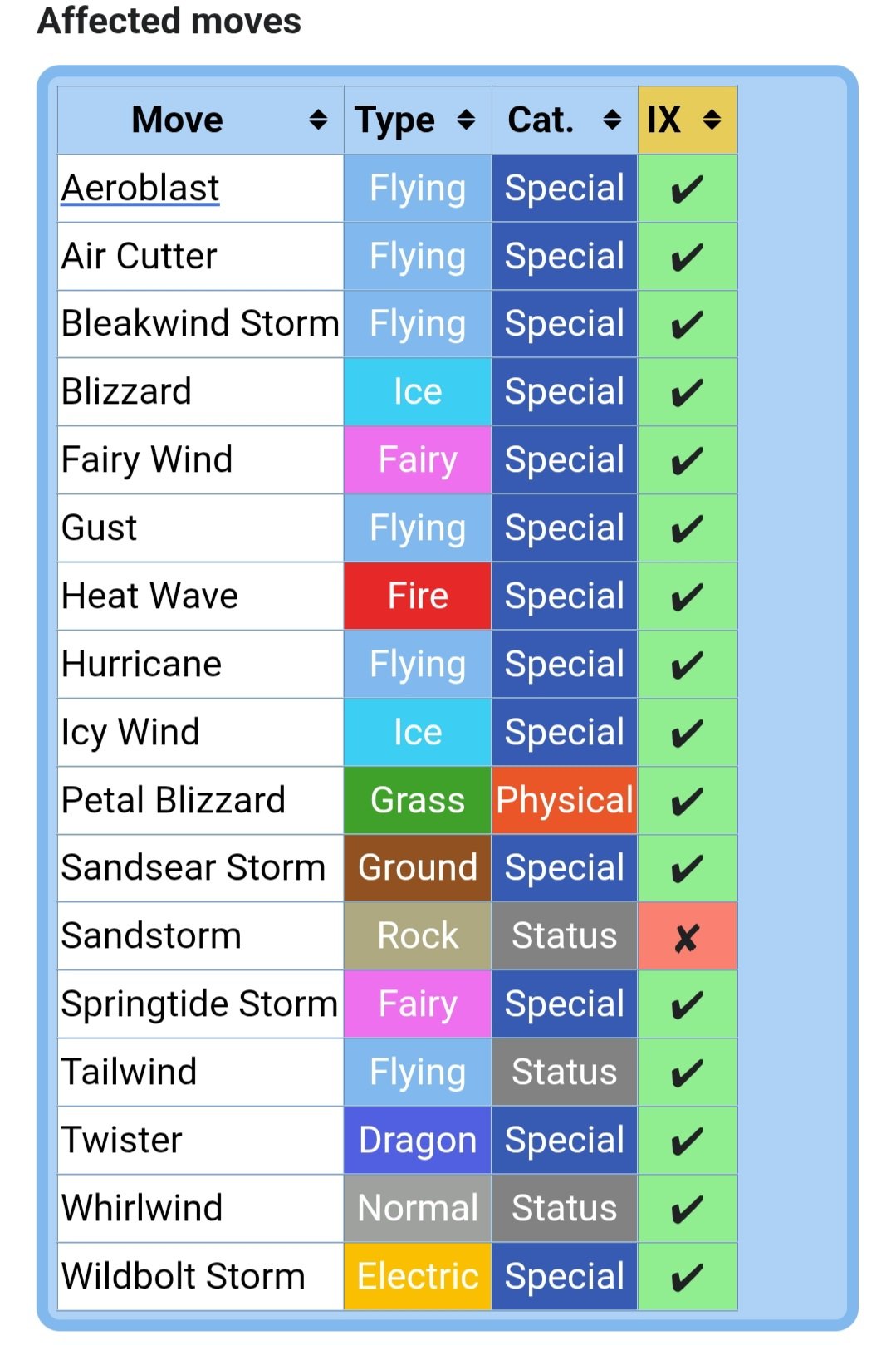
@Hasanchucha Here all the moves that will not work vs Wind Rider ability! Not only flying moves, as you can see here some electric/fire moves not working.
-
Hello, You have to fight Horon at Dark Valley (top of Necropolis) without a pokemon fainting. And you will be able to back in dark realm.
-
You need to do hard difficulty to get the Mega-Gengar outfit.
-
This spot is useless, you have to go left and take the ladder.
-
Bump.
-
Got it! If you wonder why Mewtwo and others big legends have the pokeball icon it's because they are miniboss, you are not able to catch them but you will get data.
-
If you fought them, you good. No need to catch them.
-
Hello, The Adamant Orb can be found in one of three different spots: The first two are in Eterna Forest Cave. This area can be accessed with Rock Climb, which can be found on Route 207. The entrance to the area that contains the Adamant Orb will be behind a tree and you can access the secret passage way to go up by using Rock Climb, then proceeding down the stairs. You will also need Rock Smash or a Pickaxe once in the cave. The third, and last, possible spot is the Old Chateau 2F, in the fifth room. Old Chateau can be accessed in the northeastern part of Eterna Forest. And here the wiki page for more informations: https://wiki.pokemonrevolution.net/index.php?title=Lake_Trio_(quest)

