




New Trade Zone
Trade Zone is now live
Use the new Trade Zone for auctions and instant-price trades so Pokemon and item offers are easy to find.

Athul123
Suspended
-
Joined
-
Last visited
Everything posted by Athul123
-
Theres a button near map called coins shop click it then click get coins u will be in a page from where u can get coins for real money
-
U can fight Nikola to catch it
-
-
Ya it will work thanks for help
-
Thise guides are before updation right?
-
Ok that was a mkstake from me I am sorry
-
Same problam for me also when interacted to those 4 balls 1st time I fought some wild pokes then when I interacted 2nd time it's showing nothing here so I can't recieve gs ball
-
How can I win bosses after updation?any suggestions?
-
+1 It costs 500 coins to change name which cannot be afforded by players like me
-
+1 it's a good idea and useful for newbies
-
Ok thanks
-
Any new region will come on pokemon revelution?
-
Can I replace mew with any pokemon?
-
When can i go to evrgreen?
-
Oh ok thanks
-
I can't win any boss because when I disable a move polemon attacks with another move
-
U want white angel wings?
-
Ok thanks for help
-
How can I get free rock helmet? Some guys said there is quest in nap town
-
-
I don't have discord any other way?
-
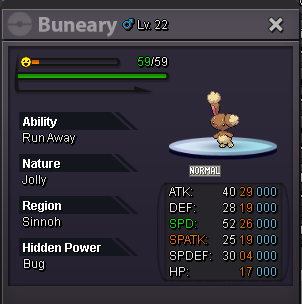
Buying this buneary jolly buneary
-
Buying jolly 26/29 hp bug buneary for 50k
-
Can u pls give a vedio guide thank you
-
Can u pls give a vedio guide too it will be helpful thx
