




New Trade Zone
Trade Zone is now live
Use the new Trade Zone for auctions and instant-price trades so Pokemon and item offers are easy to find.

Jarihallstrom
Registered User
-
Joined
-
Last visited
Everything posted by Jarihallstrom
-
Murky town quest, darkrai quest, baby xd quest, and gengar quests 1 2 and 3, How much and when are you available?
-
Hi are you available to take on a new account for a few hlw services?
-
Hi,, are you doing the hlw quest part service? If so, how much for eveything on the island?
-
Are you offering the Halloween Quest aswel?
-
Application Form Please answer honestly: IGN: Jarihallstrom Timezone: idk, what sweden has xD How many hours per week do you play PRO? too many, but when i have my kids im always off a few days What is your main focus? (PvP / PvE / Both) i main pve and hunt, but i want to get into pvp, its just hard. Have you been in a guild before? If yes, why did you leave? Toxisity and other people grouping up and not letting a new person in is a huge turnoff, everyone should feel included imo. When did you start playing Pokémon, and how long have you been playing PRO? i started playing on my brothers account hundreds of hours, remember getting mew, then he got banned and went to prison since then ive accumulated hundreds of hours on my own account (see card above) and i ofc have alt accounts aswel. Culture & Knowledge: 7. What is one Pokémon you think is underrated and why? rattata, built correctly a raticates hyper fang is a deadly thing. 8. What is your favorite held item and how do you use it? macho brace left overs and berries, since i train alot, 9. If Phantom hosted a BBQ, what would you bring? My imaginary friend and a glass of rum and coke Final Question: 10. What made you choose Phantom, and what can you contribute? This "tech" isnt my best subject, i play pro because i played the old game boy games and its nostalgic, and the social part of it is a super part. So i got linked here by a friend and here is my application, what ill promise to bring is a smile :) ━━━━━━━━━━━━━━━━━━
-
Does posts get deleted here sometimes? BC i could have sworn i applied but cant find my application :/ just posting my card this time
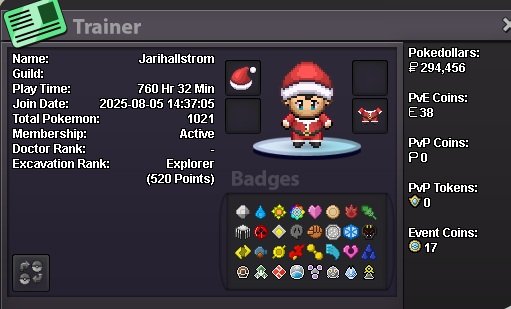
-
IGN:-Jarihallstrom How old are you?: 38 Are you active in Discord?: Yes, v much so Where are you from? : Sweden/Finnland What's your total playtime? : 760h on main acc, but shared an acc with a family member be4 he went to jail that had aloot aswel. What's your goal in PRO? : Hunt, pass time, get the distraction i need from life whilst having a good time making new friends. What do you enjoy while playing the game? : Hunting, bantering on disc and events, bossing and TRYING too learn PvP atm. Why do you want to be part of the guild? : Heard the name and thought it was cool, and reading the intro im sure it is :) What's your favourite Pokemon and why? : Breloom, got the same summer mount as the summer brelooom im hunting with in my xmas suit. Red is my colour <3
-
Not sure if this is silver or gold,.. But if its silver here's my application! What is your IGN? Jarihallstrom Where are you from? Sweden-Europe Highest rating achieved: N/A How old are you? 37 Discord ID: jari.hallstrom (displayname - D Identity D) Why do you want to join Empire? Only ever played pve, and wanna get into it, so thought id try and learn from the best and make some friends along the way. Left Silver Nabs recently due to a disagreement, i reported a RMT and it was like everyone turned against me for doing the right thing. Just wanna be as open as possible going into this since ill prob never change guild again lol.
-
Any working counter at all atm?
-
Does anyone have a new download link? Current one dont work.
-
Jarihallstrom on silver. I just want to add what a wonderful thing to do for people, bless you <3
-
I cant say how much i love this guide, best one 😂
-
