




New Trade Zone
Trade Zone is now live
Use the new Trade Zone for auctions and instant-price trades so Pokemon and item offers are easy to find.
.jpg.a0260ce0dc8c40eee6869c9d8dabfa69.jpg)

0danobunaga
Registered User
-
Joined
-
Last visited
Everything posted by 0danobunaga
-
Player name : 0danobunaga Showdown name : Ilovekillhunter Server : Silver Timezone : GMT +8 Rank on Ladder : 3
-
Here we go again?
-
Looking family member ^^
-
check ur dm ^^
-
Bump
-
Bump looking family member ^^
-
I not really like the Baby XD001 current set but I can suggest this set Item : Light Clay Ability: Multiscale Move: Reflect, Light Screen, Roost ,Thunder Wave/Toxic/Shadow Storm I suggested this set because since Baby XD001 has low Special Attack and Attack in Random Ranked and has good Defense and Special Defense, so Baby XD001 can become a supporter will be better in Random Ranked with using Reflect and Light Screen. Futhermore, Baby XD001 use Roost can live and support pokemon longer in Random Ranked with Multiscale ability.
-
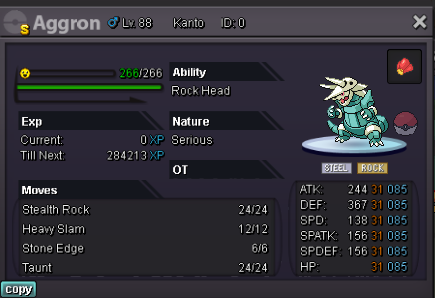
Chople berry set Aggron lvl 88, change to Head Smash move instead of Stone Edge move since Aggron ability is Rock Head(do not take recoil damage). At the same time, Head Smash accuarcy is 80% same with Stone Edge however Head Smash(150) more powerful than Stone Edge(100).
-
bump
-
Bump
-
Check ur dm^^
-
Player name: 0danobunaga Showdown name:Ilovekillhunter Server:Silver Timezone: GMT+8 Rank on ladder:2
-
Bump
-
Please check ur dm ^^
-
Better change it random monotype instead of random lc
-
Bump
-
Player name: 0danobunaga Showdown name: Ilovekillhunter Server: Silver Timezone: gmt +8 Rank on ladder: 2
-
bump
-
check ur dm^^
-
Looking new member 24 slots for genesis
-
check ur dm^^
-
check ur dm ^^
-
Looking new member 24 slots for genesis
-
This thread just for weird set in random ranked battle to let dev remove set Example:
-
Bump

