New Trade Zone
Trade Zone is now live
Use the new Trade Zone for auctions and instant-price trades so Pokemon and item offers are easy to find.

Voldis4
Registered User
-
Joined
-
Last visited
Everything posted by Voldis4
-
just be patient.
-
Welcome! Have fun playing!
-
well do you know u can skip that by speed up the dialog at options right? if you put at max , will remove every animation in battle,but yes i agree .
-
i love the itachi one . whats your price?
-
well trained. u can sell it for alot. lvl 100 spatk and speed. and is a really good pokemon.
-
2h 15 mins eta. like they said ingame. is a update.
-
yes. Will detect "trojan" but is not a virus is a file that works with the pokemon revolution.
-
Hello . is the windows defender/ antivirus blocking . just move to quarentine and add a exeption. i will add the fix here. 2- guides 1/2 https://pokemonrevolution.net/forum/topic/86887-url https://pokemonrevolution.net/forum/topic/86857-url
-
Bem vindo!
-
Same happen to me today check my post here https://pokemonrevolution.net/forum/topic/86887-url
-
Hello my name is Diogo from Portugal I have been playing Pokémon from very first release "blue" version at gbc and i did finish all dex. I love silver version from game boy. That was amazing game I wasted hours and hours. Today, I work in a cloth shop and fixing pcs/coding, so I don't have to much time to play and to add I draw and paint. Recently I started to draw anime to follow my dream, do a famous manga. I play in the vacations events or a few hours when I not to tired. When I saw this game I was like oh this is awesome idea I love to play this game, I'm a greatest fan of the art and coding, thinking on all players that plays this game. I like a lot the system and hard work from all staff team that's make this game to much interactive and awesome, the support from both sides players and staff is amazing and I just here share my opinion and introduce myself because I was afraid of doing this at the beginning so will do now after playing 1.7k hours on this game. Thanks very much for all this experience and nice to meet you guys!
-
Nick: Voldis4 SERVER: Blue Fist time drawing a pokemon, also this is my favorite Leaf Pokemon from the few i like. https://ibb.co/fCDxsx

-
HERE.- Trojan detection is inoffensive. is not a trojan but detects like one. https://pokemonrevolution.net/forum/topic/86887-url
-
FIX HERE. https://pokemonrevolution.net/forum/topic/86887-url
-
HERE! THIS WHAT YOU NEED TO DO https://pokemonrevolution.net/forum/topic/86887-url
-
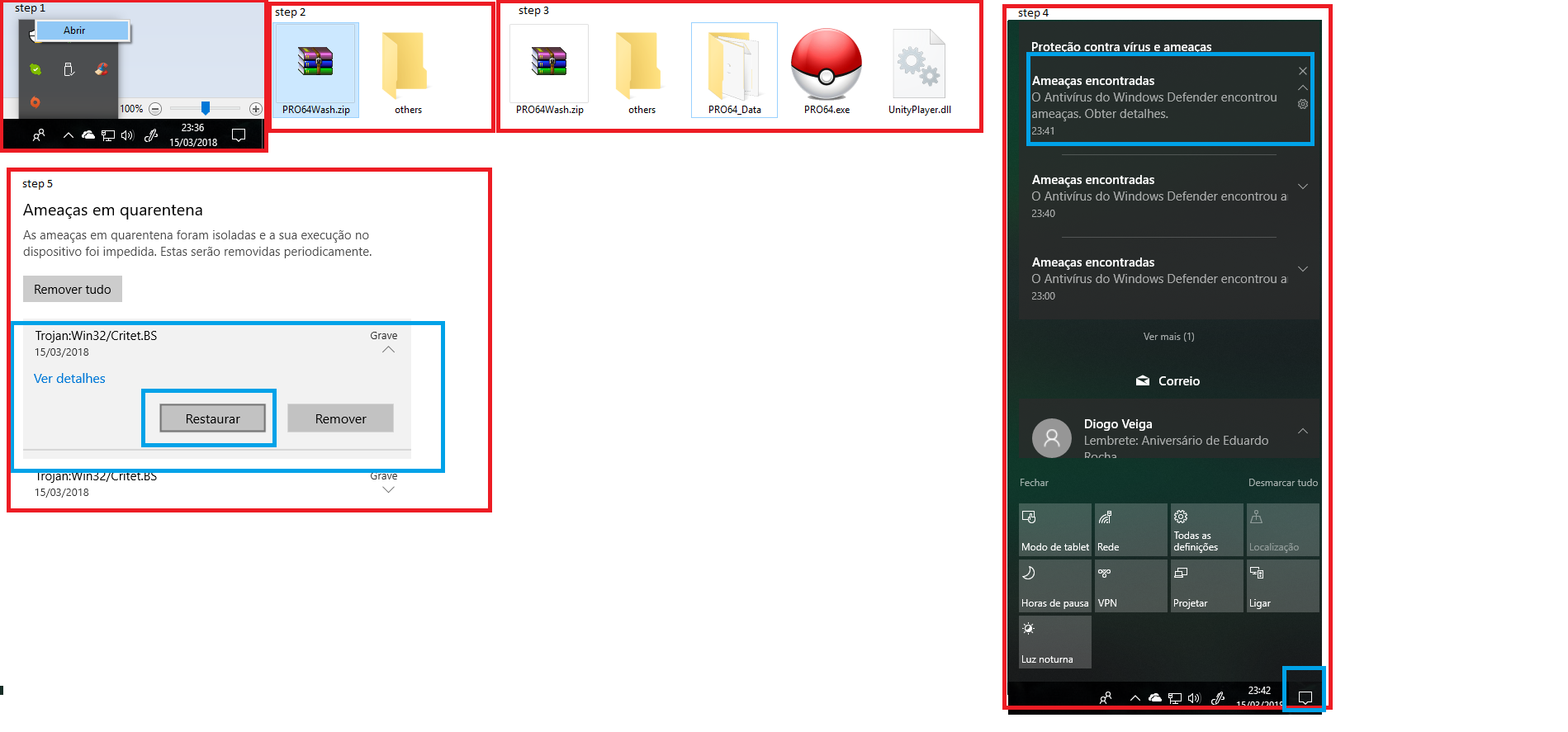
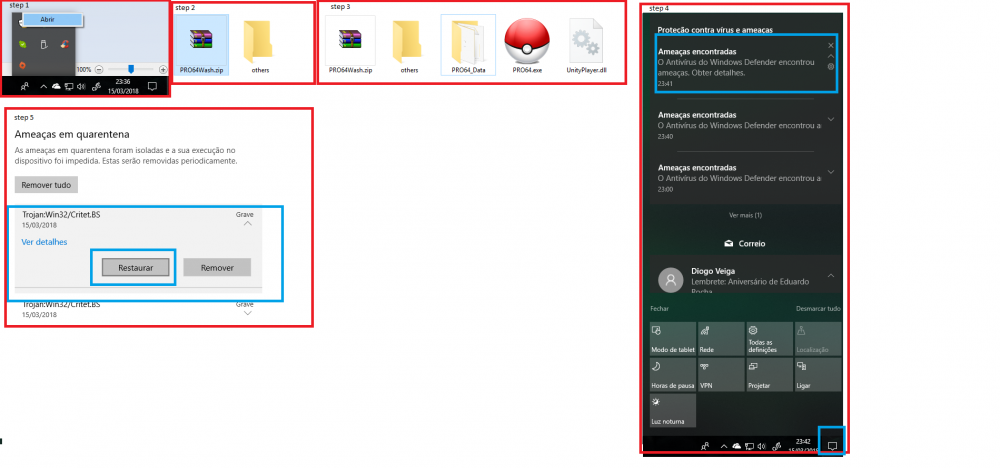
So apparently for some reason the game opens and doesn´t load or even in some don't even run. There's the guide for you. The reason is very simple, the windows defender or the antivirus on prowash version to windows version detects a trojan , that is a file that is inoffensive and only make the pro running, so is 100% secure. Before you test and try doing this make sure of: close the game try to re-open. (dont work) re-download.(dont work) run as admin(dont work) comp-w7 (dont work) turn of my windows defender(dont work) run in a pen(dont work) open at my labtop same problem.(same problem) solution: HERE IS WHAT YOU NEED TO DO! STEP 1 - OPEN THE WINDOWS DEFENDER AND TURN ON! STEP 2 - REMOVE FILES AND UNZIP AGAIN. STEP 3 - OPEN THE GAME AND CLOSE IT. STEP 4 - GO TO WINDOWS BALLON IN THE RIGHT CORNER AND OPEN THE "VIRUS SCAN". -> others antivirus just go quarantine and jump next step. STEP 5 - AT QUARANTINE RESTORE THE FILE. STEP 6 - OPEN THE GAME AGAIN (FIXED) (ADD A GAME FOLDER EXCEPTION AT WINDOWS DEFENDER, TO DONT HAVE A FUTURE PROBLEM. ) Add the Folder exeption: 1- at the folder right click and click "analyse with windows defender"/open windows defender or antivirus. 2- go second slot and select exclusions. 3- add the pro folder.
-
sempre deu ?
-
hello, for retrieve a pecha berrie for the captain /medic quest you need to: 1- start talk again the medic at the kitchen(will give the berry again) 2- talk with the kadabra guy near the captain room 3- search for blisey at balls room near the rival. 4- get the potion to captain /bypass guard. 5- find leftovers at the ship before leave. 6- leave a like thanks XDare only locked now XDHello , do that question here: https://pokemonrevolution.net/forum/index.php?forums/donation-and-coins-issues.43/serve, então quando instalares o gpu diz alguma coisa. já agora dá liek ai em todos os pots que eu dou nos teus XD para ganahr likes aqui .entao dá , XD instala isso , vai te resolver . lembrança: não te esqueças de ver se a tua fonte também consegue aguentar os wt's a mais que vais adicionar. sim deves por windows 64 bits. já que tens 4gbs^sobre isto yah tás a usar o gpu do teu processador. Slots PCI Express x16 -> qual é o gpu que comprastes?qual é a placa? já a instalas-te? se já faz a inatlação da driver. se não yah é esse o problema . o jogo fez update grafico +/- depois do client do xmas. é por isso