




New Trade Zone
Trade Zone is now live
Use the new Trade Zone for auctions and instant-price trades so Pokemon and item offers are easy to find.

Dlinknotgood
Registered User
-
Joined
-
Last visited
Everything posted by Dlinknotgood
-
-
-
-
Dlinknotgood Silver -3 25th
-
Nome de usuário: dlinknotgood Servidor: gold País/fuso horário: Brasil gtm-3
-
UP!
-
Epic Amoonguss BOLD HP FIRE Start: 8M Min bid: 100k No Insta 3 Days auction after first bid! Godly Volcarona BOLD HP ICE Start: 8M Min bid: 100k No Insta 3 Days auction after first bid! Godly Excadrill H.A 31 SPEED 21+ Start: 16M Min bid: 200k No Insta 3 Days Auction after first bid!
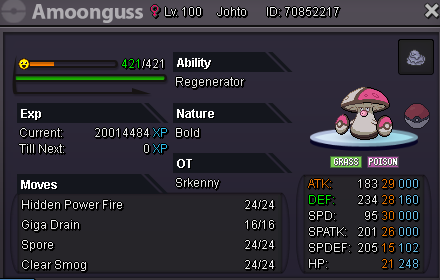
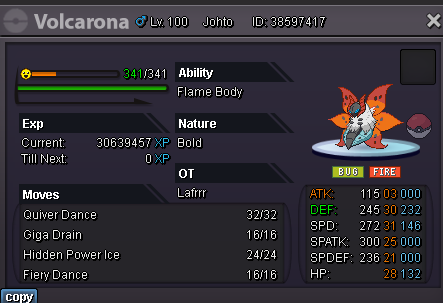
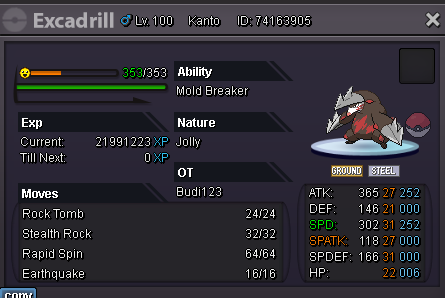
-
-
Brandonlee1 Silver Top25 / GTM -3
-
7.9 ^^
-
7.6
-
6.3m
-
6.1m
-
1.5m bisahrp
-
1m bisharp
-
+1 for change it back, another point is that, this would not change and would not affect anything in the mechanics of the game, I hope that the staff will give a better answer than, "let's not change it back". What positive does this change in happiness bring in addition for players ? You limit some pokemons to be lent between friends and guild mates. (Pinsir, Lops, Diggersby...etc) That is, if you don't go after these pokemons from today, you won't be able to use them, because nobody has the patience to keep increasing or decreasing the happiness of the pokemon in each trade.
-
4.2m
-
4m
-
3.8m volca
-
2m
-
Start
-
-
-
silver server, waiting in saffron
-
11m
