New Trade Zone
Trade Zone is now live
Use the new Trade Zone for auctions and instant-price trades so Pokemon and item offers are easy to find.
All Activity
Past hour
-
Tcpjrakm joined the community
-
Cornhurb joined the community
-
Stinkmaster joined the community
-
-
-
Butqepgp joined the community
-
Xovierexisted joined the community
Today
-
Shrekamor joined the community
-
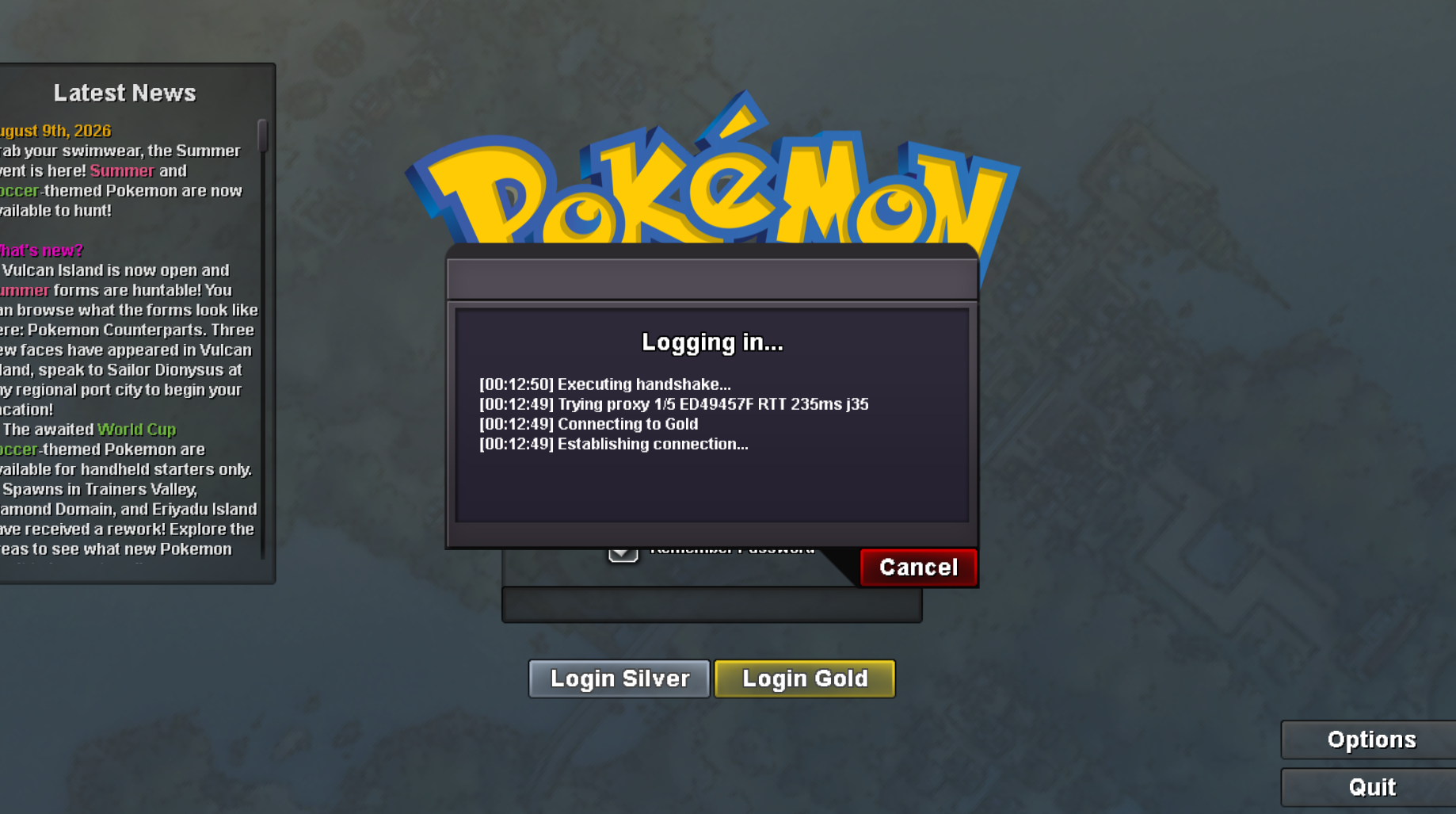
Sometimes when I try to log in to my account on the Gold server, it gets stuck at the login screen(as shown in the attached screenshot) and doesn't proceed. But when I log in to the Silver server using the same account at that time, it works fine. Could someone please help me resolve this?
-
Uafxlyzd joined the community
-
Twinsoul joined the community
-
Luckymx7 joined the community
-
Sid357 joined the community
-
+1
-
Hello @Daworker Sorry for the late reply There are no collision detection points here, which is why you can't find any Pokémon Unfortunately, we can't do anything else with this type of configuration; otherwise, you might "jump" over the cliff Have a good day Frukti
-
Hello! I'm sorry for the delay. You shouldn't have any issues entering the Cave of Origin, as the playtime requirement for all quests has been removed. However, if you run into any trouble, please send me a screenshot. Kind regards. Hallowglow.
-
Ty Nodimbo
-
Hey PROTeam,I Am Tantankare67 , this is my own suggestion which I can relate very much. So, I am a grinder who just does grinding with one hand and eating with one hand. One day when i was eating my friend messaged me in-game. So I saw a problem that when we talk in "All", "Trade" chat, we can just click enter , then enter our message and click enter to send it in that particular chat. But when we talk in game with our message using social, we have to click the box with our mouse then type and click enter to send. So, I was thinking that in the game's setting, if there would've been an option called "Message Hotkey : ". We can put our key buttons like " ` " or "tab btn" to enter chat with our friends. And for global caht there can be a option called, "Global Chat Hotkey: " we can just use the enter or any other key. I really think this is an innovative idea and would help a lot of player in faster HUD control. After changing the hot key the sentence can be like "Click ` to chat."
.png.22479ede1189dd8e55b54e2a0a4969d9.png) ^bumpAlguma guild br ativa? Completei sinnoh e estou realizando a quest pra liberar pinkan island. Quero aprender mais sobre o game. Sou ativo.upShortly after I started playing the game I purchased a couple of things from the coin shop including the head but tool I have everything else still that I bought including the pickaxe, axe, and shovel but the head butt tool itself went completely missing and I'm not sure when that happened. i'm on the silver server!Do you intend to sell it?and btw top 3 minimum is 152 points, and for worst you need to do lower than 29 ivs, 2 days leftguys, submissions in discord please, read the rules :)Hi :) I accidentally released my false swiper can you please restore it. ID : 80154853
^bumpAlguma guild br ativa? Completei sinnoh e estou realizando a quest pra liberar pinkan island. Quero aprender mais sobre o game. Sou ativo.upShortly after I started playing the game I purchased a couple of things from the coin shop including the head but tool I have everything else still that I bought including the pickaxe, axe, and shovel but the head butt tool itself went completely missing and I'm not sure when that happened. i'm on the silver server!Do you intend to sell it?and btw top 3 minimum is 152 points, and for worst you need to do lower than 29 ivs, 2 days leftguys, submissions in discord please, read the rules :)Hi :) I accidentally released my false swiper can you please restore it. ID : 80154853 Please Help, at some point in the last week and a half I must have released my level 100 fully trained Pangoro. It is adamant with ability mold breaker and it's for my boss team can you please help me get it back?+1
Yesterday