New Trade Zone
Trade Zone is now live
Use the new Trade Zone for auctions and instant-price trades so Pokemon and item offers are easy to find.
Leaderboard
-
Azrielyang
Registered User8Points161Posts -
Henry001
Registered User7Points156Posts -
Javiisito
Registered User6Points37Posts -
Itoennazo
Registered User5Points73Posts




Popular Content
Showing content with the highest reputation on 06/14/25 in all areas
-
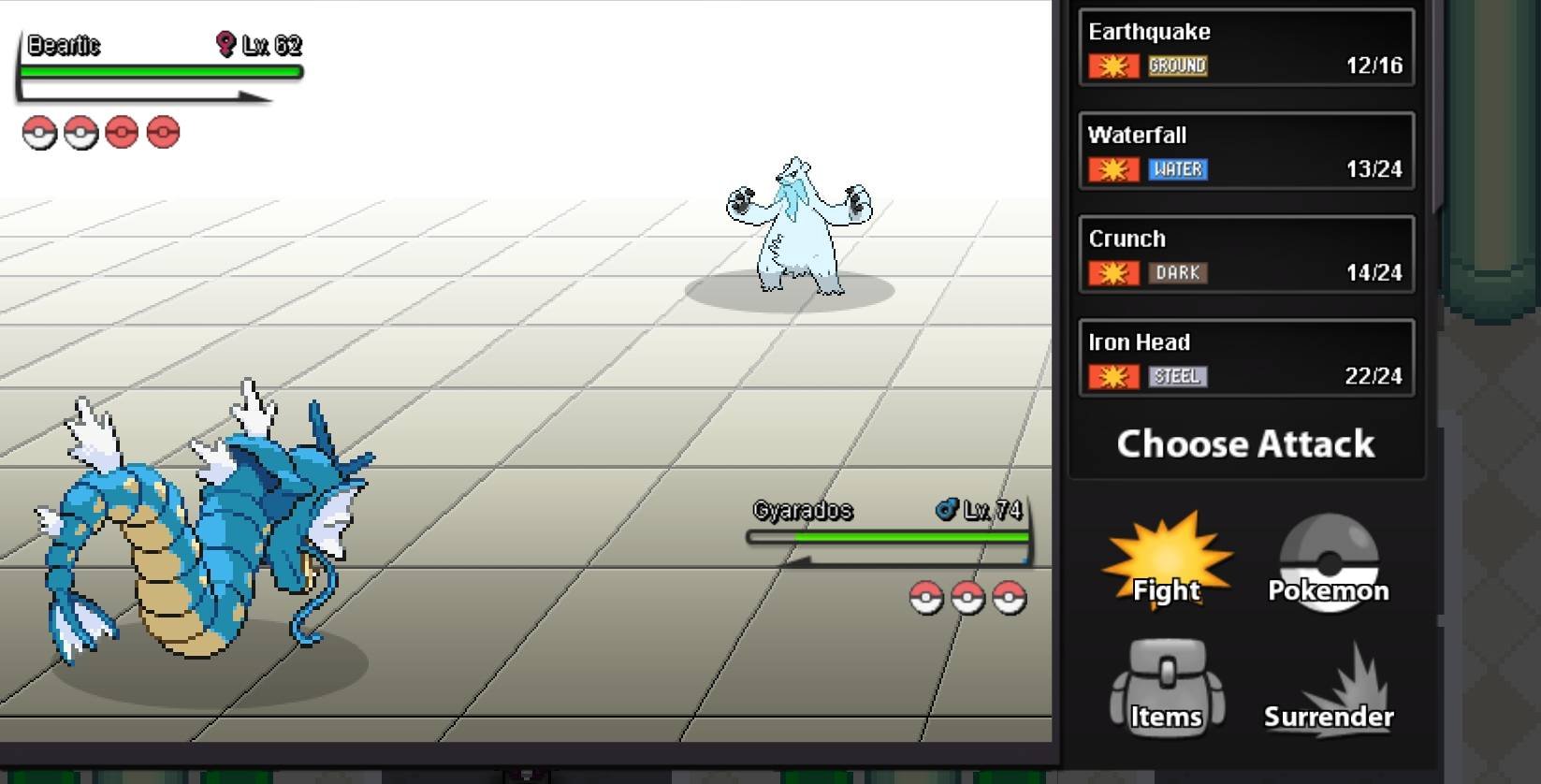
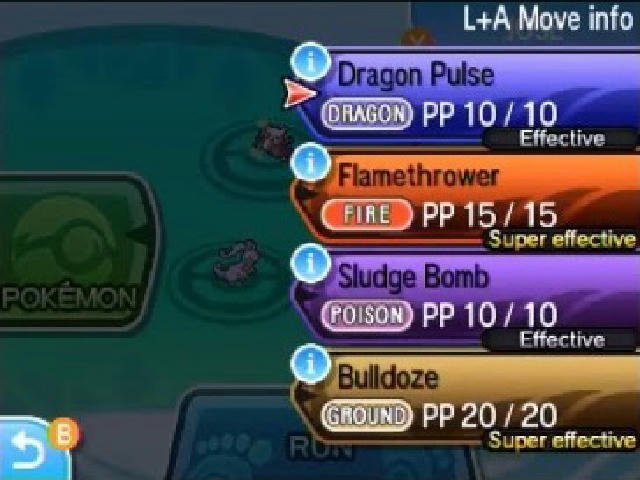
2 pointsI am not sure if this would be possible to implement. But I would like to suggest color coded battle moves. In Pokemon, moves are color-coded to indicate their effectiveness against different types. Green means the move is super effective, orange means it's not very effective, and red means the move can't hit that type. For example in the below screenshot. Gyarados Iron head would be in green text instead of white which would suggest it would be super effective. Another option, if possible, most handheld games would even say under the move if it’s super effective against opponent pokemon. I think this would be a great QOL improvement especially for new starters in the game and for people that casually play. Remembering the whole type charts and other pokemon typings can be a bit difficult. Would save time from googling types. Also would be handy in randoms when you’re facing pokemons you don’t normally see or unsure of.
 2 points
 -
2 points
-
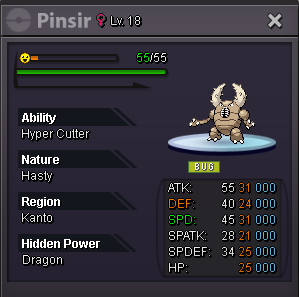
Starting price: 500k Min bid: 100k No insta 48h Auction (Ends Monday 16-06-2025 19:29 pm) 15min Auction rule : Enabled Payment methods: Pokedollars Coin Capsule:470k
 1 point
 -
1 point
-
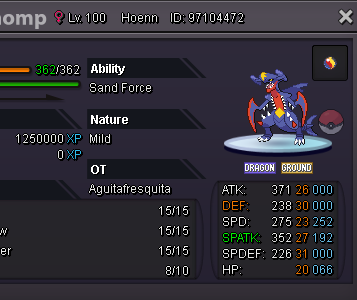
[ Auction ] Mega Garchomp 20+ Starting Offer Each : 200k Min. Bin : 50k all ends aution 48h left >> No Insta << Accepted Payments : Pokedollars / Coin Capsule ( 450k ) / IV reroll ( 600k ) / nature ( 300k ) infernape Kommo-o Alomomola
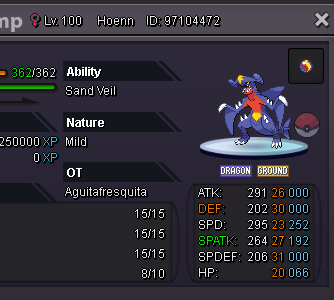
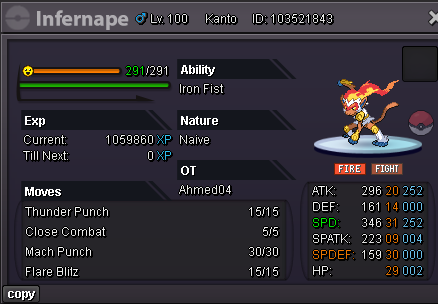
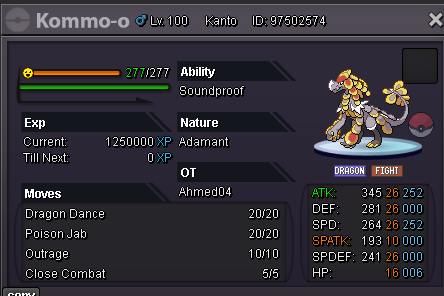
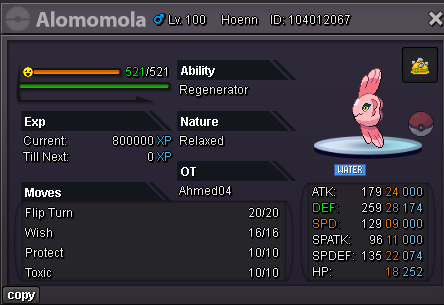 1 point
 -
1 point
-
1 point
-
1 point
-
1 point
-
1 point+1 but could be some icon added instead of colour. Another cool thing would be when we drag the mouse to have an ETA of possible damage it can deal. Minimum damage % would assume if opponent Pokemon had 6x31 and maximum damage % would assume if opponent Pokemon had 6x1 . That way won't spoil the IVs of the opponent, but would help us calculate how damage we would deal.1 point
-
1 point
-
1 point
-
1 point
-
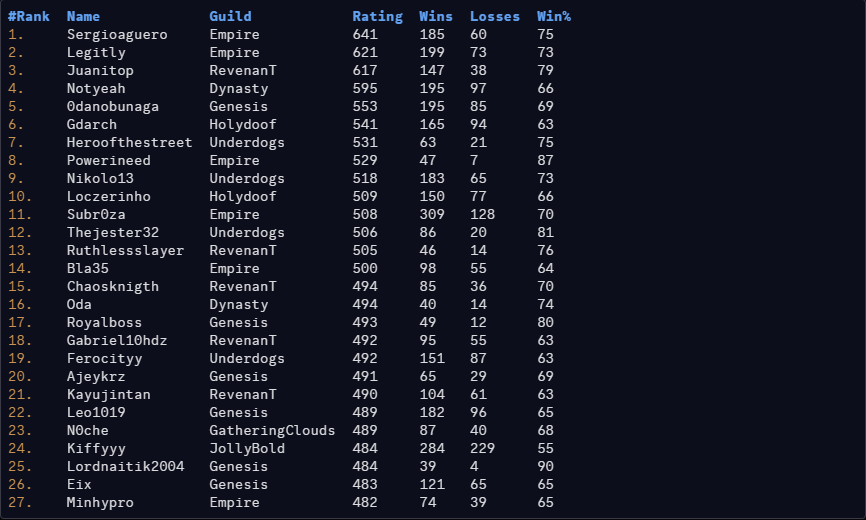
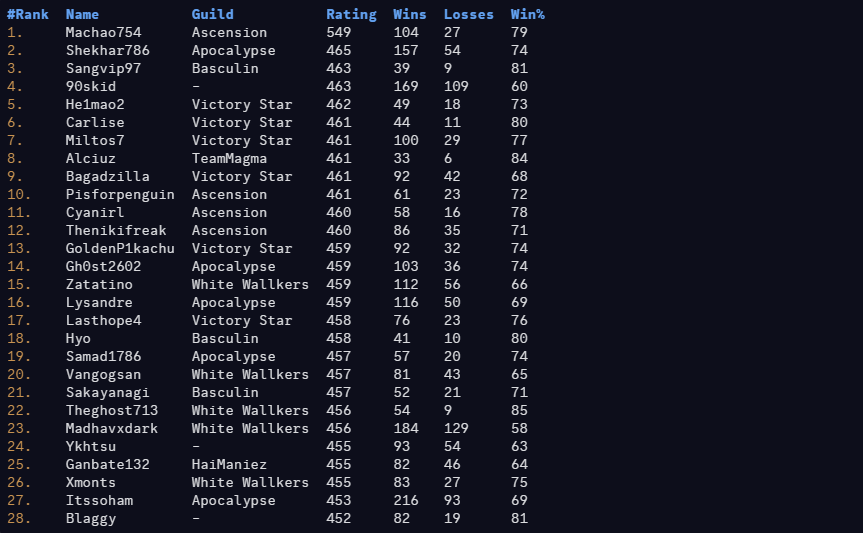
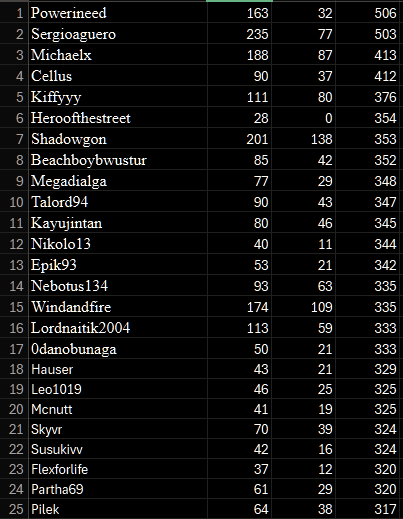
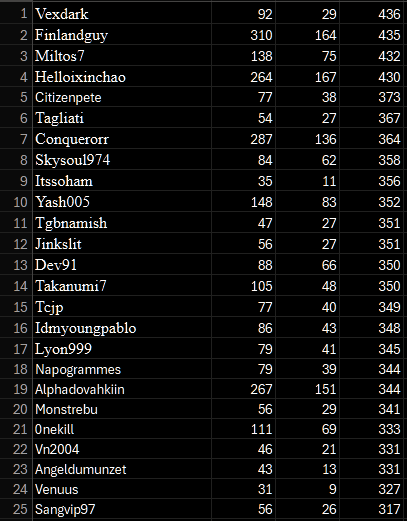
1 point1 point1 point1 pointGreat service by @Envymeister fast and reliable, highly recommend to anyone looking for help with Z crystals1 point1 point1 point1 point1 point1 point1 point1 point1 point1 point1 point1 point1 point1 point1 point1 point1 point1 point1 point1 point1 point1 point1 point1 point1 point1 point1 point1 point1 point1 point1 pointHello @Halinh. Every player has been pertmitted to have up to 4 accounts. Since you do not own (changed email and password) your friend's account and vice versa, this account will not count towards the 4 accounts. You are allowed to log in for help, but make sure you are aware of what your friend does to your account and vice versa. If you do get banned, please appeal in Appeal Section with detailed explanation and evidence; a staff member will have a look at it and deal accordingly.1 pointHey there @Arne15 You have to move west after you have defeated the grunt in front of you, then you can beat the next grunt you meet to proceed further to grad the remote and the path on the east opens. Let me know if you run into any issues since this quest was recently updated and was found to have faulty variables. Make sure to include a screenshot of the issue you might run into, as far as I can see now, its not bugged for you. Take care for now, Fusionflair1 point1 pointHello everyone! Today we are announcing the results for last month's PvP Season Like always, we would like to thank everyone for giving PRO a competitive environment for another season. We would also like to congratulate each player and guild who made it to the top of the ladder, it's not an easy feat reaching the top. We all wish you the best in the next season. Thanks for participating! REWARDS: Normally, 1st Place will receive 600 PvP coins, 2nd place 595, and so on. Top ladder guilds shall receive 25% EXP Boost for the entirety of the next season! Additionally, Top 25 players from each server can: Access Tutor Heaven! Additionally with the PvP Chests update, an additional reward will be distributed in the following fashion: 1st Place: 5× PvP Chests 2nd–3rd Place: 4× PvP Chests 4th–10th Place: 3× PvP Chests 11th–19th Place: 2× PvP Chests 20th–25th Place: 1× PvP Chests RANKED LADDER RESULTS: Top 25 Silver Ranked Rating (No Tier Ladder) Top 25 Gold Ranked Rating (No Tier Ladder) RANKED GUILD LADDER RESULTS: Silver Guild Rating Gold Guild Rating RANDOM RANKED LADDER RESULTS: Top 25 Silver Random Ranked Rating (No Tier Ladder) Top 25 Gold Random Ranked Rating (No Tier Ladder) Disclaimers : Results may have a marginal difference to ones recorded by other players. The results taken were taken seconds before the ladder was reset, whilst the servers were offline. If you used a Discord bot, or gathered your own screenshots earlier than us, your results may be inaccurate. If you are or aren't on the ladder when you think you should/n't be, please contact a Moderator via Discord DMs or Forum Thread. Please note that users with the exact same rating may switched positions during the reward process, we have no influence over that.


 1 point