New Trade Zone
Trade Zone is now live
Use the new Trade Zone for auctions and instant-price trades so Pokemon and item offers are easy to find.
Leaderboard





Popular Content
Showing content with the highest reputation on 11/03/26 in Posts
-
The Trade Zone was a very positive addition to the game; I managed to make plenty of sales and some great purchases. I even got hooked on auctions at the start. 😂 However, lately, I find the Trade Zone a bit cluttered with too many listings from the same player; this makes it hard to spot cool Pokémon—ones you might have favorited or that come with great offers—amidst the noise. I know there’s a filter for specific Pokémon, but if you rely solely on filters, you might miss out on cool Pokémon you weren't actively looking for but that are priced really well. With that in mind, my suggestion is simply to limit the number of listings per player. For example: a player could have a maximum of 10 active auctions and 10 active "instant buy" listings (I actually think 10 is already a lot, but fair enough 😅). For players with a large number of Pokémon for sale, the right approach would be to open a shop to showcase them. That way, things would be more organized, making it easier to view all the listings without having to scroll past 50 "instant buy" Pikachu listings from the same player. 😅😂1 point
-
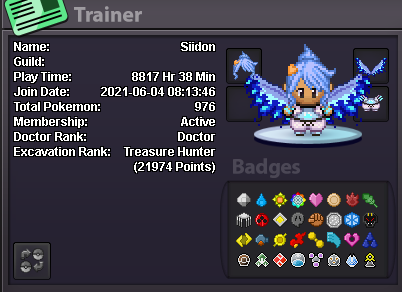
Hey everyone! I'm currently looking for a team or guild on Silver Server to unlock the Halloween Hunting Grounds and go for a 12-hour hunting session. My goal is to grind as efficiently as possible and achieve the highest score ever. I'm willing to commit the full 12 hours without a break and would love to team up with players who are equally motivated. If your team has a free spot or you're putting together a group with the same goal, feel free to DM me! Discord: not_siidon Disclaimer: This post was written by AI. Humanity has created artificial intelligence, yet finding four people to click on Pokémon for 12 hours remains an unsolved problem. Incredible progress.
 1 point
-
xD Disclaimer is awesome. Its a shame most the threads are dead. I am also looking for a guild but wont commit to 12 hour hunt haha.1 point
-
Hi @Daworker , Sorry about the bug, but thank you for reporting it. The team is aware of the issue and its being looked at, but I do not have an ETA on when a solution will be implemented. I'll let you know when it's patched. Until then, happy hunting!1 point
-
1 pointHappy to be an Elite Emperor, and you will be too!1 point
-
1 point👑 ELITE EMPEROR – MORE THAN JUST A GUILD! 🔥 Elite Emperor is not just a guild, it's a family built on loyalty, unity, respect and teamwork. ❤️ Our strength is not just in our power, but in the bond we share. Every member is valuable, every battle is a statement, and every victory reflects our unity. ⚔️ We don't follow others, we create our own legacy. Our name speaks for itself, and our attitude says it all. ONE GUILD, ONE FAMILY, ONE LEGACY! 👑🔥 WE ARE ELITE EMPEROR! 🖤1 point
-
1 pointwe guys support every guild member and take care of everyone whether you are looking for guidance or help1 point
-
1 point+1 very supportive guild im glad to join here1 point
-
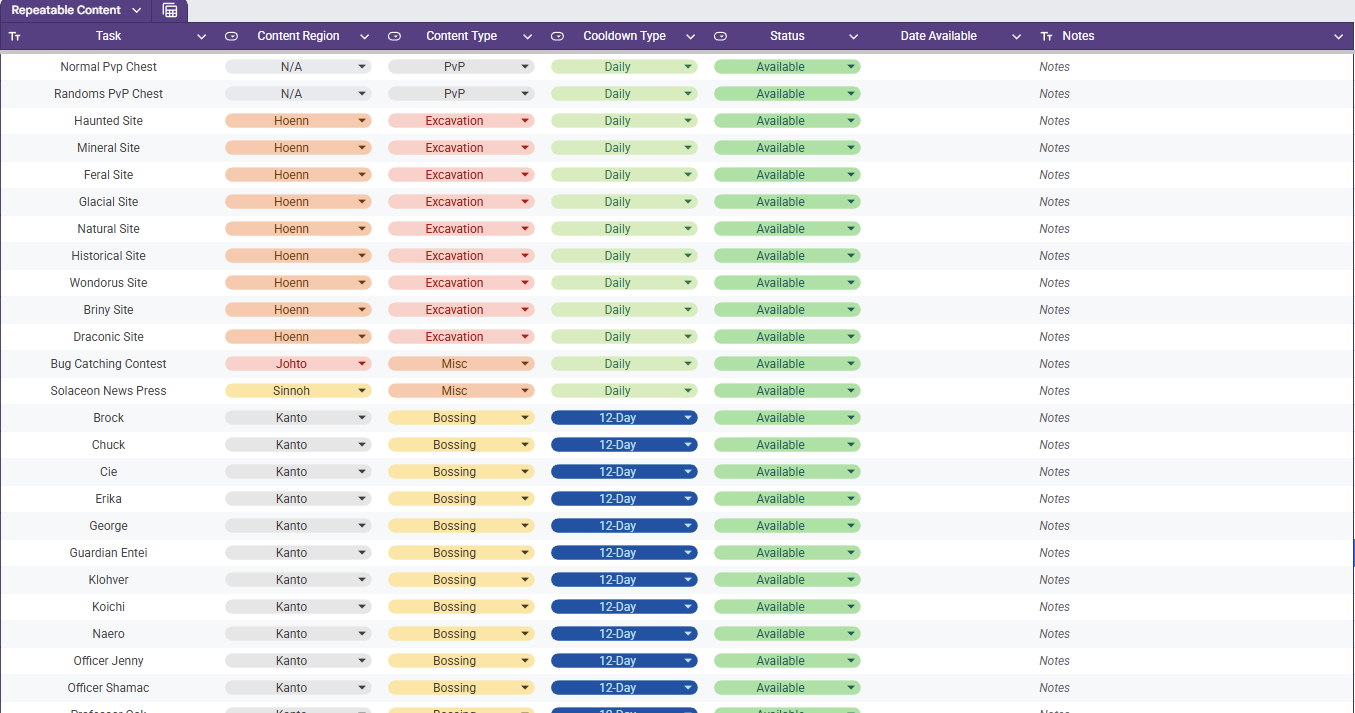
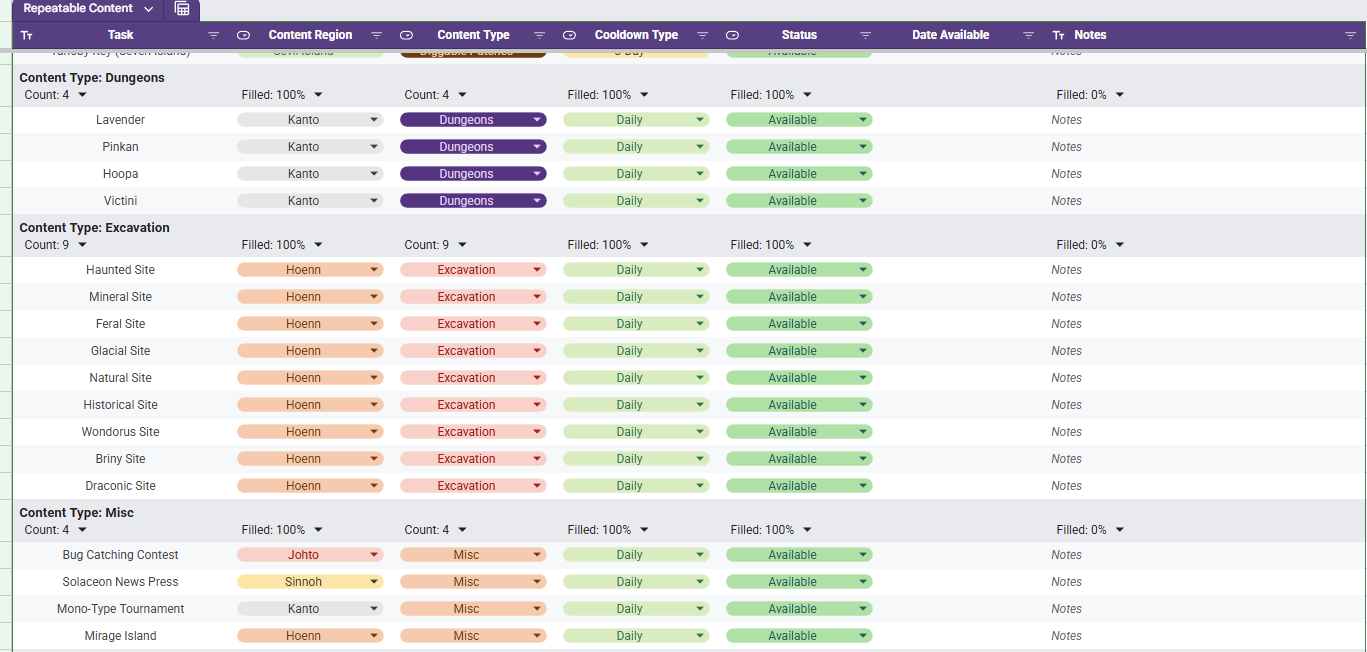
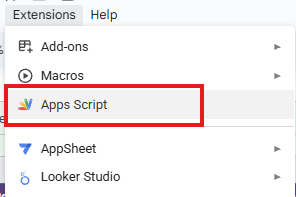
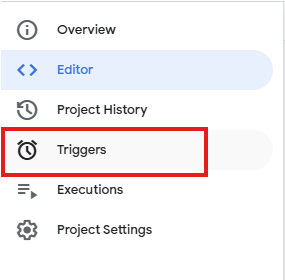
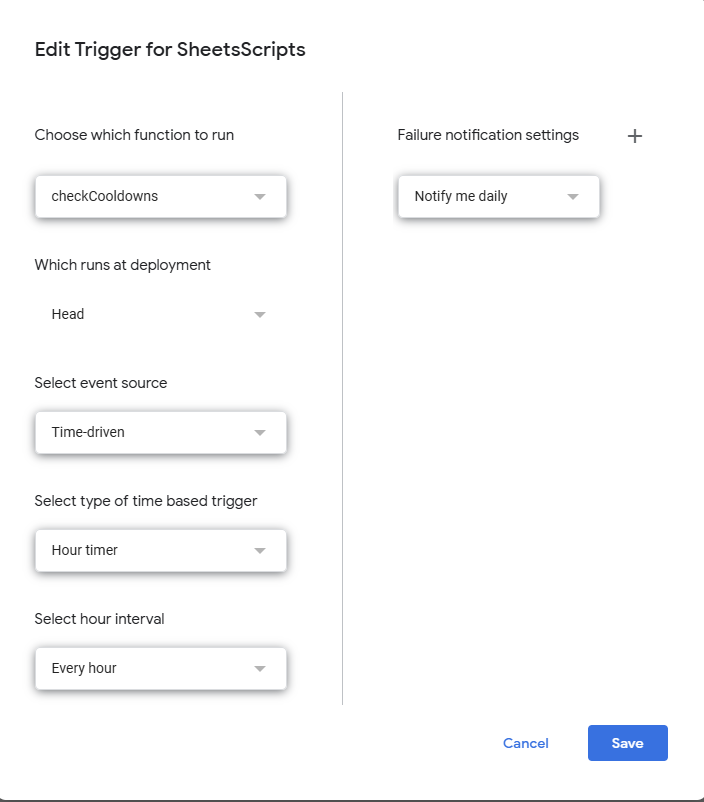
Repeatable Content Cooldown Tracker Tired of having to try to remember if your repeatable content is off cooldown or wasting your time making your way to dome content to realize it's unavailable cause you already did it? I know I was as well, so I made a spreadsheet (those who know me know I love my spreadsheets). Specifically, this spreadsheet lists out repeatable content (Dailies, weeklies, etc) and gives your the ability to mark it as on cooldown or available. While it sounds simple, there is a bit more luxury in this tracking tool. Once you set something as on cooldown the corresponding cell in the Date Available column will auto populate the day that it is to come off cooldown (In the case of Excavation sites, it calculates it with date and time and checks for exactly 20 hours). If the spreadsheet receives an update, then you will need to make a copy of the updated one if you want to have the new / fixed functionality. How to Acquire The first thing you need to do is acquire the spreadsheet with the following steps. - Access the Google Sheets link here. - At this point you are a Viewer and will need to make a copy by clicking File and then Make A Copy - Once you have a copy made, you are ready to track your Repeatable Content. How to Use The first thing you need to do is set your specific time zone. This can be done be clicking File and then Settings. Once the settings are open you will need to set your specific time zone. Doing this will allow tie cooldowns to be set relative to your time zone. When the file is first acquired, you will see all of the listed repeatable content in a single table as seen below and the columns are broken down as follows. Column A - Task The daily repeatable task name. Column B - Content Region The region (loosely) in which the content is located. Column C - Content Type The group in which the content is associated with. Column D - Cooldown Type The associated cooldown of the task. Column E - Status The indicator whether your repeatable task is available or not Column F - Date Available If on cooldown, the date which is will become available Column G - Notes A section for the user to leave personal notes associated with the task Although it is preference, a much cleaner view is through using a pre-saved data view "Group by Content Type". You can access this by selecting the Data tab and then Change View followed by Group by Content Type. This view will have all of the content separated neatly by the type of content it is identified as and an snippet of this view is shown below. As you go complete repeatable activities, you will want to mark them as "On Cooldown". Once you select this, the corresponding cell in the Date Available column will populate with a cooldown associated with the value in the Cooldown Type column. For example, if you complete the the Diggable Patches on Route 3 on 01/28/2026 then they will be available on 01/31/2026 (as seen below). When the current date is the same as the Date Available, the "On Cooldown" in the Status will automatically flip back to "Available". If you want to add or remove content that you don't do, that is no problem. Simply remove the row from the sheet and refresh. Be advised, if you were to remove a column, it runs the risk of breaking the scripts and references and you may have to acquire a new copy. Adding a new cooldown type is not as simple and requires script modifications. The current version of the spreadsheet covered as much ground as I could think regarding repeatable content and its associated cooldown. The current cooldown options are 1, 3, 12, and 14 days as well as 20 hours. I am excited to share this with you all and, while I do not know of any bugs that currently exist with it, if you run into any issues please let me know and I will do my best to sort it out. Trigger Setup Instructions To get the spreadsheet set up to auto-update, you will need to set up the triggers within the spreadsheet scripts. The instructions can be seen below. Access the Script found under "Extensions-> Apps Scripts" After you have clicked the App Scripts page, it will open in a new tab. On the left side of the screen you will see a collapsed window of options. Hover the collapsed window to expand the options and then select the option that says "Triggers" You should now be in the trigger menu. The trigger is a scheduled in while to run the scripts in the editor tab. There are two functions in the script. the "onEdit" function is responsible for filling the date available column in with the appropriate date / date and time until the activity should be off of cooldown. The other function is the checkCooldowns function. This function is responsible for checking the date / date and time in the Date Available column against the local date / date and time and then resetting the On Cooldown chip to Available in Column E (Status). The function of interest is the checkCooldown function and we want to set it on an hourly trigger. Select the 'Add Trigger' button on the bottom right of the screen. For the trigger options you will want to set them as follow: Choose which function to run: checkCooldowns Which runs at deployment: Head Select event source: Time-driven Select type of time based trigger: Hourly timer Select hour interval: Every hour Once the triggers are set, click the Save button and then your copy should update both all activities accordingly. Updates - 1/28/26: Fixed the download link and added Sinnoh Underground and Celadon Daily - 1/29/26 Updated Non-Excavation Date Available to put the local representation of 12:00 GMT+0 (so that it properly resets with game daily reset) - 1/29/26: Fixed bug where Petalburg Woods timer would only update a 1 day instead of 14 days. - 2/1/2026: Updated instructions for setting the triggers to allow time based updating and fixed a bug where some cooldowns were not generating the proper date available. - 2/2/2026: Adding instructions to the post to walk the user through setting the time zone of the spreadsheet to their own.

 1 point
-
Hi there @Xanderthegreat , Sorry for the confusion with the Baby XD001 quest. Before you can start that quest, you'll need to meet the 3 prerequisite quests. These are the Mayor Quest, the Darkrai Quest, and the Gengarite Quest. Once those are complete, you can then start the Baby XD001 quest. In terms of Halloween Candies, they are only required for the Mayor Quest, which unlocks part of Phantasm Island. If you have not fully finished it yet, feel free to check out the Guide. You can also find additional guides for the other quests both on the forums or on Youtube. I hope that helps clear everything up for you1 point
-
+1 , After giving so much effort . getting no reward is so sad.1 point
-
1 pointOn the 1st of January 2024, @Moltenm3tal and two of his friends have tragically passed away in an accident near Mumbai, India. They were all only 23. This has completely broken three families and communities where we still struggle to accept this happened. Their lives were cut short in such an unfair way that we in Raiders still struggle to accept it. This is a goodbye post for him but also to remember his presence in the game. I am not good with words so I'll try. Those who played in Gold Server in the recent years know of Moltenm3tal. He used to colead the Raiders Guild (together with RoyalRaiders, one of the top 10 guilds for years in Gold Server) for several years. Molten was always outgoing, never shy to speak to people and always made friends with people from the guild but also the All Chat community. Many will still remember his giveaways and his hide and seek events, the discord calls where we would play chess together, miserably fail at PvP, draw in Skribbl until 3 AM and laugh together for hours at how horrible we drew pokemon (I still do). Molten was our leader and coleader for over three years. He financed several events and was always willing to teach newbies when needed. From 2018 to 2021 and onwards, he was always there when you needed him. He always joked around, he never ever got mad, he always was rational and down to earth and he never had an ego. I do not recall a single time where we both ever argued. He donated over 70 million pokedollars to the guild over years without ever asking for anything back. Ever. He funded so many countless events that it's impossible to count. Even to this day, in PRO discord, you can even check the player hosted events section and see how many Pokemon Hunt events he paid for in Raiders. But more than anything, he was a good friend. He was a young kid from India who started playing the game in 2018. He was 18 back then. He joined us full of motivation and he quickly met others (Bergelon, Kyxy, Nayasky, Debeast, Ashes55, Ariknu, Kalisto, Rednaks, Valeriu and so many more) and helped raise Raiders. He was happy to work with his family even if they were many long hours. He was always there to help out ingame even while at work, he always hung out with friends, he was there when you needed him. Every single time. He was my best ingame friend for years as I even let him lead the guild for a long time. He was always there to provide personal advice, to help when I was not mentally stable and going through a hard time, and he would always be willing to lend a hand whenever needed. He and his friends were just 23. You never know when someone will leave for the last time and you'll never be able to see them again. Regardless of age, location, or circumstances, please talk to your friends and family often and tell them that you love them and stay up to date with them. I still regret not having talked to him more. I regret not having answered his messages earlier. Situations like these remind you that the people you love the most could be gone the next day. Talk to your loved ones often and don't be afraid of showing your feelings to them. Rest in peace Dhwaj. I wish I and all of your guildmates could've spoken to you one last time.1 point